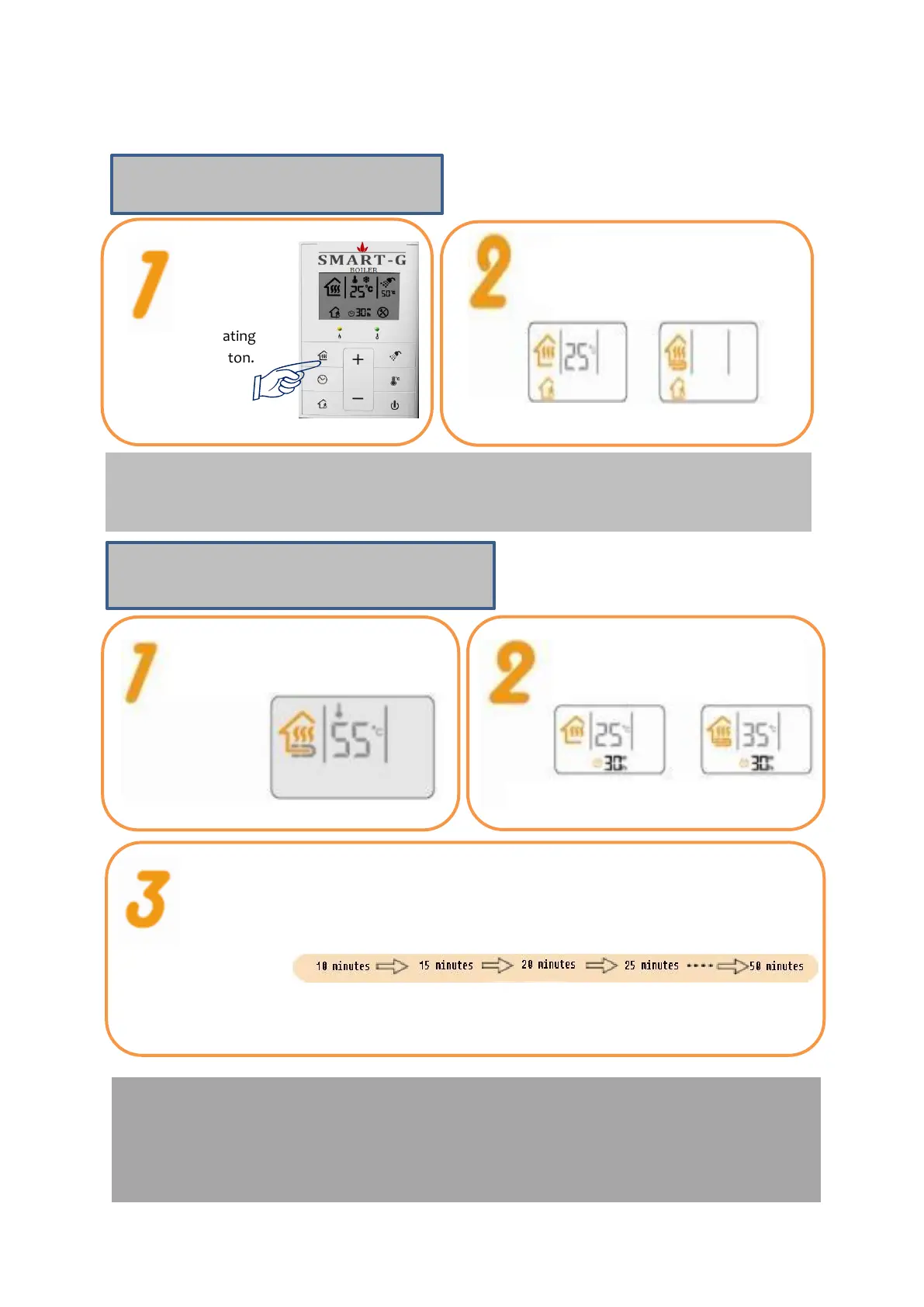
Press Going Out button. When
Going Out button is on,
Operation for Going Out starts.
▶What is Operation for Going Out?
Warm the rooms by operating the boiler at the minimum level when no one is at home.
To cancel Operation for Going Out, press the Going Out button again or Heating button.
Press the Heating button to turn
heating on.
Press the Heating Interval Setting
button.
Press the Heating Interval Setting button for 3 seconds. When the
Heating Interval display flickers, select the heating interval you want.
▶Set the heating interval using Up or Down button.
▶Press the Heating Interval Setting button. Or wait for 5 seconds, and
the Heating Interval is automatically set.
▶What is Heating Interval?
When the heating interval is set to 20 minutes, the boiler works for 20 minutes and stops for 40
minutes. The boiler repeats heating and stopping at that interval. (The operation cycle is based on one
hour)
Heating interval (Heating)
Turn Heating
on by pressing
Heating
button.


 To Next Page