Operation Procedures
▶ How to Set Heating Temperature
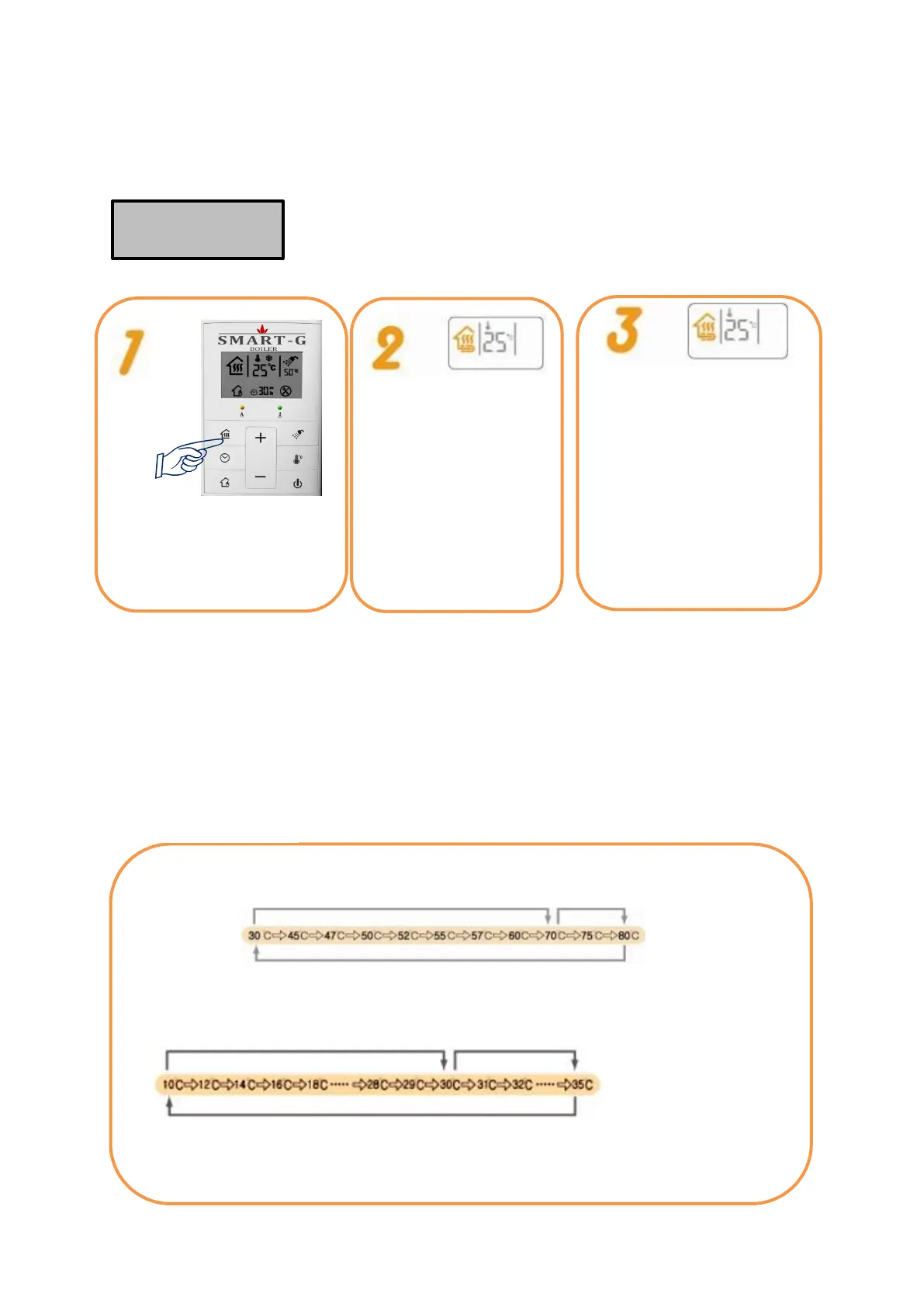
Activate the heating function by
pressing Heating+Bath button.
Heating+ Hot Water
button flickers when the
boiler starts working.
Combustion lamp is on
when the boiler is
ignited.
Press Heating+Hot Water
button for 3 seconds. When
‘Heating Temperature’ display
flickers, set the heating
temperature by pressing the
Up or Down button. (Press
Heating+Hot Water button
again or wait for 5 seconds,
and the heating temperature
is automatically set.)
▶ To change the setting, press Going Out button and Heating Interval Setting button at the same time
with Heating+Hot Water button off. For floor heating, the control panel shows Heating+Hot Water
button on. For indoor heating, the control panel shows Heating+Hot Water button and Present Room
Temperature.
▶ How to set room temperature: Press Heating+HotWater button for 3 seconds. When “Room
Temperature” flickers, set the room temperature using the Up or Down buttons. (Press Heating+Hot
Water button again or wait for 5 seconds, and the heating temperature is automatically set.)
Floor Heating Temperature Steps
Press Up button, and the temperature
goes up by 1 degree.
Temperature
changes by pressing
the button.
Temperature
changes by pressing
the button.
Temperature changes by keeping the button pressed.
Press Up button, and the temperature
goes up by 1 degree.
Room Heating Temperature Change
Temperature changes by keeping the button pressed.
Room Heating is activated by the temperature sensor attached to the remote
controller and Floor Heating by water temperature inside the boiler.
▶You can use hot water by pressing the Bath button even when only Heating function is on.


 To Next Page