Even when the Bath button on the remote controller is on, the boiler doesn’t work to supply hot
water if hot water is not used.
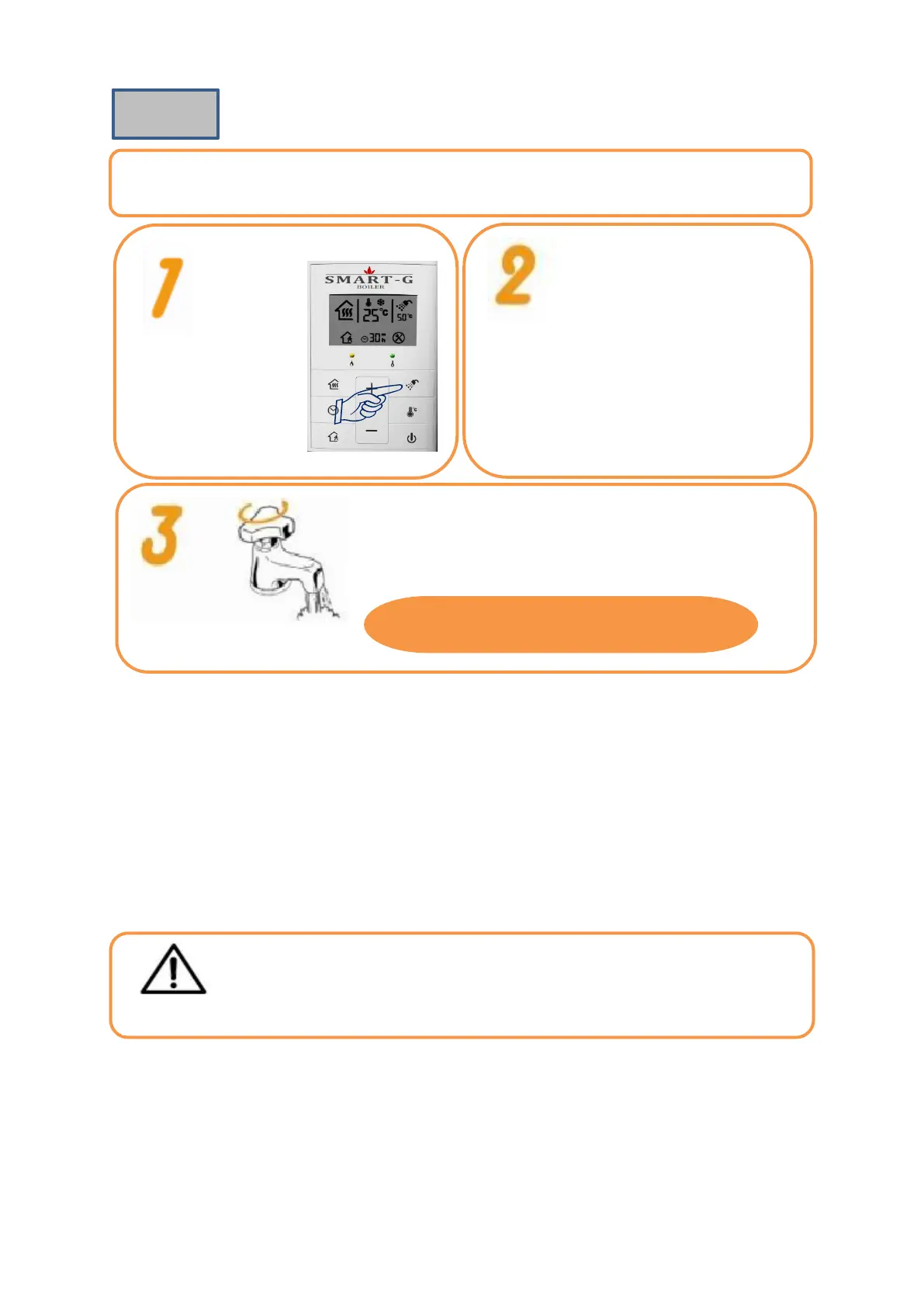
Turn the Bath
function on by
pressing the Bath
button.
Press the Bath button for 3
seconds. When ‘Temperature’
display flickers, set the hot water
temperature by pressing the Up or
Down buttons. (Press the Bath
button again. Or press the Bath
button for 5 seconds, and the hot
water temperature is
automatically set.)
Turn the hot water tap, and the Bath display on the remote
controller flickers. Then the boiler is ignited and hot water is
supplied after a while.
Press the Hot Water Temperature Setting button to set the temperature
30°C ☞60°C (Setting by the unit of 1°C)
▶When the Heating display is on, heating and bath function are activated.
▶If only Bath button is on, heating doesn’t work.
If you increase the hot water temperature while using hot water, you may be
burned. Be careful when using hot water.


 To Next Page