Programming Instructions for SRU Boards
May 9, 2019 ©2019 Smartrise Engineering, Inc. All Rights Reserved Page 5
Tips*to*Preserve*Settings*During*Board*Replacement*
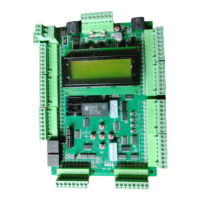
The Machine Room (MR) board sends all settings and parameters to the Cartop (CT) and Car
Operating Panel (COP) boards. These settings are stored in each board. If the MR SRU fails, then
the only way to save the job settings (Slowdowns, Floor Levels, Parameters, etc.) is as follows:
• Replace the MR SRU with either a CT or a COP board
• Replace the MR board that still powers on.
Swapping the MR SRU board
Replace the MR board with either the existing CT or COP board.
Once replaced, power it up and reprogram the CT or COP board as the MR board.
Install the new board as the CT or COP board and program it as such.
Replacing the MR SRU board
Power down the controller.
Remove the CAT5 pigtail that goes from the MR SRU NET port to the DIN rail.
Using a standard CAT5 cable, connect the MR SRU to a new CT SRU board, NET port to
NET port.
Power up the controller.
Wait 15 minutes for all the parameters to download to the new CT SRU.
After the parameters are downloaded to the new CT SRU board, power down the
controller and replace the MR SRU with the new CT SRU (Do not plug in the CAT5 pigtail
that was previously removed).
Reprogram the CT SRU as the new MR SRU.
Connect the CAT5 pigtail.
The previous settings from the old MR SRU board (that were transferred to the new CT SRU
board) will now transfer to the new boards and the car should operate as before with all the
original settings.
You can replace either the CT or COP board at any time as it will retrieve the settings from the
MR board when powered up.


 To Next Page
 Loading...
