Programming Instructions for SRU Boards
May 9, 2019 ©2019 Smartrise Engineering, Inc. All Rights Reserved Page 13
Software*Extraction*to*Laptop*
The software can be provided by an online download link. If an update was made to the job OR
the flash drive is not available, Smartrise can send an e-mail with a link to a downloadable zip
file for the software.
For example: http://smartrise.info/Software_packages/Smartrise_Job_(111112-001).zip
Download*Zip*File*
Perform the following to download the zip file.
Click on the link and choose Save As to save the zip file to the laptop, preferably to the
desktop.
NOTE: There are several ways to open a zip file. The laptop should have the capability to
extract the file to a location of your choosing. If not, you need to download a free
program from the internet to unzip this file.
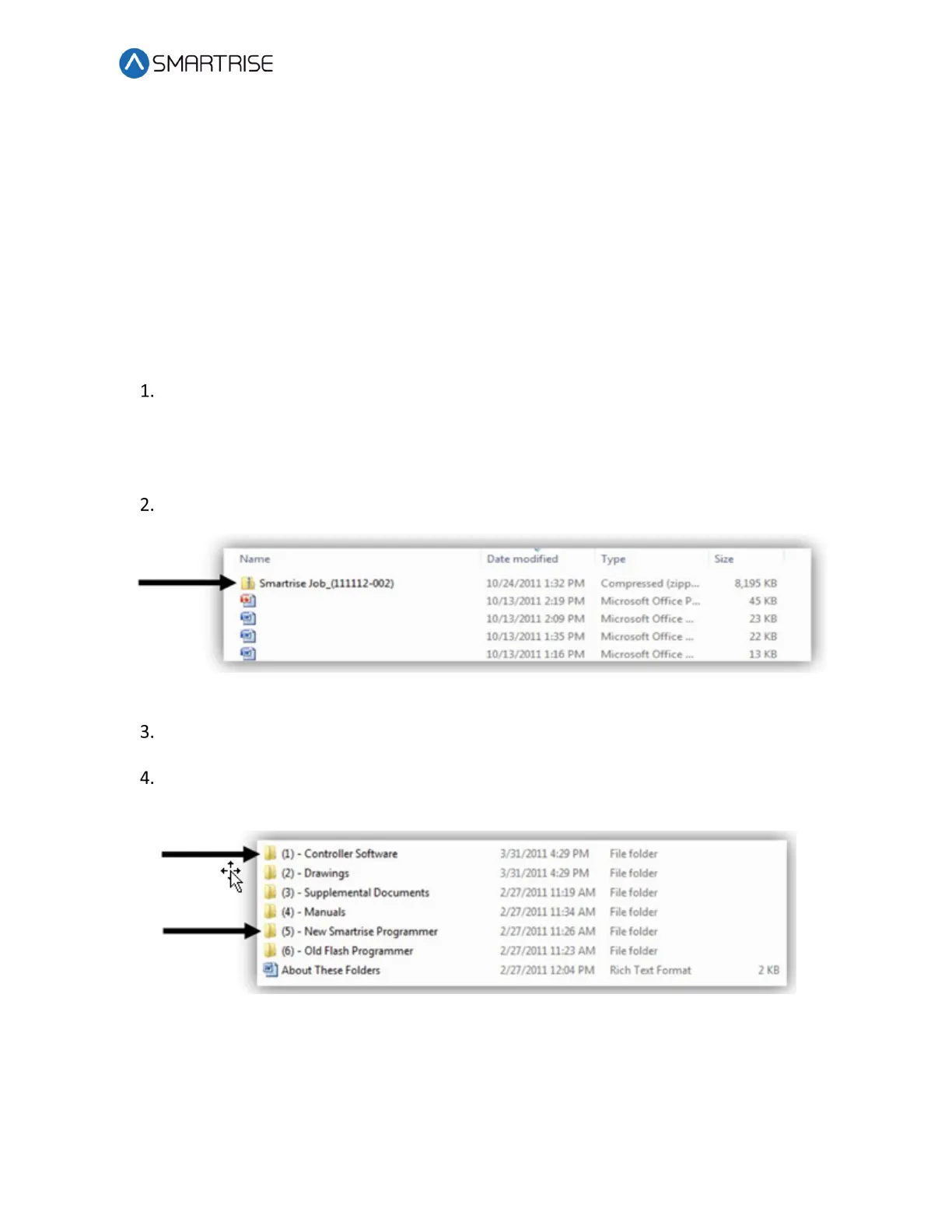
Navigate to the location of the saved zip file and double click on it to show the contents.
Figure 13: Zip File Location
For those laptops that do not allow the Smartrise programmer to run directly from a zip
file, copy all the contents of the zip file to a folder on the laptop.
Proceed with the installation of the programmer (if not already installed) and software
files.
Figure 14: Programmer and Software Files


 To Next Page