EasyManua.ls Logo

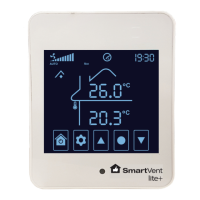
SmartVent Lite+ - User Manual

SmartVent Lite+
16 pages
Print Icon
To Next Page IconTo Next Page
Loading...
HOME VENTILATION SYSTEMS
Firmware Version 3.4
User Manual
Your guide to a healthier home

Questions and Answers

  • S
    Samantha WalkerAug 2, 2025
    How to reset filter change required on SmartVent Fan?
    • C
      Corey CrossAug 3, 2025
      If the SmartVent Fan indicates that a filter change is required, replace the filter. After replacing the filter, reset the filter change indicator by navigating to Advanced Setting 018, changing the value to 10, and pressing SELECT to confirm the change.
  • K
    Kathleen SextonAug 17, 2025
    What to do if fresh air relative humidity sensor COM error appears on SmartVent Fan?
    • J
      John SummersAug 17, 2025
      If the SmartVent Fan's fresh air relative humidity sensor shows a COM error, the installer should inspect the wiring connections for any issues and check the sensor cable for any signs of damage.

Summary

System Modes

Auto Operation and Temperature Setting

Configuring the system for automatic ventilation based on indoor/outdoor temperatures to achieve a set home temperature.

Manual Operation and Fan Speed Control

Manually controlling fan speed and selecting air source in the SmartVent Lite+ system.

Advanced Settings Management

Advanced Setting Menu Details

Comprehensive list of advanced settings, their ranges, default values, and notes.

Troubleshooting Common Issues

Error Code Resolution

Identifying and resolving common error codes related to system sensors and communication.

Technical Specifications Overview

Controller Specifications

Detailed technical specifications for the SmartVent Lite+ Touch Screen Controller.

SmartVent Lite+ Specifications

General IconGeneral
BrandSmartVent
ModelLite+
CategoryFan
LanguageEnglish

Related product manuals