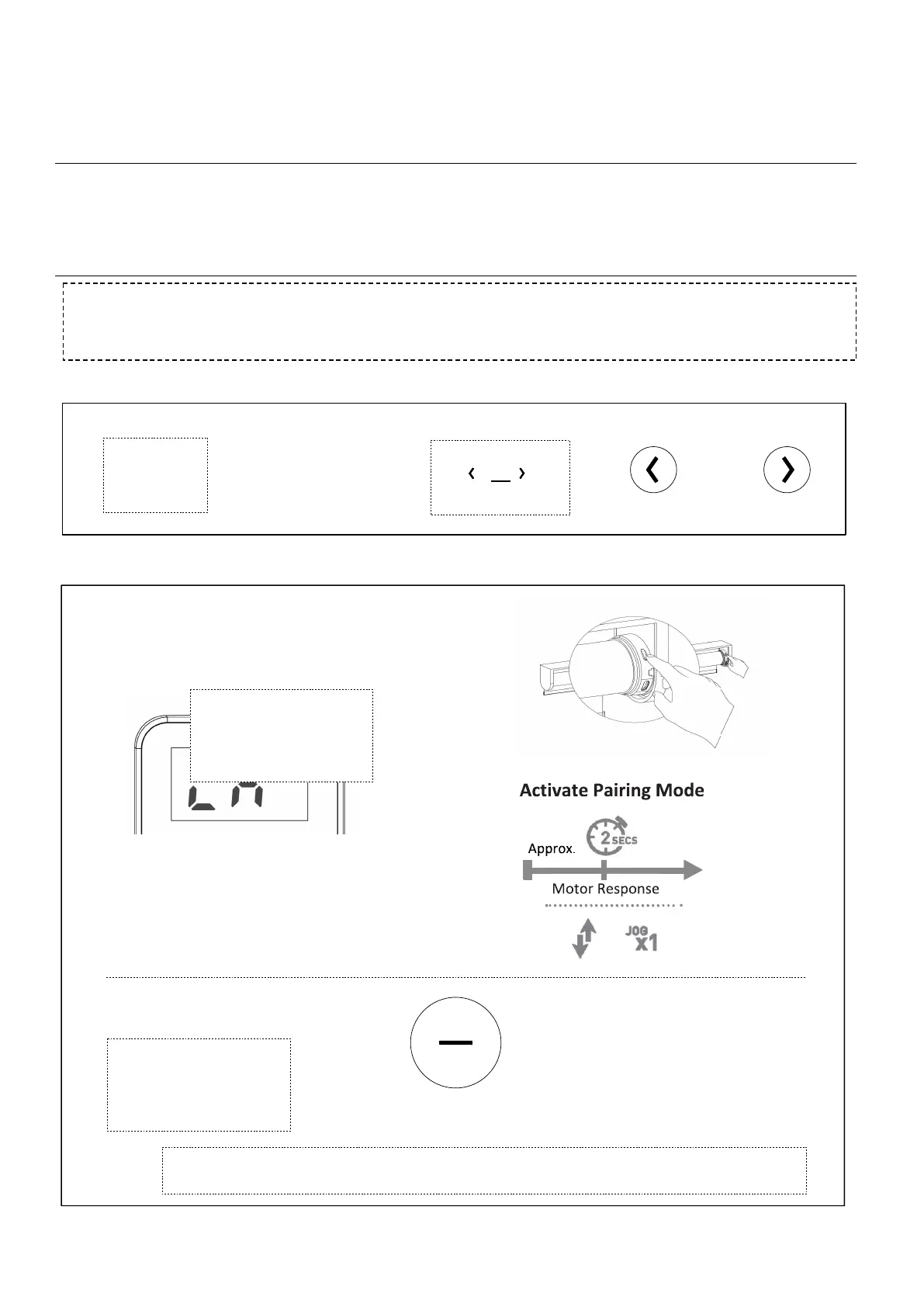
Group Control
Each battery motor will come preprogramed from Smartwings . If multiple motors are
paired to the same 15 channel remote, the 0 channel is the default channel to control all motors at once.
Follow the steps below to group motors on a specific channel for simultaneous control.
To custom define a channel to control multiple motors, pairing in groups can be executed. This will
allow you to operate a series of motors in unison without needing to change channels. Each motor to be
grouped must be paired with the remote on its own channel prior to grouping.
1. SELECT CHANNEL TO BE PAIRED AS A GROUP
2. PAIRING OR REMOVING MOTOR FROM A SPECIFIC CHANNEL
Within 10 sec of
activating pairing mode,
Press & Hold STOP
If you do not pair the remote in time the motor pairing sequence will time out, repeat the
above steps assuring to press and the STOP button within 10 seconds of the motor jog
2a ACTIVATE PAIRING MODE ON MOTOR
2b PAIRING REMOTE
Press any
button to
wake remote
Within 10sec Press
select desired
channel.
1a
1b
Press & HOLD
Programming Button
on motor head (2sec)
Note: the motor jogs once
Note: t
he motor jogs twice
.
Press STOP (2sec)
" "
or " " to



 To Next Page