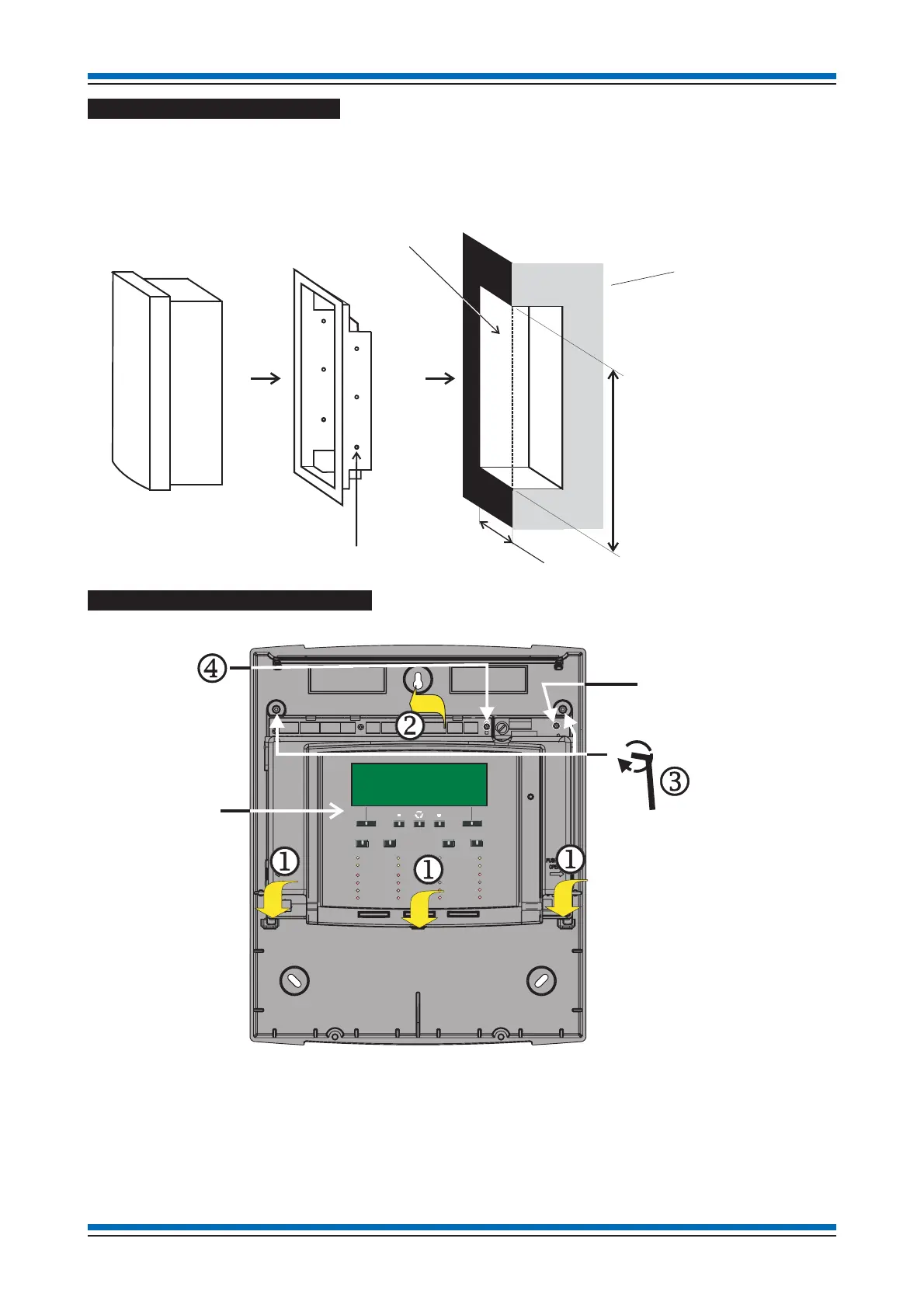
Flush Mounting the backbox
The control panel may be flush mounted using a flush surround SENTRI1-FLUSH.
a Cut out an aperture in the wall to allow the flush surround to be fitted, see diagram for dimension of the aperture.
b Using the fixing holes on the flush surround, secure it into the aperture side walls.
c Route the cables through the cable entry points into the panel and at the same time insert the panel into the flush surround.
d Fit the panel back box to the flush surround using the 3-off 5mm screws not supplied with the flush surround.
Refitting the electronics module
Locate the three tabs of the electronic module j into the backbox and close the upper part k of the module into the backbox and
then secure the assembly by tightening the two captive screws
l using the allen key. Ensure the two PCB fixing-screws m that
provides earth bonding are securely fitted and are not loose.
Installation instructions
16
Control Panel
Cross section of
the wall to which
the panel is to be
semi-flush mounted
Aperture
4mm diameter
fixing holes
Aperture Height: 406mm
A
erture Width: 347mm
perture
ept
s
ou
not
e
ess t
an: 75mm
Semi-flush surround
POWERFAULT
FIRE
Tes t
Delay
Verify
Sounder Fault
Zone 2
Zone 6
Zone 10
Zone 14
Zone 3
Zone 7
Zone 11
Zone 15
Zone 4
Zone 8
Zone 12
Zone 16
Disablement
Zone 1
Zone 5
Zone 9
Zone 13
System Fault
Sound
Alarms
Silence
Alarms
Power Fault
Reset
Cancel
Buzzer
Sounder
Disablement
Allen Key
Electronic module
Backbox
Check to ensure these
screws are securely fitted.


 To Next Page