32
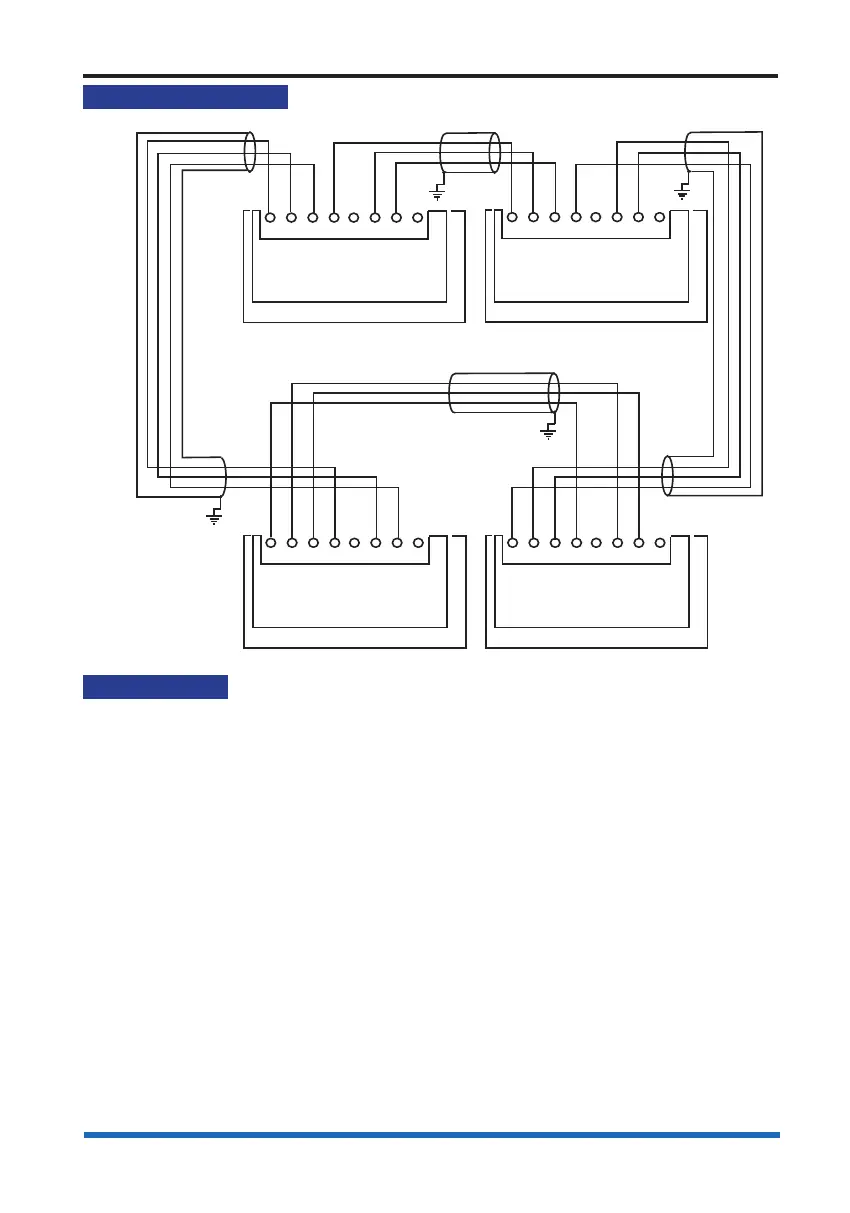
Network connections
Network connections
Cable screen
N/C
N/C
P10
Connections for
Network card in
Socket P8 (Card 6)
Control Panel
Cable screen
N/C
N/C
Where a multicore
cable is being used
ensure the unused
cores (cores without
signal) are connected
to 0V.
0V1 +VE1 -VE1 0V2 N/C +VE2 -VE2 N/C
P10
Connections for
Network card in
Socket P8 (Card 6)
Control Panel
P10
Connections for
Network card in
Socket P8 (Card 6)
BACKPLANE
(post 08-2006)
Control Panel
N/C - No connection
0V1 +VE1 -VE1 0V2 N/C +VE2 -VE2 N/C
0V1 +VE1 -VE1 0V2 N/C +VE2 -VE2 N/C
P10
Connections for
Network card in
Socket P8 (Card 6)
Network Node
0V1 +VE1 -VE1 0V2 N/C +VE2 -VE2 N/C
BACKPLANE
(post 08-2006)
BACKPLANE
(post 08-2006)
BACKPLANE
(post 08-2006)
Network wiring
In countries where the European EMC directive is in force use only those cables that
are EMC Compliant, see list under the heading Network cables.
The recommended cables listed in this manual should be used to interconnect control
panels.



 To Next Page