© 2009 snom technology AG
man_snom870_v101_en
30
snom 870 User Manual
Display Icons, Buttons, and Indications
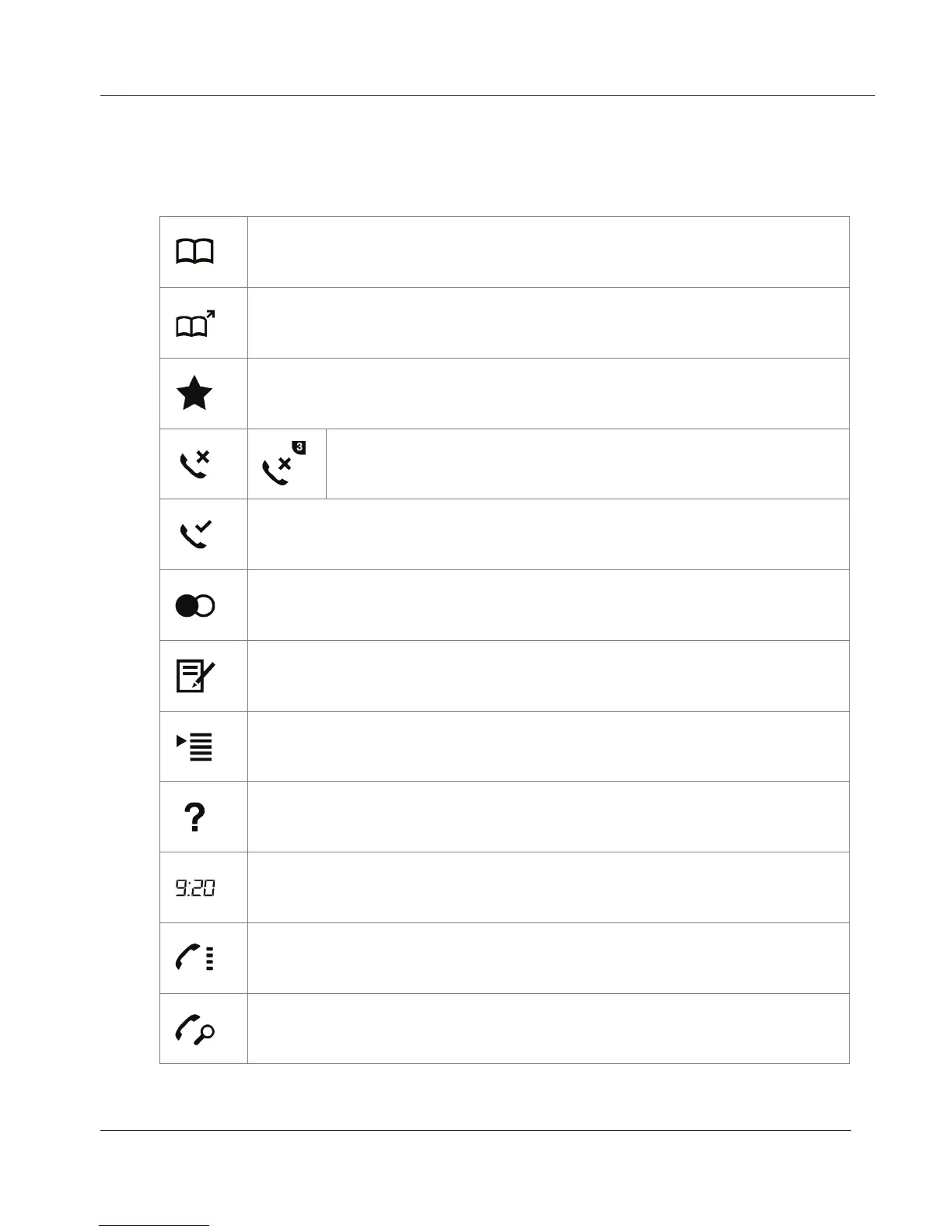
Springboard
Phone directory - see "Directories" on page 35
Remote directories - see "External directories" on page 46
Favorites
Missed calls - icon with number in upper right corner
indicates new missed calls. See "Call lists" on page 22
Received calls - see "Call lists" on page 22
Redial (dialed calls) - see "Call lists" on page 22
Configured identities, select outgoing identity. See "Outgoing
identities" on page 22 and "Identities/Accounts" on page 65.
Settings menu - see page 23
Help - tap to show phone's IP address and web address of snom's
Wiki help pages
Time. Tap to show "clockface" and full date. Setting date/time
format: See "Date" on page 69 and "Time" on page 70.
Freely programmable virtual function keys - see "Virtual function
keys" on page 23 and "Configuring the Function Keys" on page 59.
Monitoring calls - see "Monitored calls screen" on page 62
www.InternetVoipPhone.co.uk | sales@internetvoipphone.co.uk | 0800 088 48 46



 To Next Page