© 2009 snom technology AG
man_snom870_v101_en
31
snom 870 User Manual
Display Icons, Buttons, and Indications
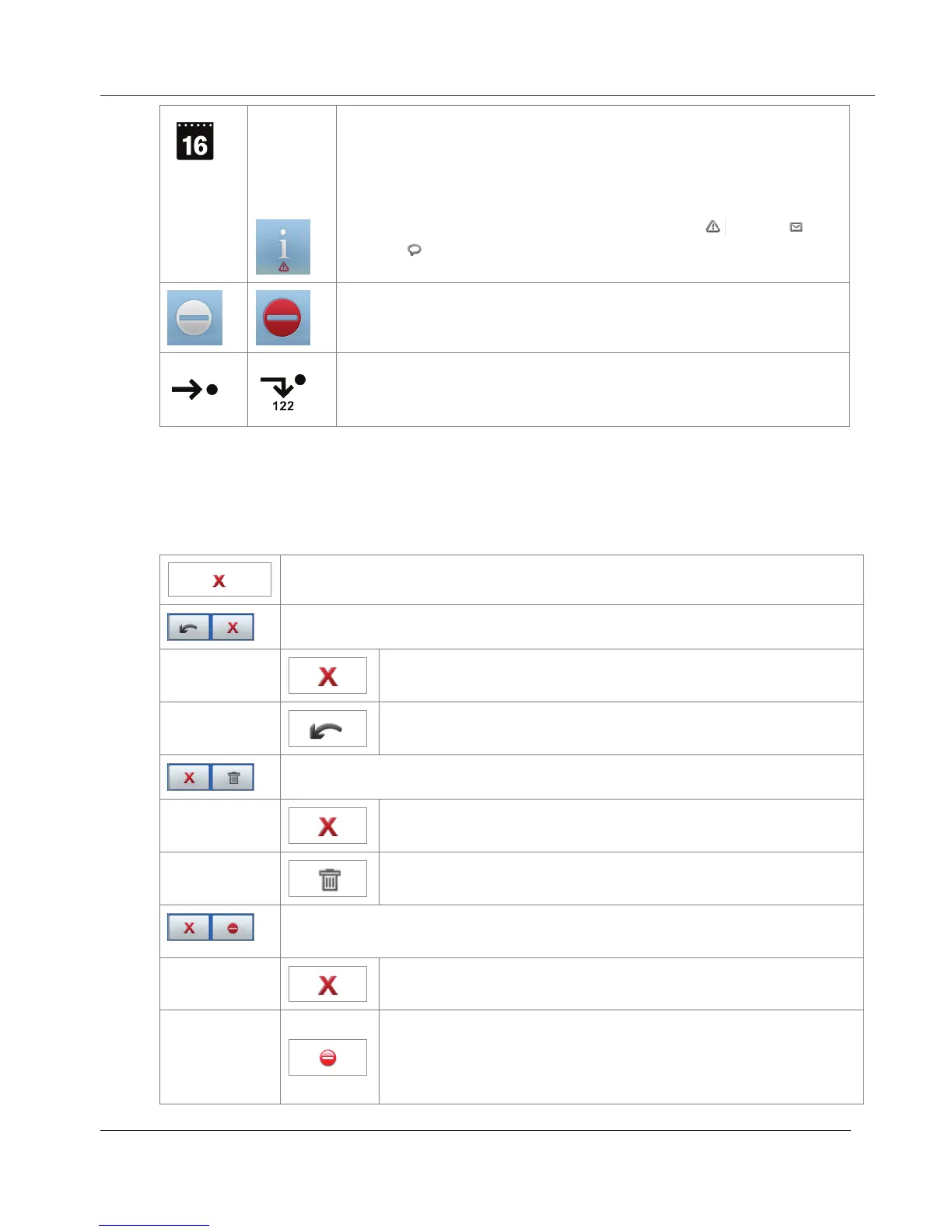
Date (day) and day of the week, indicated by a bold-face
dot at the top of the "calendar page" (from left to right:
Mon - Sat; on Sunday the dot on the right turns yellow).
The date is replaced by the information alert when
update is available, reboot is necessary [ ], text [ ] or
voice [ ] message has been received, etc. Tap icon to
show details.
DND inactive=white/active=red. Tap the icon to turn
DND on and off. Works like the hard key - see page 14.
Call forwarding of all calls inactive=white/active=red.
Tap the icon to turn call forwarding of all calls on and off
- see page 56.
Context-sensitive virtual function buttons
Single button - return to previous screen
Combination of arrow + cancel buttons (menus)
Return to idle screen
Return to previous screen
Combination cancel and delete buttons (call lists, directories)
Return to previous screen
Delete
Combination of "block this call" and "block all calls from this
number" buttons (incoming calls, call waiting).
Block incoming call. Caller hears the busy signal.
Block incoming call and place caller on deny list.
This is not a factory setting. See "Contact Types"
on page 35. Change setting: change at Advanced >
Behavior > Deny all feature > "On".
www.InternetVoipPhone.co.uk | sales@internetvoipphone.co.uk | 0800 088 48 46



 To Next Page