10
D345 User Manual Setting up the Phone
Setting up the phone
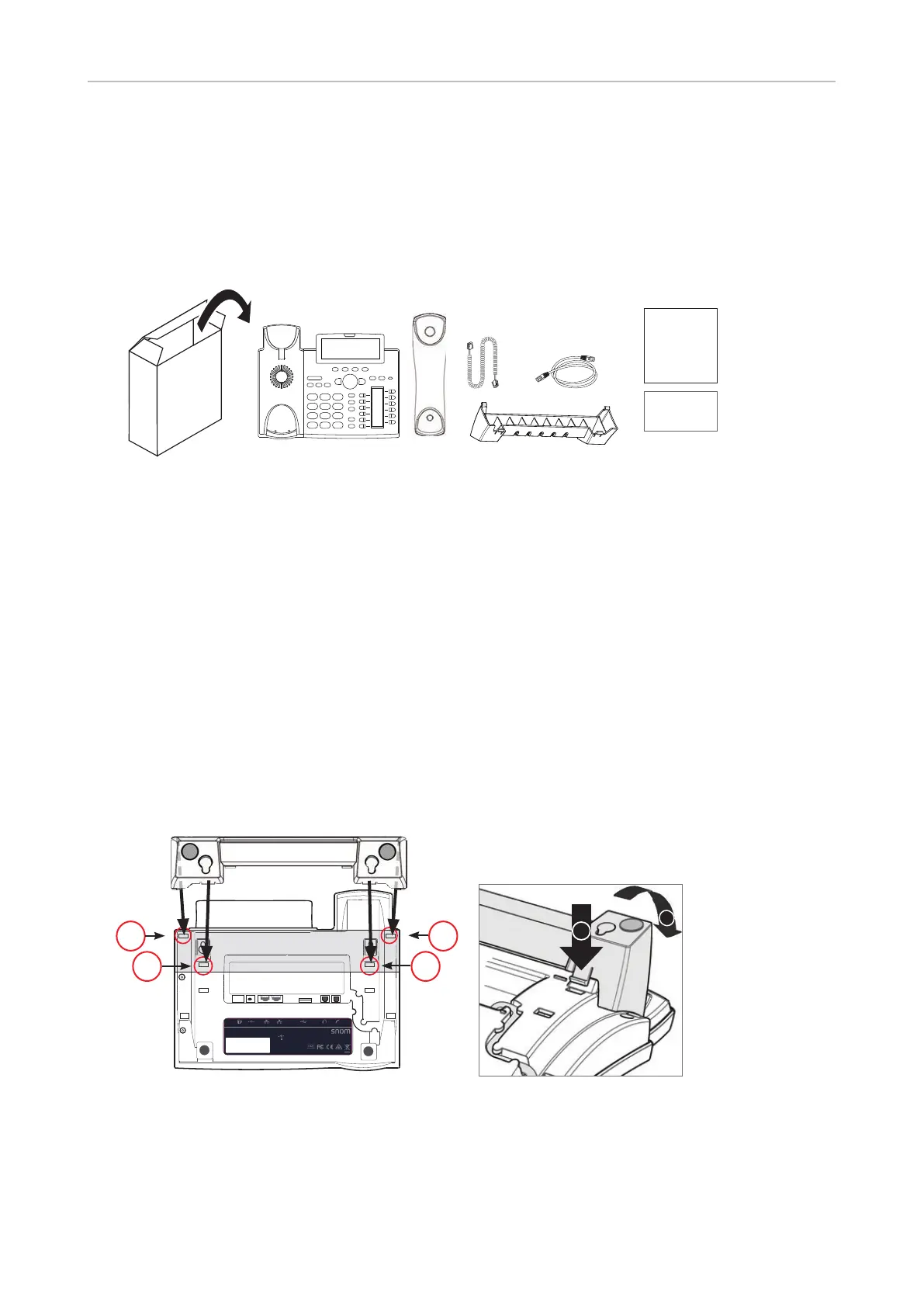
Delivery Content
GNU
General Public License
Quick Installation
Guide
D345
- Base phone unit
- Footstand
- Handset
- Handset cord
- Ethernet cable
- Quick Installation Guide, GNU General Public Licence
Attaching and detaching the footstand
The footstand can be attached in two dierent positions, depending on whether the phone will be
placed on a desk or mounted on a wall. To avoid scratching or otherwise damaging the phone, we
recommend turning it upside down and placing it on a soft piece of cloth.
Attaching for desktop placement
D345
PN 00004260
EXT DC 5V NET PC USB AUDIO
S/N
MAC address
Use only power supply
listed in the user guide.
Snom Technology AG
Wittestr. 30 G · 13509 Berlin · Germany
© 20xx by Snom Technology AG. All Rights Reserved. Made in Xxxxxxx
Rn
Adapter 5V 2A
PoE 48V 0.25A
11
22
2
1
Fig 1 Fig. 2
1. Insert the snap-fits on the longer ends of the footstand into the holes marked (Fig. 1 and 2).
2. Tilt the footstand towards you and insert the snap-fits on the shorter ends into the holes
marked (Fig. 1 and 2).



 To Next Page