72
D345 User Manual Configuring the Function Keys
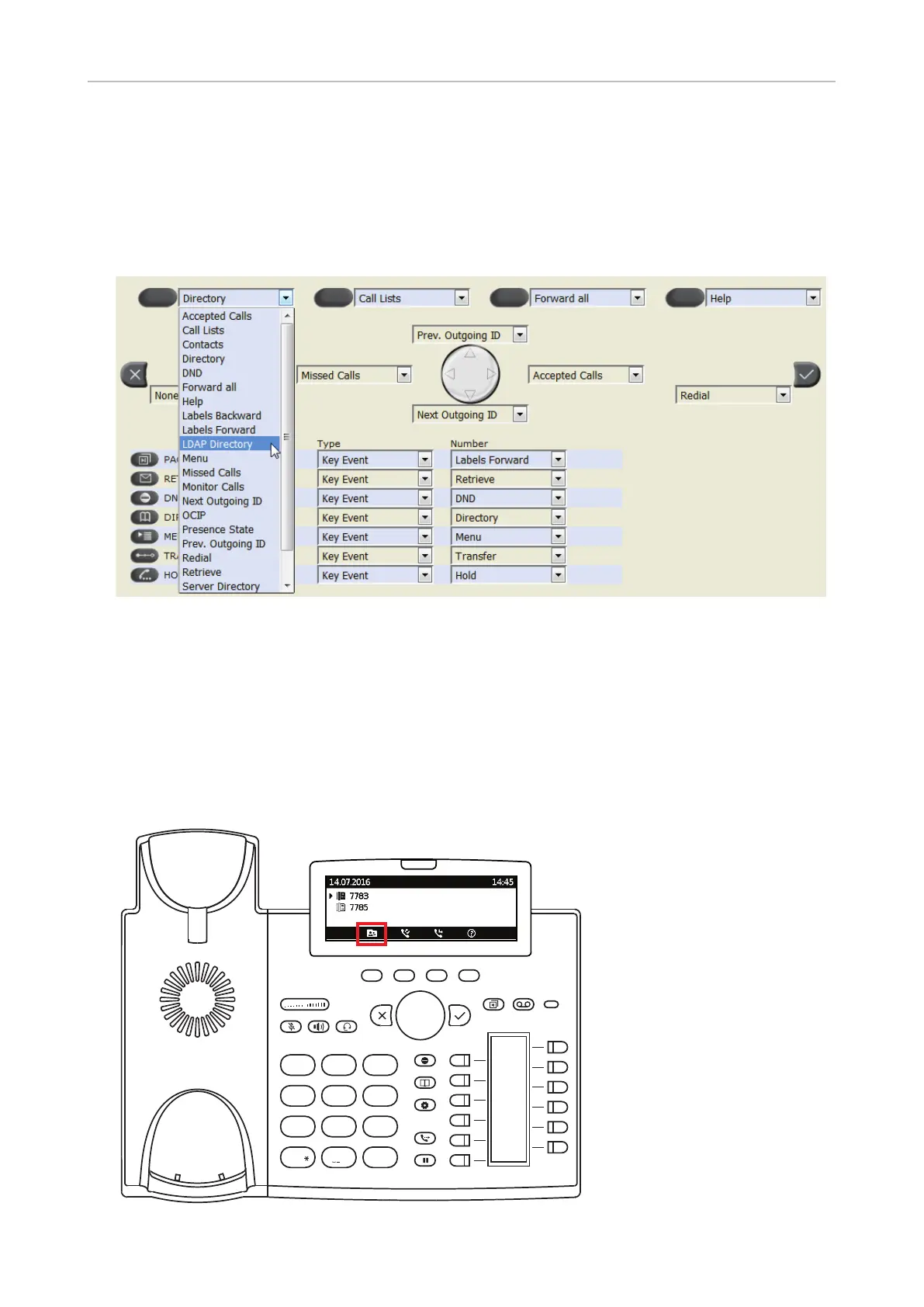
Example 4, Changing setting of context-sensitive key
You can select a dierent key event to be available on the four keys under the display when the phone
is in idle mode. You cannot change the functions that are available when the phone is active, for
example when you are in a call, when the phone is ringing, etc. In the following example, the setting
of the left key will be changed from Directory to LDAP Directory.
1. On the phone's web interface, click on Function Keys in the menu on the left.
2. Click on the drop-down list of the left key under the display.
3. Select "LDAP Directory" from the drop-down list.
4. Click on Apply and Save.
By pressing the context-sensitive function key you now have direct access to your LDAP directory, if
available and the settings are provided on the phone's Advanced Settings page > Network tab > LDAP
section.
4
7 8
0
9
#
5 6
GHI JKL MNO
PQRS
a » A
TUV WXYZ
1 2 3DEF
ABC



 To Next Page