October 21
st
, 2021 38
Limiter Sensor Automatic Setup
Requires Batteries, AC coupled panels must be off while detecting, and does NOT work for 208V installs.
If you do not have batteries or are in 208V mode: verify CT sensor placement manually.
1) Install limiter sensors as previously described (shown in all diagrams as well). Battery and grid connections also
required before starting auto-setup.
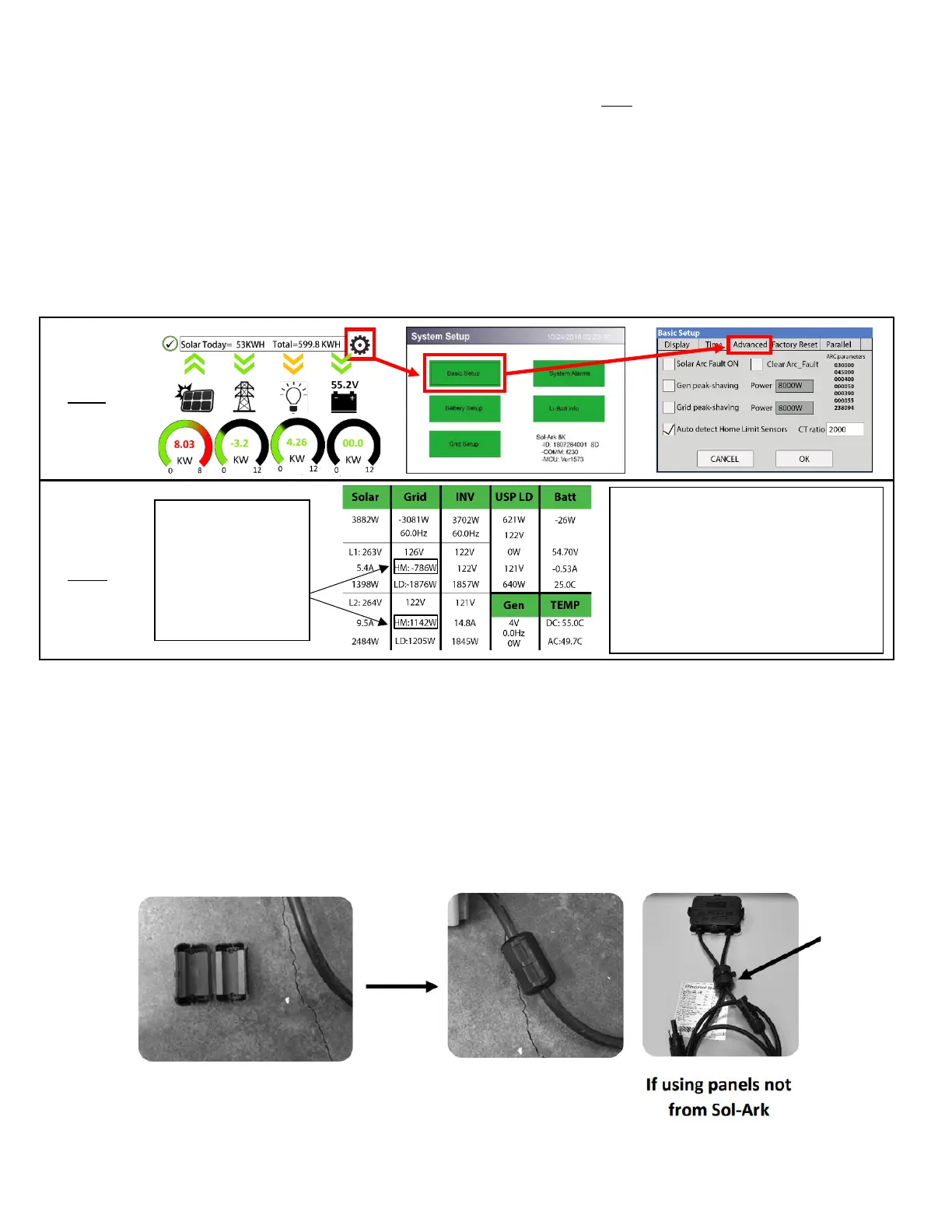
2) Navigate to the "Advanced" Tab of the Basic Setup screen (follow the directions below to get there)
A. Touch the gear icon → Touch the Basic Setup button → Select the Advanced tab (see Fig. C)
3) Select "Auto detect Home Limit Sensors" and press “OK”
4) Wait for the Sol-Ark to finish its learning process (Sol-Ark will alternate sell back between legs and magnitude
automatically determining the correct settings for the sensors)
5) Verify sensors were correctly configured (see Fig. D) if they are not correct, repeat the learn function
E.M.P Systems Only
Suppressor installation
• If your system was purchased with Lightning / EMP Hardening, the vast majority of protection is in the Sol-Ark.
However, you also have EMP suppressors that get installed on the power cords of appliances that are connected to the
transfer switch. Although not critical, it is recommended they be installed as close as possible to the appliance.
• You also have EMP suppressors that get installed on both solar panel wires with a zip tie. Closer to the panel is better.
If you purchased the panels from us, we already installed >150kV/m protection inside the solar panels.
Possible Limiter Sensor issues:
Sensors are facing wrong direction
Sensors are on the wrong wire(s)
Sensors are not fully closed on wire(s)
Sensor Polarity is wrong (White = + BLK = -)



 To Next Page