August 3, 2019 7
8. Connect Batteries (Sol-Ark should be POWERED “OFF”)
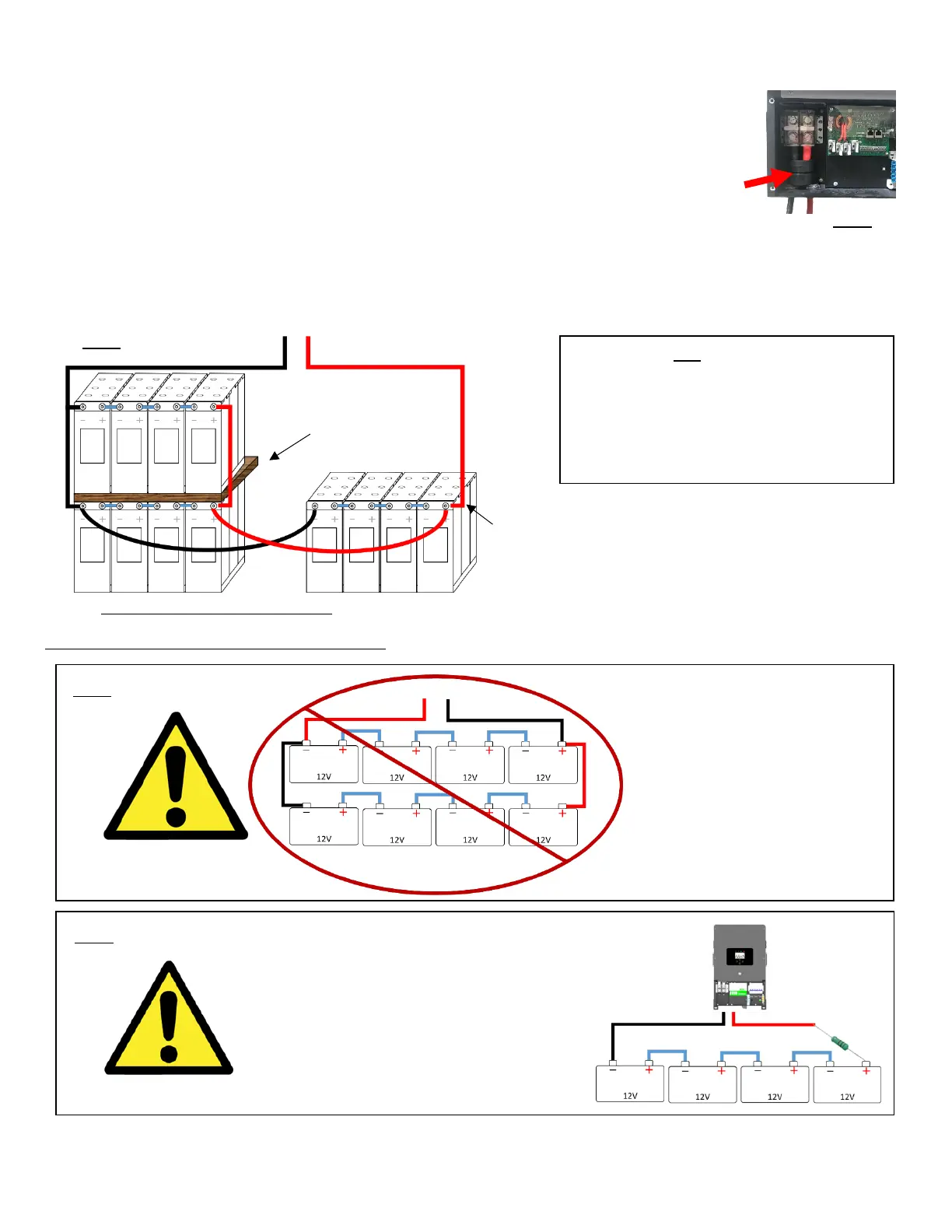
a. Connect the batteries to the Sol-Ark 8K as shown in the diagrams Fig. B
below:
b. Fig. A: Install included ferrites (part k. on pg. 3) on the battery input cables.
Slide the ferrite over the battery cables so that both cables are within the
toroid (as shown in Fig. A).
i. The toroid usually fits inside the user area of the Sol-Ark.
c. When connecting for 1
st
time, use included 100ohm resistor (part b. on pg. 3) to
pre-charge the inverter for 30s before connecting 6ft cable to Sol-Ark (see Fig. D).
i. Hold the resistor so that it contacts the free battery cable and the battery terminal,
completing the circuit (see below). This can be done with small clamps or by hand.
Sol-Ark 8K is a 48V system. Do not wire the
battery bank to any other nominal voltage.
When using 12V batteries do not exceed 4
batteries in series. When using other
battery chemistries, stay within the voltage
range: Min 41V-Max 59V



 To Next Page