Sola Neumasem Plus Drill Control
18
6. Fan Speed / Speed Alarms
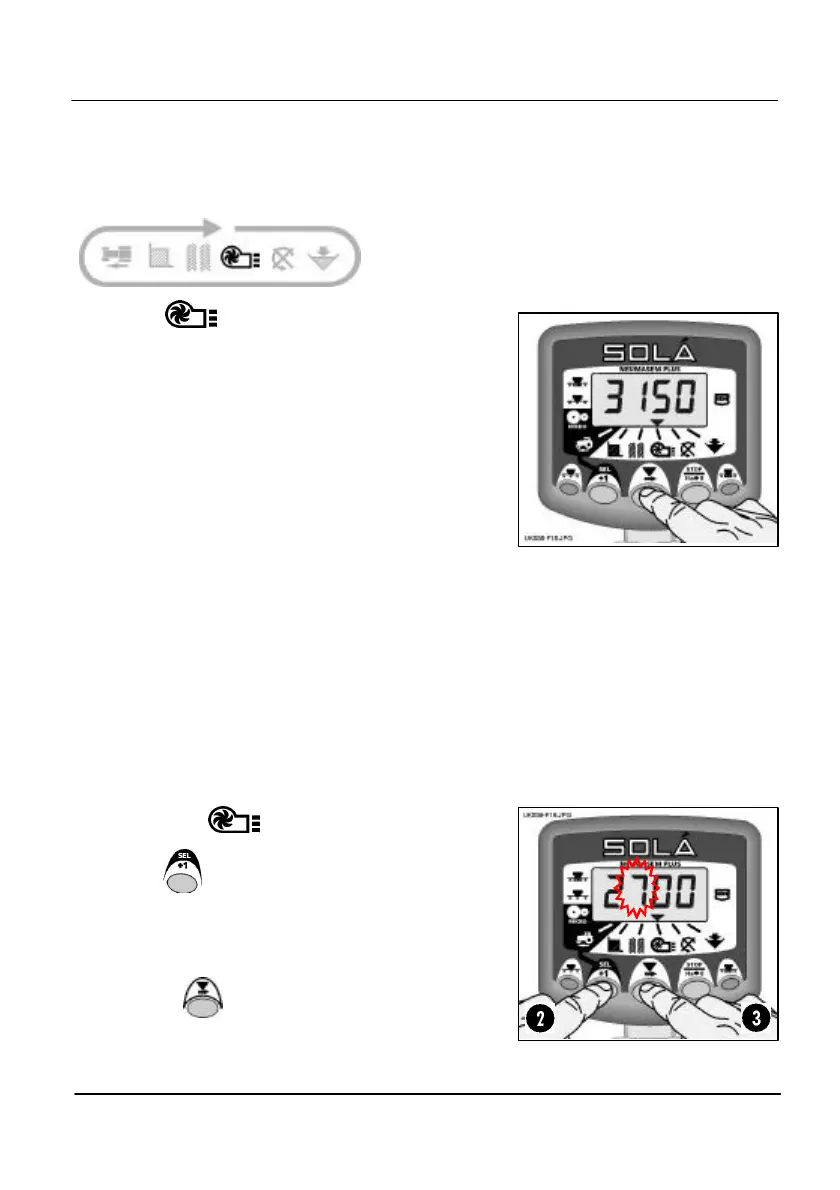
Display Fan Speed
Select the channel.
Fan Speed displays for 10 seconds before
returning to the tramline display.
Fan Speed Alarms
There is a programmable low-speed alarm and a
non-programmable high speed alarm. An alarm
condition causes the instrument to default to the
fan speed channel, sound 5 beeps and flash the
actual fan speed. The audible alarm will continue
to sound every 30 seconds until the alarm
condition is resolved.
NOTE: The alarm is temporarily inhibited if another
channel is selected, or if the forward speed is less
than 2 km/hr.
Thresholds: Low speed = 2700 rpm (default), High speed = 5000 rpm
Set Low Fan Speed Alarm
1. Select the channel.
2. Hold to enter programme mode 1.
The alarm threshold is displayed after 5
seconds. Continue holding the button
and…
3. PRESS to select the digit or decimal point to change.
Figure 15: Display Fan Speed
Figure 16: Low speed alarm
threshold


 To Next Page