Sola Neumasem Plus Drill Control
7
Speed Sensor Calibration
The forward speed sensor is magnetically operated
and senses the seed shaft rotation. In order to
display the correct speed and accumulate area
correctly, the instrument must be programmed with
the correct Speed Sensor Factor (SSF). This is the
distance travelled between two signal pulses
received from the sensor.
The S.S.F. is normally calculated automatically via
the “Autocal” function.
‘Autocal’
For maximum accuracy, perform an auto-
calibration in field conditions.
NOTE: The seed shaft gear ratio must be set for
normal seed i.e. not set for 'micro' metering. If the
gearing is set to the 'micro' ratio, speed calibration
will be incorrect resulting in incorrect forward
speed display and area accumulation when set at
the normal metering ratio.
1. Set two markers at 100 metres apart (328
feet). Choose a convenient reference point on
the tractor/implement and position this point
opposite the first marker.
2. Select the channel.
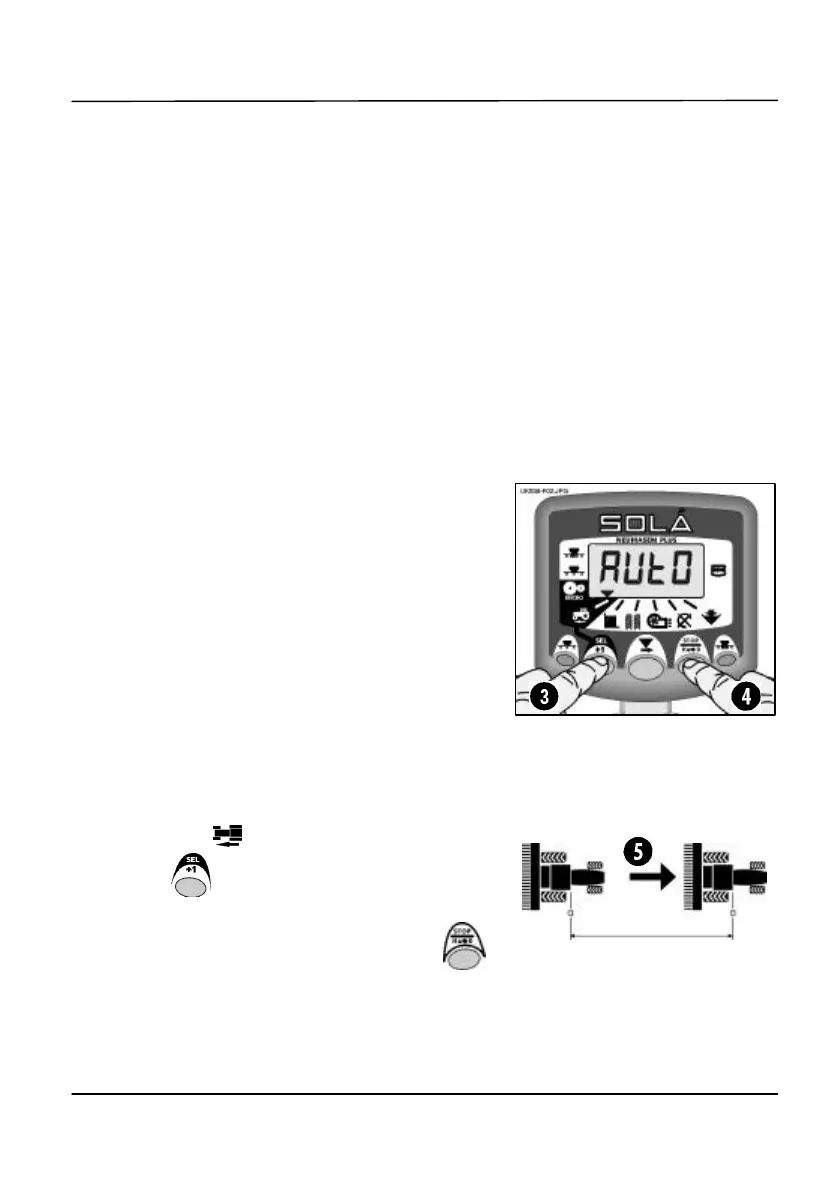
3. HOLD until the existing calibration factor
is displayed.
4. Continue holding this button and press .
The display flashes ‘Auto’ ready for
calibration.
Figure 2: Start ‘Autocal’
Figure 3: ‘Autocal’ distance


 To Next Page