Sola Neumasem Plus Drill Control
4
1. Overview
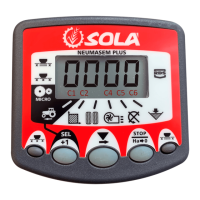
The Sola Neumasem Drill Control monitors several functions of the seed drill, sets the
seeding width, and controls the tramlining function of both conventional and
pneumatic type seed drills. The instrument has an illuminated 4-digit display with 6
display functions and alarm functions for forward speed, fan rpm, seed distribution
shaft rpm and hopper level.
The speed and area functions are displayed in metric units.
The instrument indicates;
• Forward Speed (plus low speed alarm)
• Part Area and Total Area worked
• The current bout number and tramline bouts for the selected tramlining
sequence.
• Fan rpm (plus low/high speed alarm)
• Seed Distribution Shaft rpm (plus low speed alarm)
• Hopper level low (plus alarm)
There are two memory registers (Total 1 and Total 2) to record area worked. The area
is accumulated to both memory registers. Area totals and all calibration data are
automatically stored in memory when the instrument is powered off.
The instrument also indicates whether seeding at part width or full width, or that the
micro-metering ratio (for small seed) is in effect.
Normal Display Mode
The instrument has a normal display mode displaying the work functions. Select a
channel by pressing the button once or more.
When the drill is moving, the selected channel is displayed for 10 seconds before
defaulting back to the tramline display ( channel).
Programming Modes
There are 2 programming modes with various calibration factors and default settings.
Many of these settings are made on installation and do not normally need to be
changed unless the instrument is switched onto a different drill. These settings are
appended to the back of this manual. The operator does not normally need to refer to
them.


 To Next Page