Sola Neumasem Plus Drill Control
23
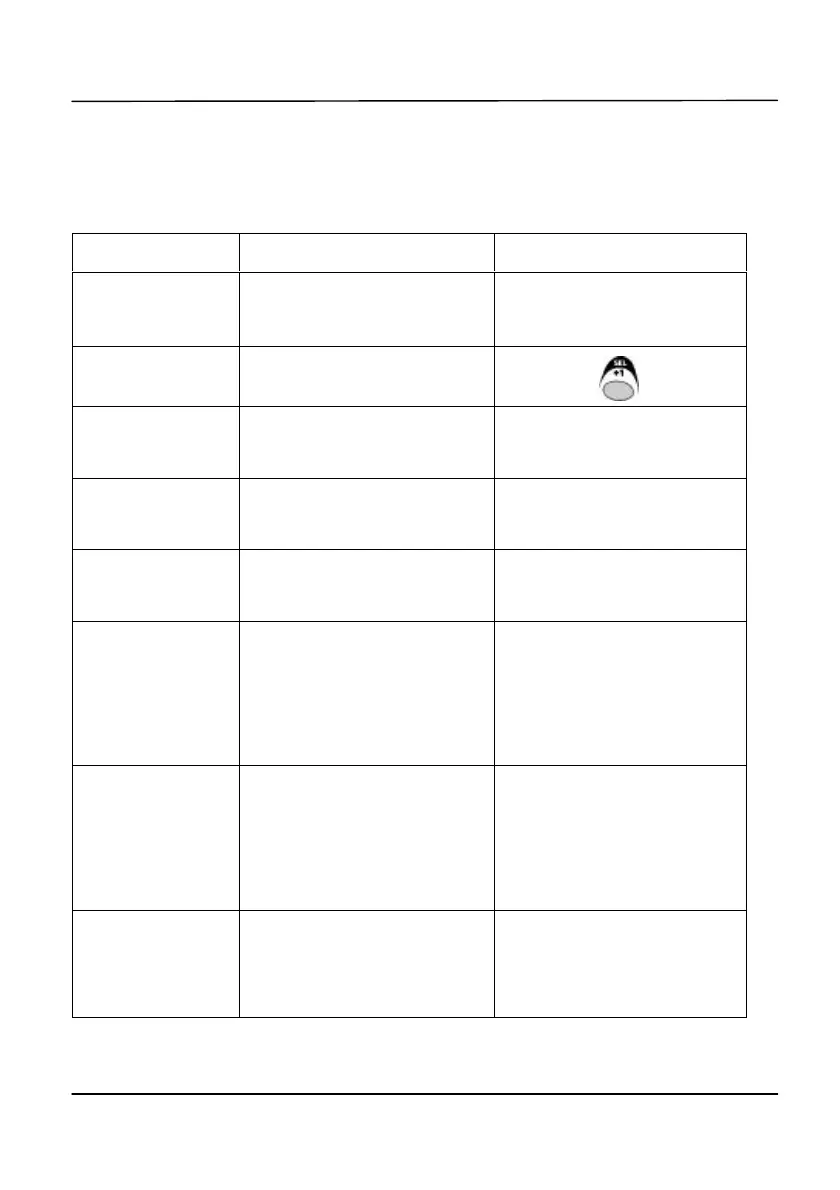
9. Summary of Programme Modes 1 – 3
Most settings do not need to be accessed during normal. Default values shown in
[brackets].
Mode 1 Mode 2
Mode Entry
From normal display mode,
select channel and hold SEL/+1
button continuously
Press and hold SEL/+1 button
while switching instrument on
Channel
Selection
As Above Press button
Channel 1
Speed Sensor Factor
see page 7
Forward Speed Alarm
On (1) / Off (0) [1]
Channel 2
Implement Width [4.000m]
see page 10
Display Grand Total Area
(non-resettable)
Channel 3
Set tramline sequence
see page 17
Tramline function
On (1) / Off (0) [1]
Channel 4
Low Fan Speed Alarm
[2700rpm]
see page 19
Fan speed Sensor – pulses per
rev.
Set 0 to inhibit fan speed
channel
[1.000]
Channel 5
Distribution Shaft – Alarm Speed
[0]
see page 21
Dist. Shaft Sensor – pulses per
rev.
Set 0 to inhibit Shaft Speed
channel
[1.000]
Channel 6
Hopper Level Alarm
On (1) / Off (0) [1]
see page 22
No function


 To Next Page