12
L30US-IB80, L30US-IB00, L40US UPS
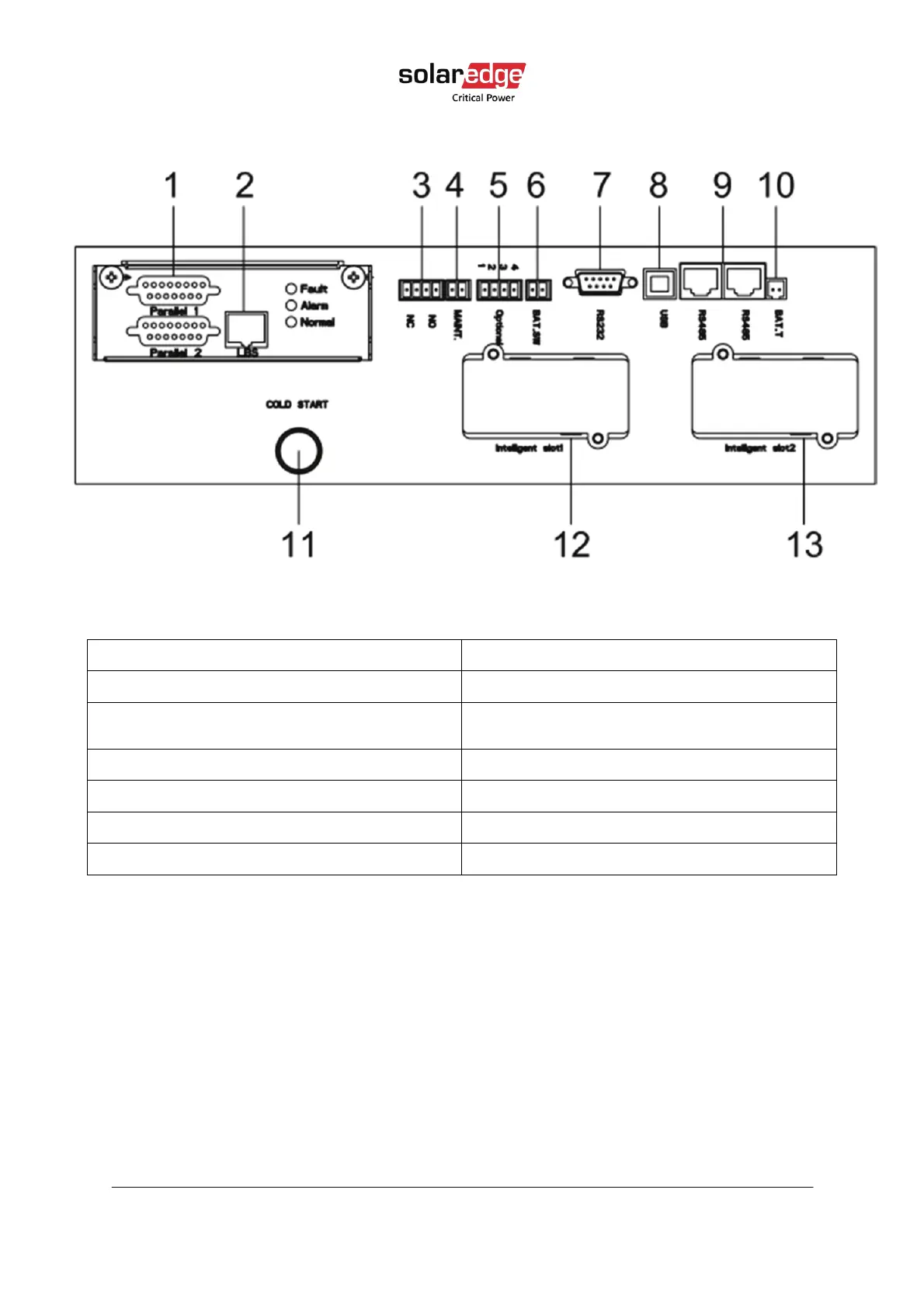
3.5.1. Communication panel:
Figure 5 Communication panel
Table 4 Communication panel
(1) Parallel ports (2) LBS port (for parallel connection)
(3) REPO port 12VDC/ 15mA (4) MAINTAIN-AUXSWS port 12VDC/ 15mA
(5) Optional port for backfeed protection
120VDC/ 150mA
(6) BAT_SW: detects battery switch status,
normally open, 12VDC/ 15mA.
(7) RS232 port (8) USB port
(9) RS485 port (for temperature sensor) (10) Battery temperature sensor (NTC)
(11) Cold-start button (12) Intelligent Slot 1 (SNMP card/ Relay card)
(13) Intelligent Slot 2 (SNMP card/ Relay card)
3.6. Computer access
1. With the USB cable, connect the USB port of the UPS to the computer.
2. Open the Muser5000 software, click the System button.



 To Next Page