Chapter 2: Connectors and Interfaces
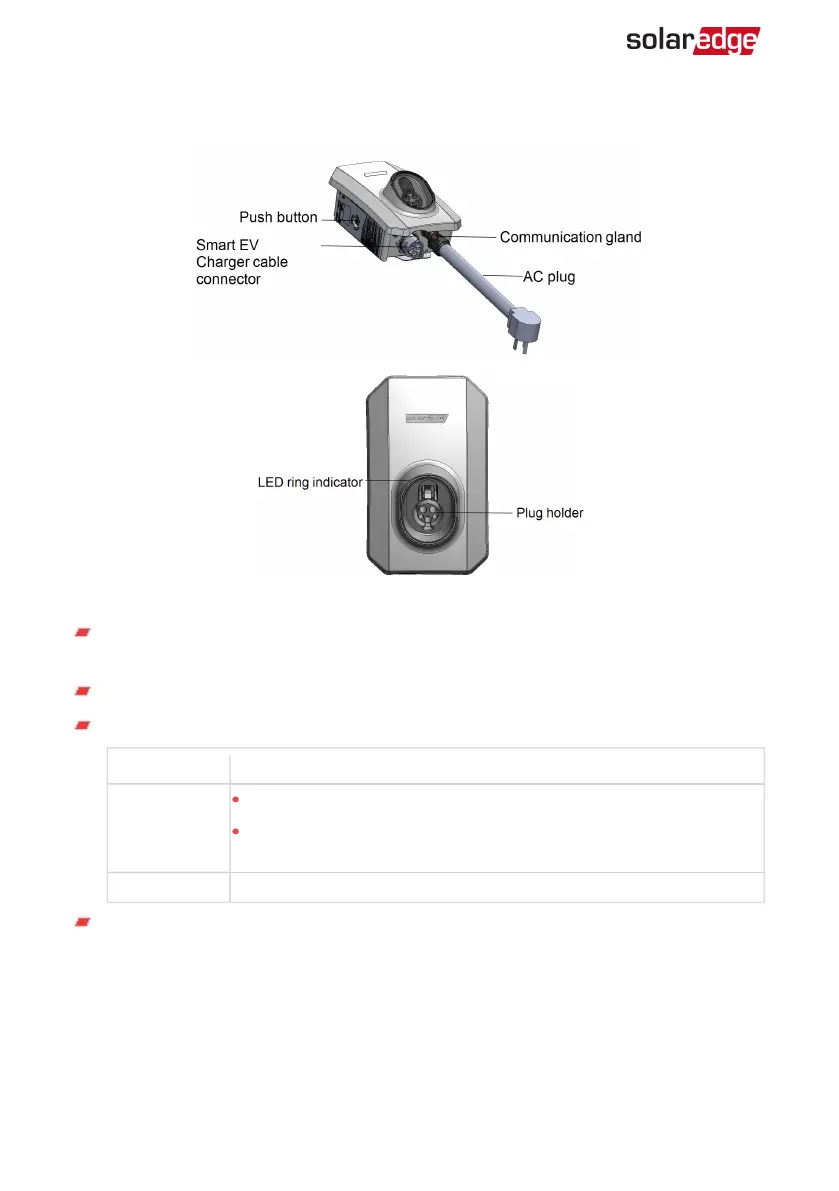
Figure 2: Smart EV Charger connectors and interfaces
Smart EV Charger cable connector: Used for connecting the cable to the Smart EV
Charger
AC plug :Used for plugging the Smart EVCharger into the wall socket
Smart EV Charger push button: Pressing the button has the following functionality:
Press Description
Short press
In case of malfunction restarts the Smart EV Charger.
In case the Smart EV Charger is on scheduling mode press to
immediately start charging.
Long press Turn on the Wi-Fi
Communication gland - for professional installer:
For connection of Smart EV Charger communication options, refer to
Professional
Installer - Setting Up Communication
on page 36 for more information.
Smart EV Charger Installation MAN-01-00657-1.0
15 Chapter 2: Connectors and Interfaces



 To Next Page