Plug holder: Holds the plug when not being used.
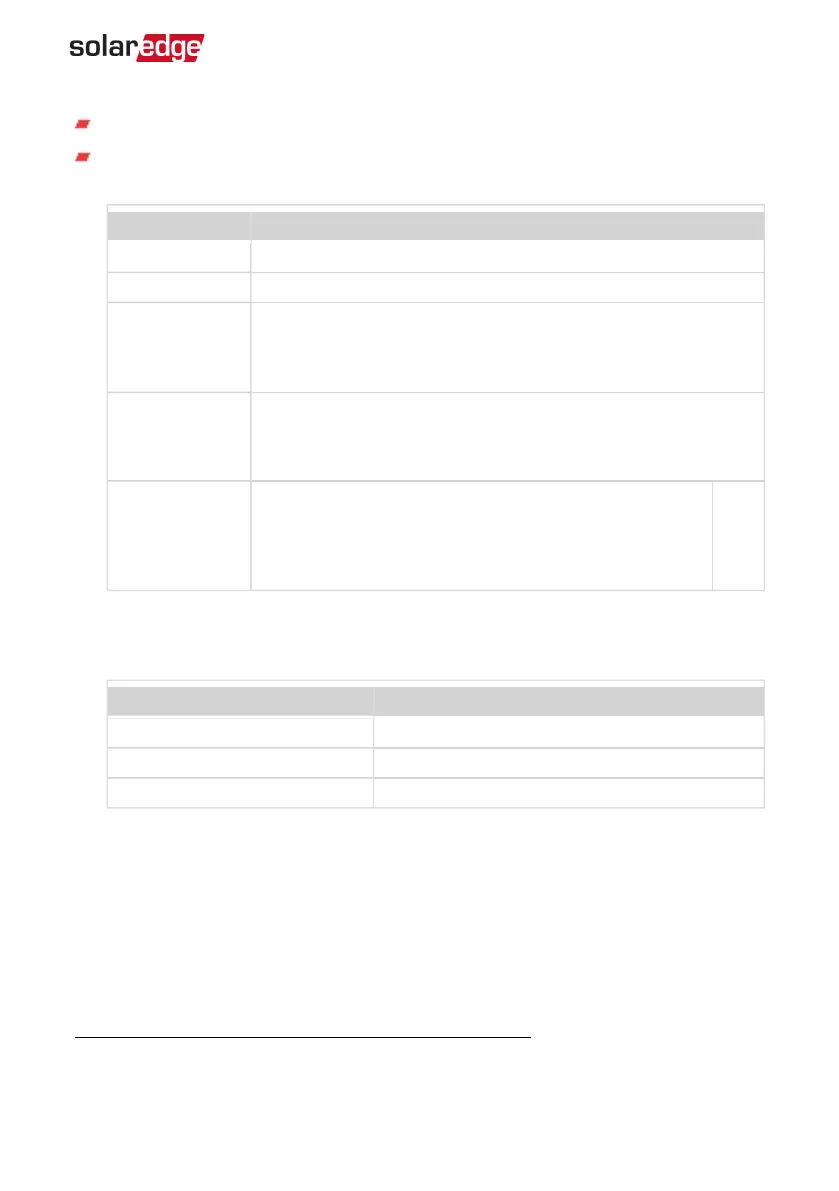
Smart EV Charger LED ring indicator: Indicates the Smart EV Charger statuses as
described in the following table:
Color Description
OFF No AC power
Red ON - Error
Green
ON - Charging
Blinking -Connected but not charging
Breathing
(1)
- Ready to charge
Orange
ON - Charging. No network connection.
Blinking- Connected but not charging. No network connection
Breathing -Ready to charge. No network connection.
Purple
Fast blinking - Wi-Fi is available, Smart EV Charger not
connected to the network.
ON - Wi-Fi is available and Smart EV Charger is connected
to the network.
Buzzer
The Smart EV charger includes a buzzer with the following indications:
Event Buzzer Indication
Connected to EV 1 short beep
Charging starts 2 short beeps + 1 long beep
Error 5 beeps
(1)
The light switches on slowly and gradually increases up to maximum and then slowly decreases back to
off
Chapter 2: Connectors and Interfaces 16
Smart EV Charger Installation MAN-01-00657-1.0



 To Next Page