Chapter 8: Errors and Troubleshooting
For the following system errors, when an error occurs, the red LEDring lights ON and
the buzzer beeps 10 times.
The error messages are displayed on the mobile app screen.
If the error persists- contact SolarEdge Support.
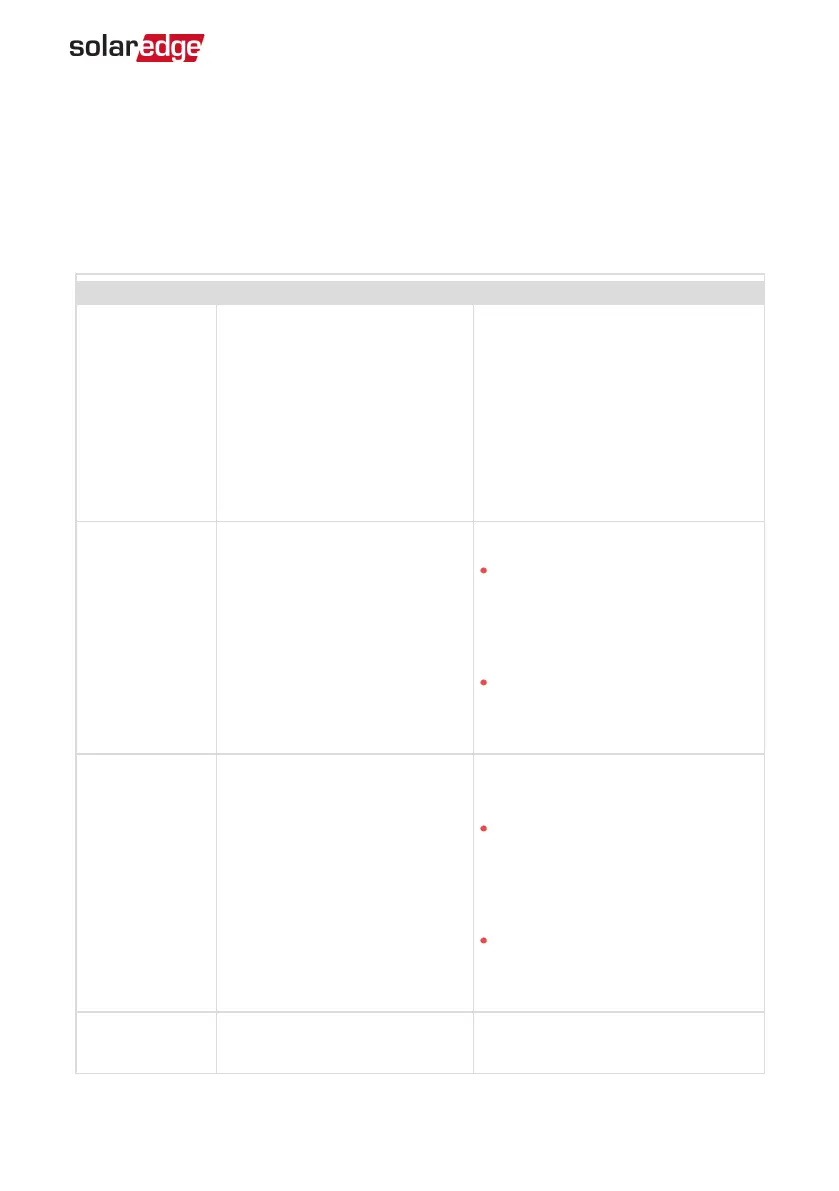
Error code Displayed Error message Description and Troubleshooting
3x85 EVSEComm. Error
An internal communication error.
When this error occurs, the red
LEDring is not lit, the buzzer does
not beep and charging is not
affected.
Check that the internal connections
on the communication board are
properly done.
1Cx1; 1Cx8
Over Current
Press Charge Now
Smart EVCharger AC over current.
Press the Charge Now push
button on the Smart EV Charger,
see
Figure 2
-or-
Tap Charge Now on the Smart EV
Charger tab of the Monitoring
App
1Cx2; 1xC9
Over Voltage
Press Charge Now
Smart EVCharger ACvoltage too
high.
Press the Charge Now push
button on the Smart EVCharger,
see
Figure 2
-or-
Tap Charge Now on the Smart EV
Charger tab of the Monitoring
App
1Cx3,Cx14;
1Cx15
Ground Fault (RCD)
Press Charge Now
Smart EVCharger ground fault
detected.
Chapter 8: Errors and Troubleshooting 46
Smart EV Charger Installation MAN-01-00657-1.0



 To Next Page