Functionality
The contacts 1 and 4 of the status signalling contact are used to monitor the external
input (see 4.6 Electrical connection). When there is phase voltage between contact1 and
contact4, the grid relays K1 and K2 are closed (see 3.1 Block diagram). If phase voltage
is not present between contacts 1 and 4, the grid relays are open and the inverter discon-
nects from the grid.
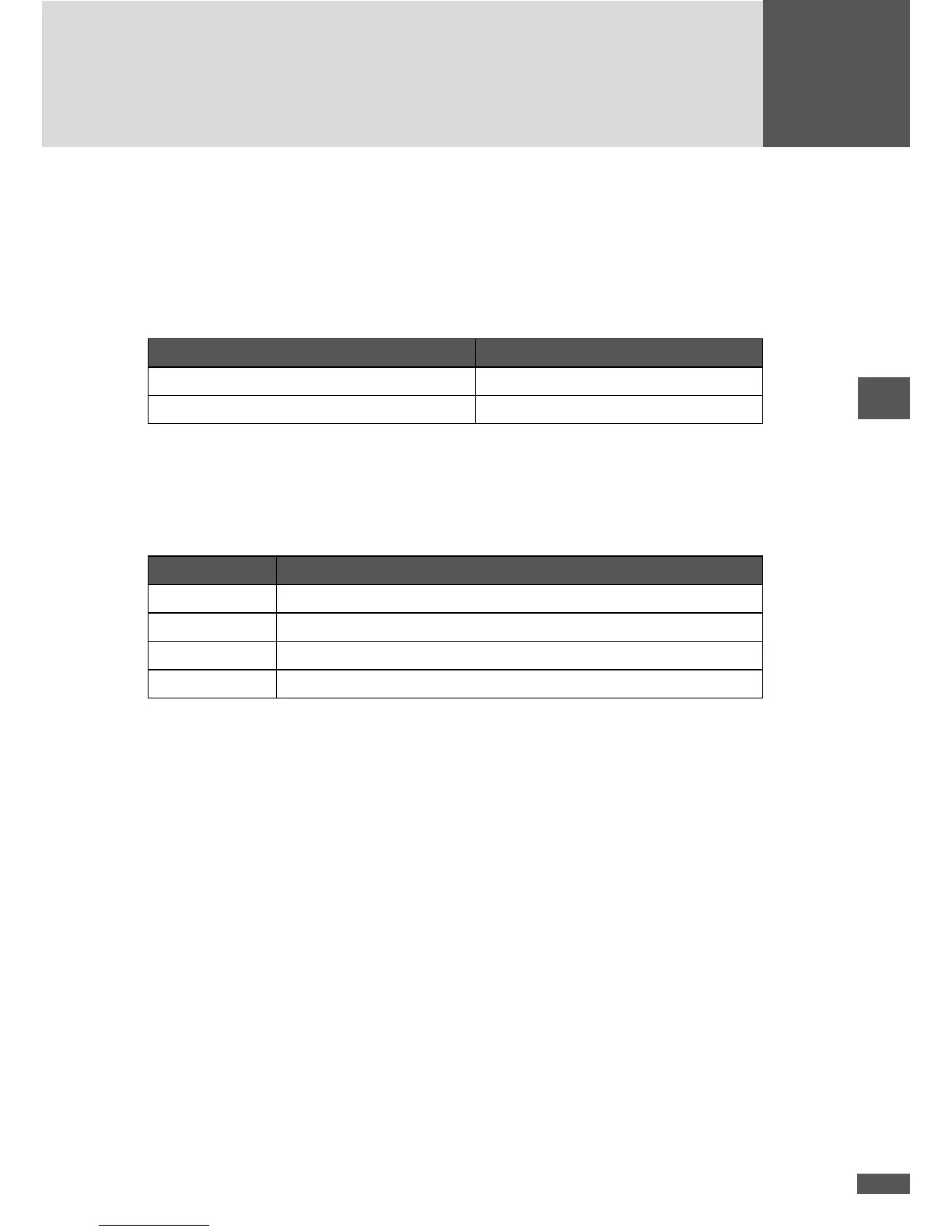
Contact 1 - contact 4 Grid relays K1 and K2
Phase voltage (L1, L2, or L3) present closed
no phase voltage present open
Connecting conditions
See 4.6.4 Status signalling contact
Pinout
Contact Description
1 Phase (L1, L2 or L3)
2 Not used
3 Not used
4 Neutral conductor N
4.6.6 Communications sockets
The SolarMax MT series inverters have two RJ45 sockets for data communication within
a MaxComm network:
n The left-hand RJ45 socket is only an RS485 interface. The RS485 interface is used for
connections to other SolarMax inverters or accessories with MaxComm interface.
n The right-hand RJ45 socket can be used both as an RS485 and as an Ethernet inter-
face; the desired function can be toggled in the “Settings” menu. The Ethernet inter-
face is used for connecting an inverter directly to a PC or to MaxWeb xp. However, if
both sockets are congured as RS485 interfaces, a network containing several RS485
nodes can be set up.



 To Next Page