28
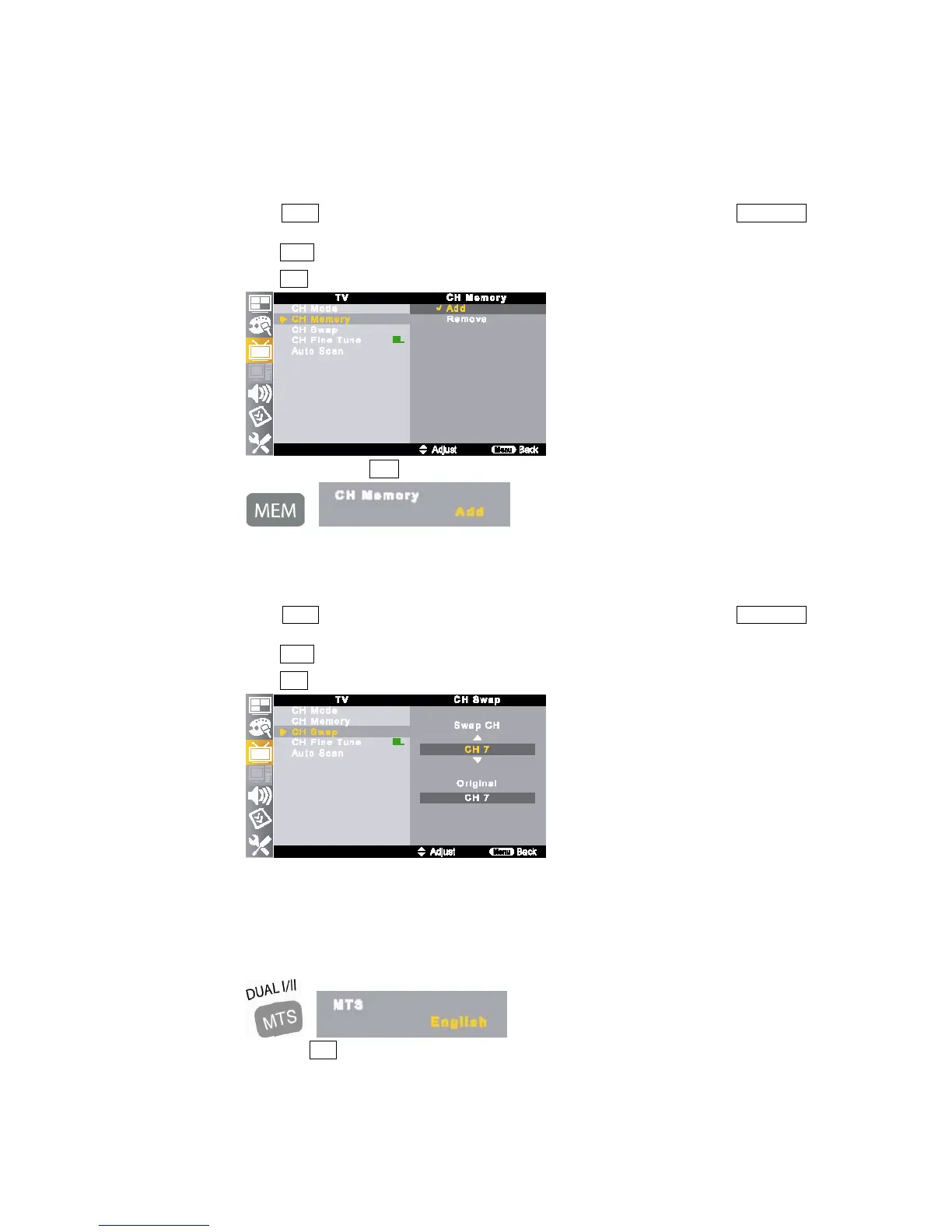
6) Add / Remove Channel
You can set channel selection add or remove as your need.
①
Move to a channel to add or remove by pressing numeric button (0~9) or CH button.
②
Press MENU button on the remote control and move to <TV - CH Memory> by pressing ▲/▼//◀▶
buttons.
③
Press ▲/▼ buttons to add or remove the selected channel.
④ Press EXIT button to return to the normal screen.
⑤
Also, it can be set with MEM button on the remote control.
7) Channel Swap
This function allows you to swap from stored channel to your desired channel.
①
Move to a stored channel which you wish to swap to desired channel.
②
Press MENU button on the remote control and move to <TV – CH Swap> by pressing ▲/▼//◀▶
buttons.
③
Press ▲/▼ buttons to change desired channel from stored channel on the <Swap CH> item.
④
Press EXIT button to return to the normal screen.
☞
NOTE
If your desired channel already has stored channel, the stored channel swaps to desired channel.
This function is available only analog TV not digital TV source.
8) MTS (Multi-channel Television Sound)
The TV has a feature that allows reception of sound other than the main audio sound for the TV program.
The TV with MTS can receive mono, stereo and Secondary Audio Programs (SAP).
① Each press MTS button on the remote control, MTS item toggles as broadcasting system.
② Also, it can be set in OSD menu if JOG button is used.



 To Next Page