40 UM0027_ SOL APOLLO Series 7.4-22K_EN_V02_0523
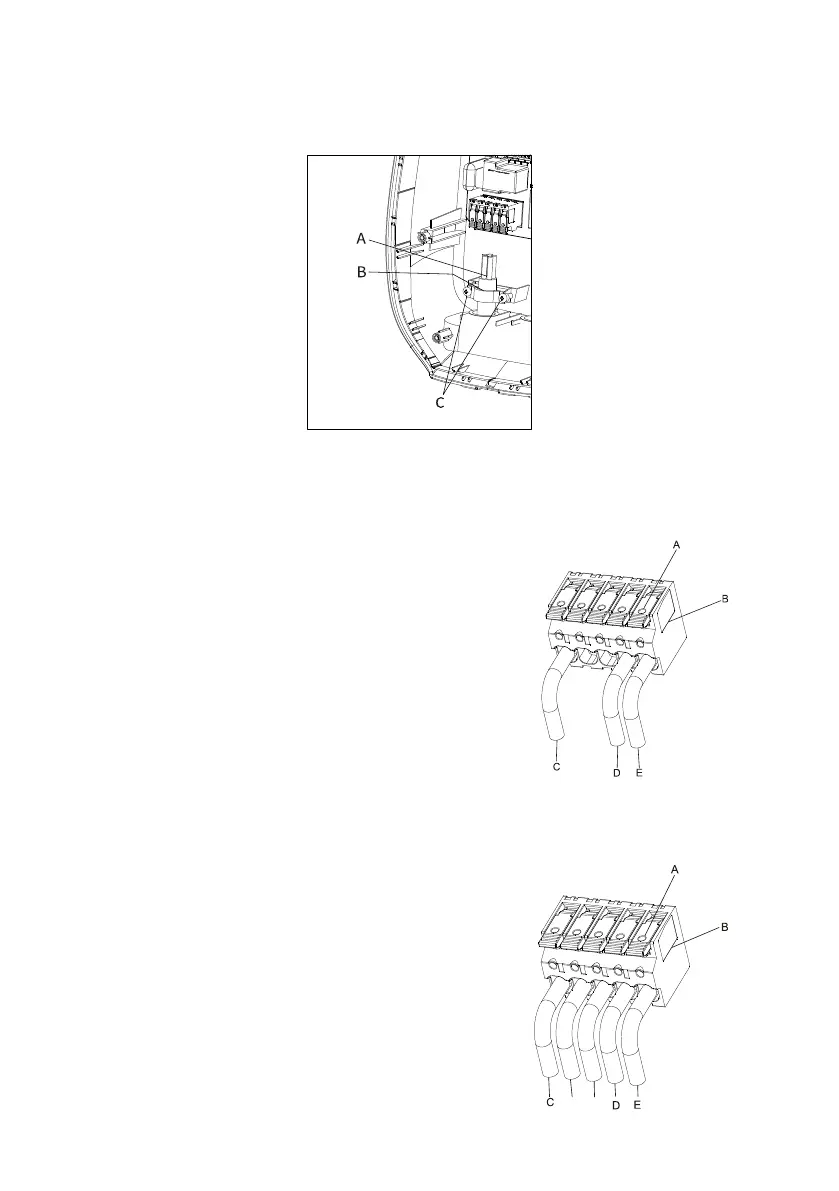
3. Secure the cables (A) with the cable clip (B). Install the two screws (C) to
secure the cable. (For Option 1)
Figure 27
4. Terminate the incoming AC supply cable.
Single phase
Loosen the cable clamps (A) of the terminal block.
Insert the cables into terminal block (B).
Connect the below wires:
1. Line (C)
2. Neutral (D)
3. Grounding (E)
F
igure 28
Three phase
Loosen the cable clamps (A) of the terminal block.
Insert cable into the terminal block (B).
Connect the below wires:
1. Line L1 (C)
2. Line L2 (F)
3. Line L3 (G)
4. Neutral (D)
5. Grounding (E)


 To Next Page