65EP-T/EP+-T
46
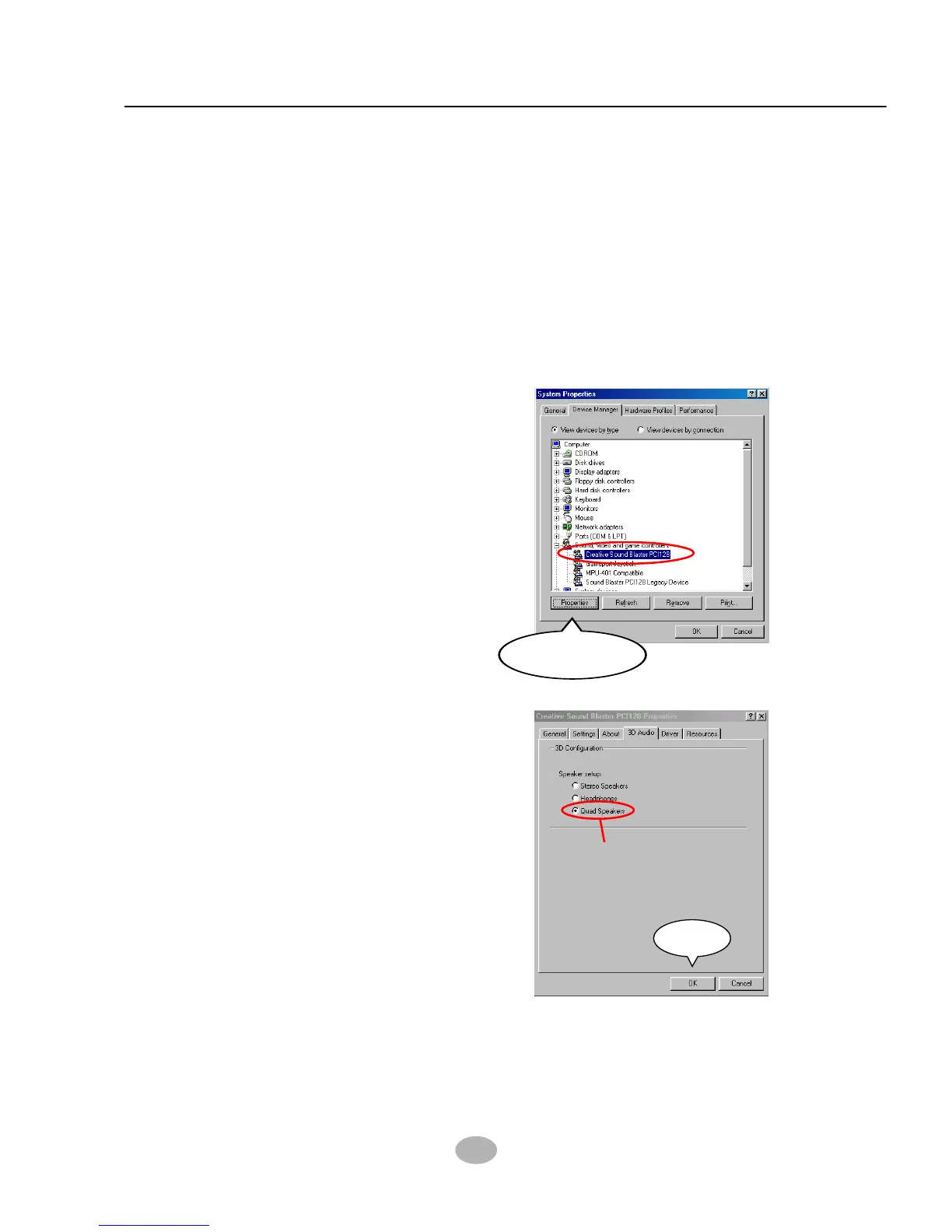
3-4.2 To Enable The Rear Line Out (For 4 Speakers)
After Installation Of Creative Audio Drivers, you should enable the
Rear Line Out connector for 4-channel speaker.
3
Click the “Creative sound
Blaster PCI128” selection, then
Click on the “Properties”
button.
Properties
Your Audio System can now support 4 speakers out. Insert second
pair of speakers to the Rear Line out jack to verify this function.
(See the following Section 3-4.3 for identifying the Rear Line out jack.)
5
Click the “Device Manager” button.
2
Click to “My computer” icon, and then “Control Panel”, and then
“System”, and you will see the “System Properties” screen.
1
• When “Creative Sound
Blaster PCI128 Properties”
Window appears, please
Click the 3D Audio button,
and then select “Quad
Speakers”.
• Click the “OK” button.
4
OK
Quad Speakers



 To Next Page