19
Hardware Setup
WARNING !!!
• Make sure that +5V DCV and +3.3 DCV of your power supply are suitable
for the processor.
• Any attempt to operate the AMD Athlon or Duron processor without
a suitable cooling Fan will damage processor and other component.
2-1 CPU INSTALLATION
2-1.1 CPU Frequency
• The CPU’s “CPU CLOCK RATIO” and “CPU HOST/PCI CLOCK” settings
are automatically detected to be default value by BIOS in the “Frequency/
Voltage Control” section.
• We do not suggest and assume the responsibility for any action that
changes the CPU default setting such as overclocking. Incorrect
CLOCK RATIO and HOST/PCI CLOCK settings may cause damage
to your CPU.
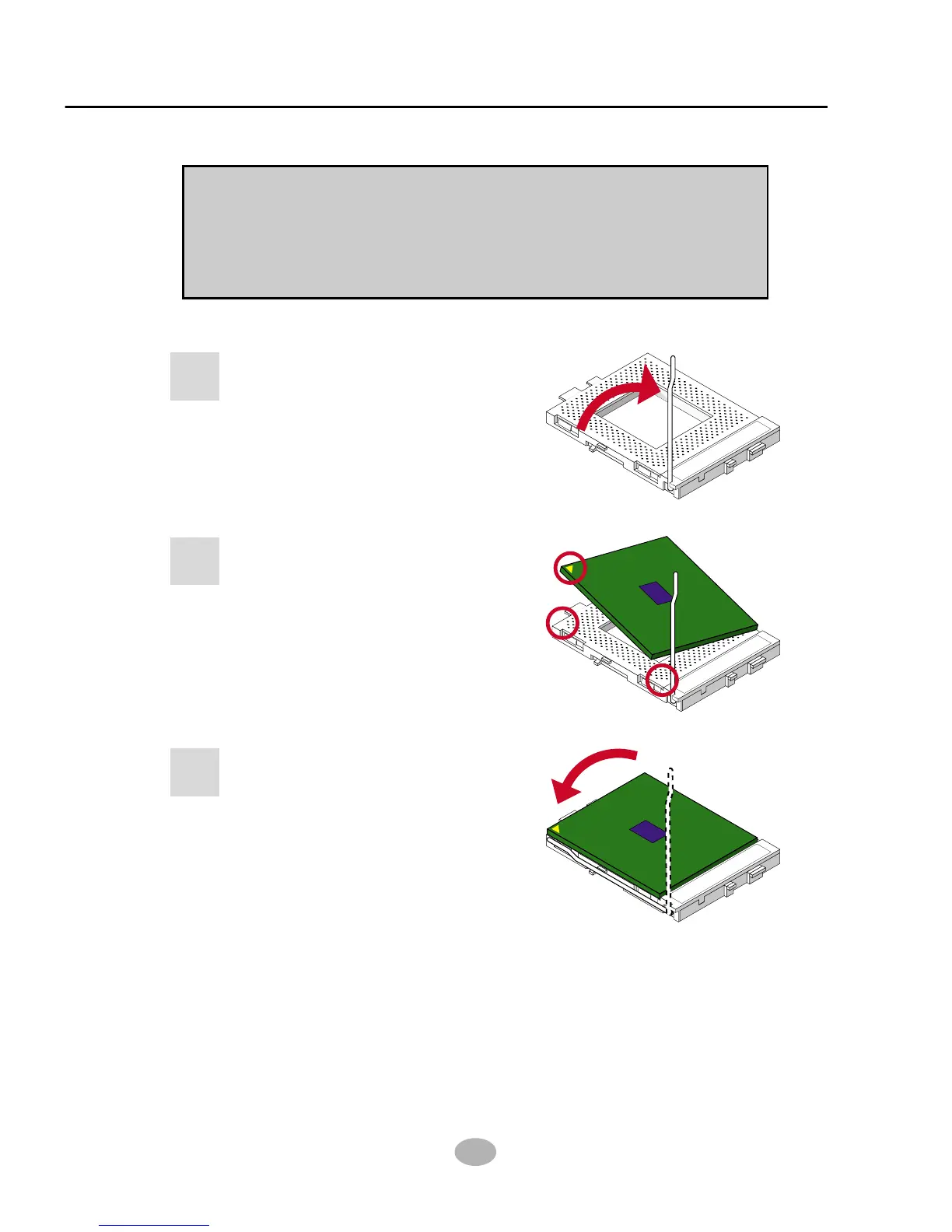
Pull out the lever from the socket,
and then raise the lever up to a
90-degree angle.
1
S
O
C
K
E
T
3
7
0
Take notice of the red circles
as shown here. While inserting
the CPU into the socket, you
can find out there is a definite
pin orientation for CPU and
socket.
2
SOCKET 370
Make sure that the CPU is
placed into the socket tightly.
Then lower down the lever to
complete the CPU installation.
3
S
O
C
K
E
T
3
7
0



 To Next Page