10 3/27/2015
• To start programming the Somfy Connect, the command strings of the Lutron devices must be known. Once
the Lutron system is installed and all devices are associated & activated, connect the Somfy Connect to the
Main Repeater using the RS232 cable. The URTSI does not need to be connected at this time – although it
can be.
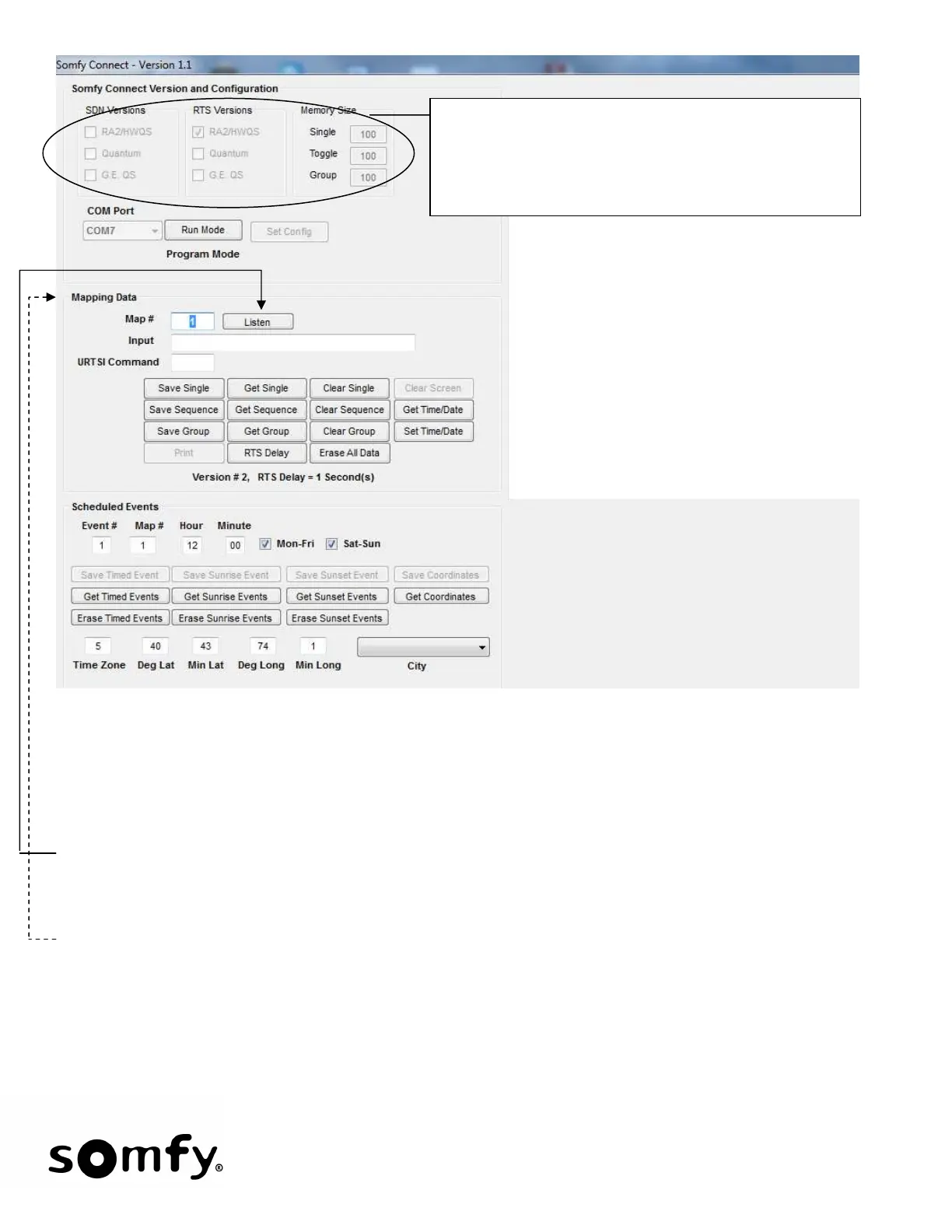
• To program a map, click Listen and then press & release the Lutron push button you wish to map to a
function. The screen on the following page will appear. Your Input will be slightly different based on the ID
of your Lutron device.
• During the Listen Mode, the Frame Heading will flash “Listening” until the Lutron string is sent. If after one
minute no input has arrived, the Somfy Connect will exit the Listing mode and return to RUN mode.
These Frames indicates how the Somfy Connect is presently
configured:
• Type of Somfy Connect (default: RA2/HWQS to RTS)
• Number of each command type (default: 100/ea)
• To change Configuration settings, see section #10


 To Next Page