6 3/27/2015
4 Hardware Setup
• In addition to the Somfy Connect you will need:
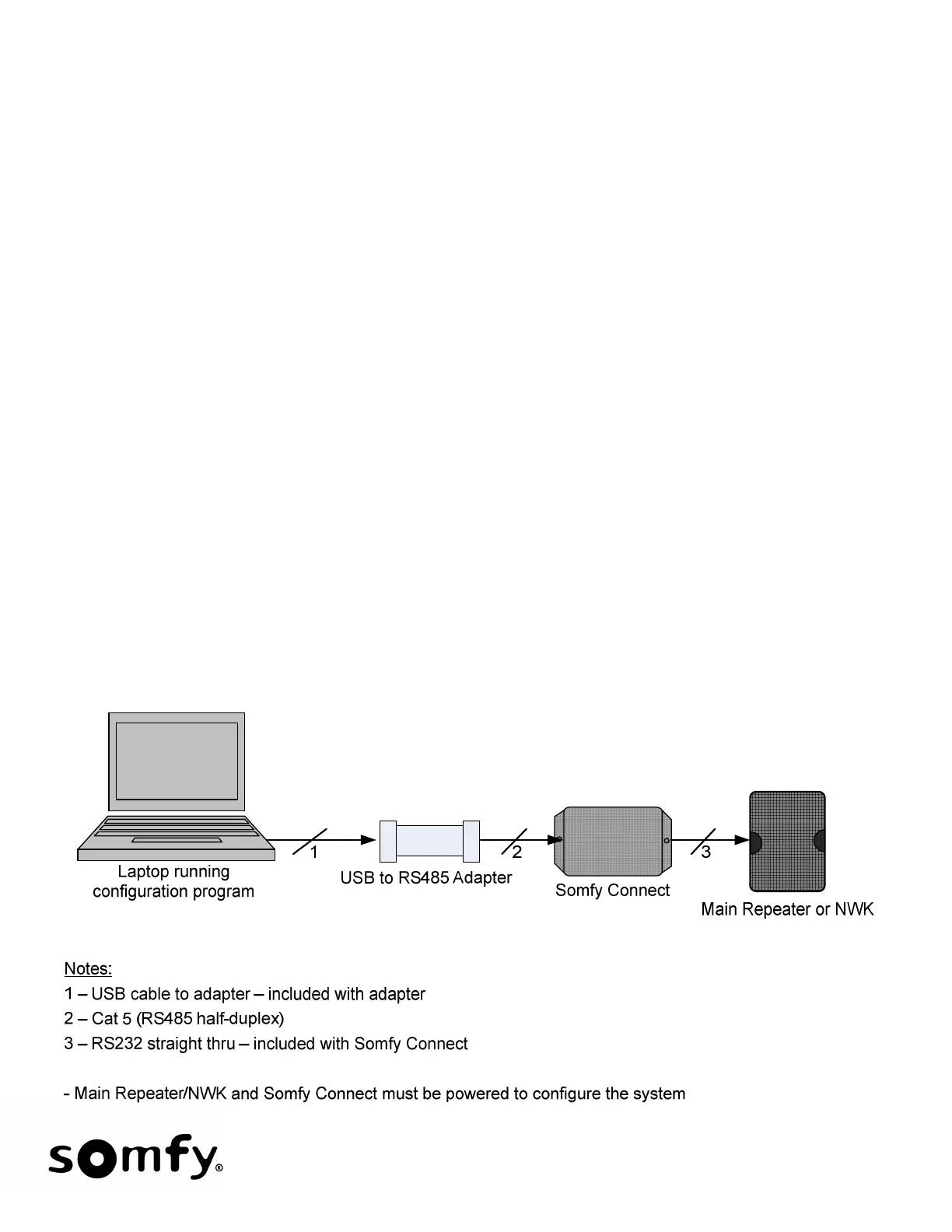
o A USB to RS485 adapter such as the B & B part: 485USBTB-2W-LW or equivalent.
o A standard Cat 5 cable.
o A straight-thru RS232 cable which must have one male DB9 and one female DB9 (included).
o An URTSI for RTS installations.
• The Somfy Connect includes an RJ45 connector that is used to connect it to the URTSI or SDN Network. It
also includes a DB9 connector used to connect to the Lutron Main Repeater or NWK.
• In RTS applications, the URTSI can provide power to the Somfy Connect or vice versa. There is a 2.5 mm
DC power input jack on the Somfy Connect. Power is delivered over the Cat 5 cable. The power supply
shipped with the URTSI can be used and can power the Somfy Connect and up to 4 URTSI’s.
• In SDN applications, the Somfy Connect can get power from the SDN or from a power supply connected
directly to the Somfy Connect.
• The Main Repeater or NWK must be configured for 9600 baud.
5 Typical Hardware Setup to Configure Somfy Connect.


 To Next Page