16 3/27/2015
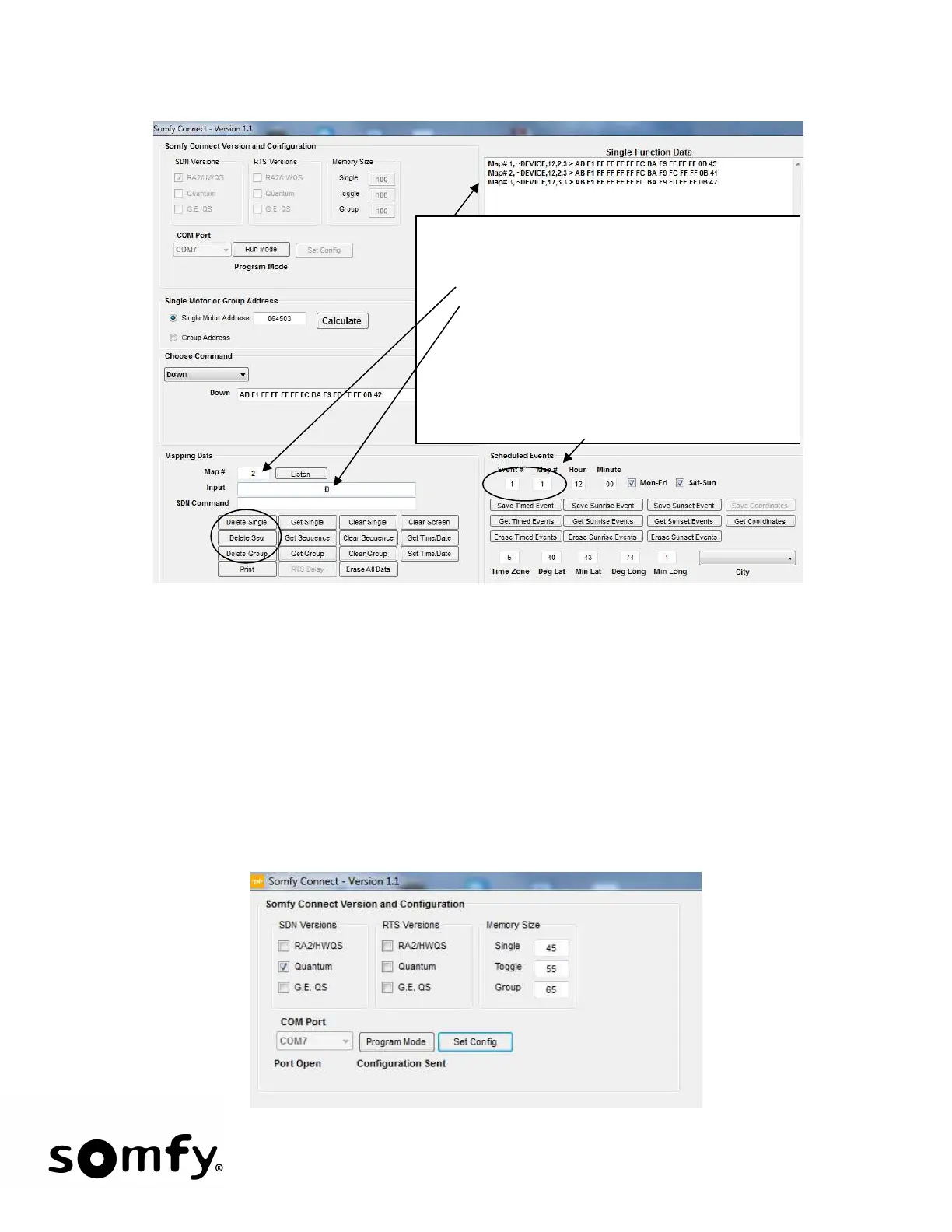
• To delete a save map or scheduled event:
10 Changing the Default Configuration
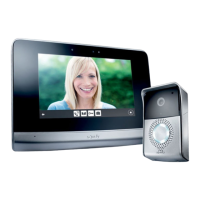
• If the Configuration of the Somfy Connect needs to change:
1. Start the Configuration program
2. Choose the Somfy Connect Version (Quantum to SDN picked in screen below)
3. Set the Memory Size for each Function (Limited to a combination of 300)
4. Select the COM port
5. Click Set Config
6. A “Configuration Sent” message will be displayed indicating the configuration has been
accepted.
Retrieve the Data set that you wish to remove a
map from using the Get Command Buttons.
Shown here is the Single Function Data set.
Enter the map # to Delete
Enter D in the Input Text box
Note that the SAVE command buttons become
Delete command buttons.
Choose the correct Delete Button. In this case
Delete Single
For Events. Get the Event data set, enter the
event # to delete and enter D in Map # then
choose the correct Delete button.


 To Next Page