9 3/27/2015
7 Programming the Somfy Connect to RTS (URTSI).
• The first step is to load the drivers for the USB to RS485 adapter. When complete, verify that the adapter is
listed under COM ports in Device Manager. Record the COM port that the adapter populates.
• Install the Somfy Connect Configuration software and start it. Uninstall any previous versions.
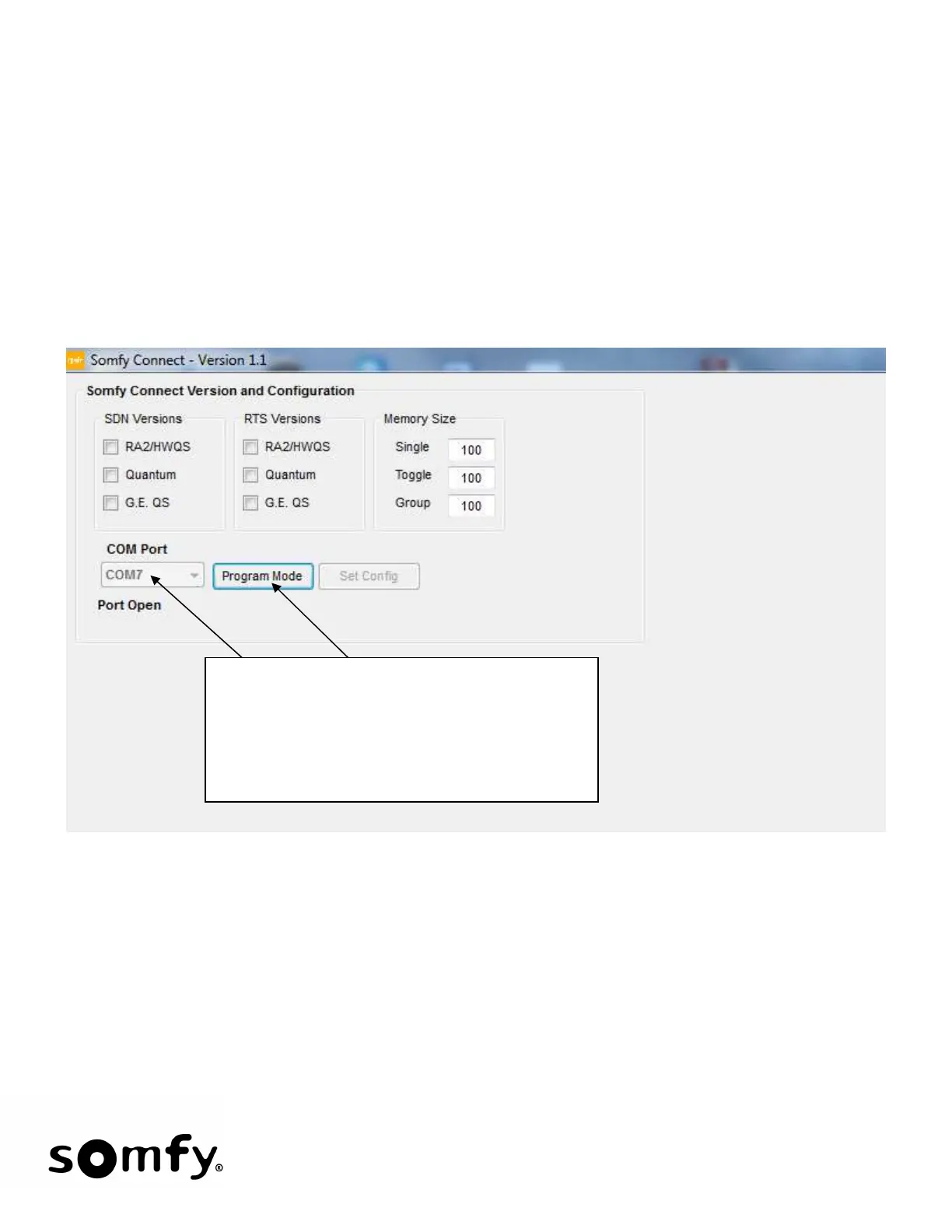
• The first screen will be:
• If you have a good communication link, the screen on the following page (RA2/HWQS to RTS) will appear.
If not, you will get an error message stating there is no response – you must successfully link to the Somfy
Connect before you can move on.
From the drop down menu, choose the COM
port that the USB to RS485 adapter is using and
then click Program Mode. Port Open signifies
that the Configuration Program has control of the
COM port. It does not mean a successful
connection to the Somfy Connect.


 To Next Page