12 3/27/2015
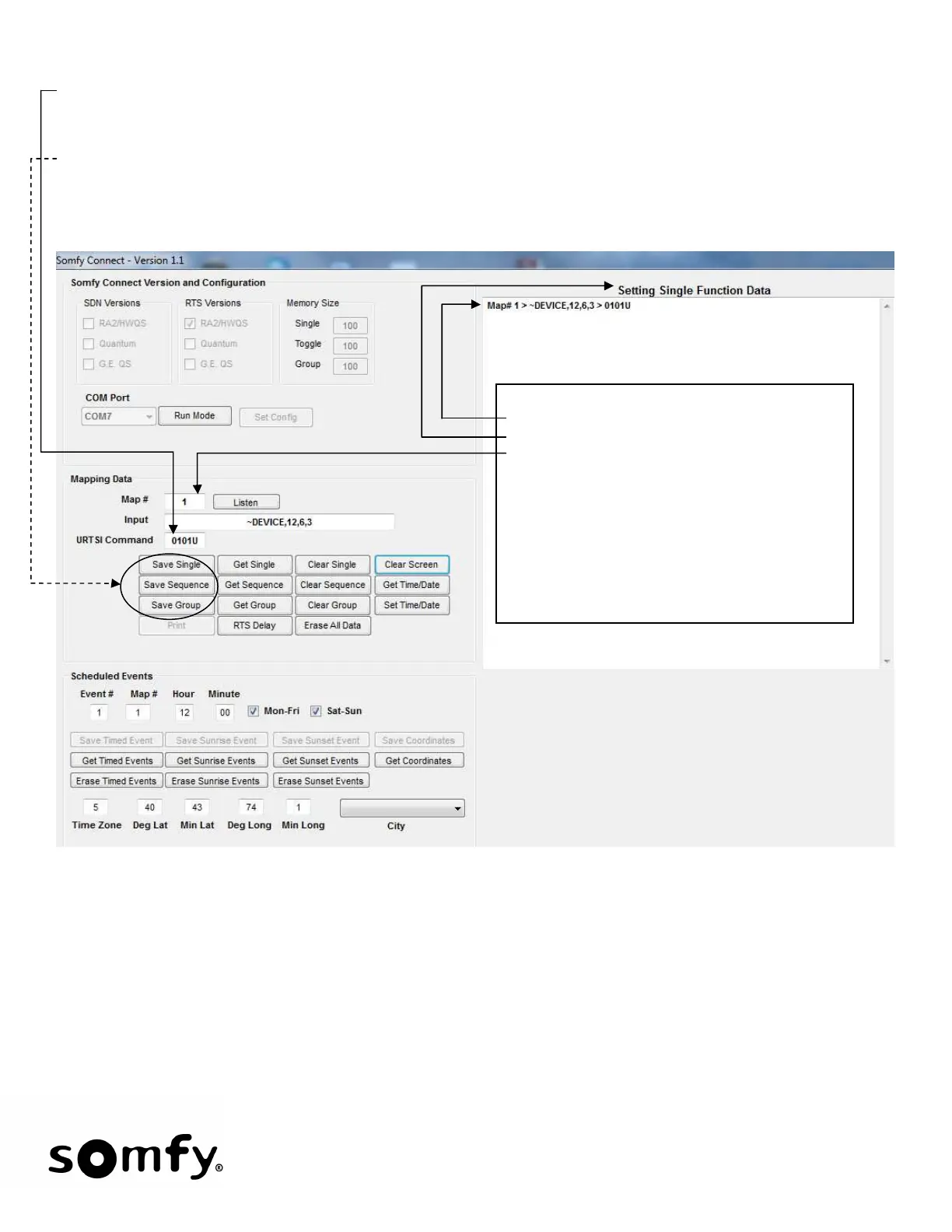
• The next step is to input the URTSI string. In this example 0101U (URTSI address 01, channel 01, U for up)
has been entered.
• To save the Mapping Data, Click Save Single, Save Sequence or Save Group – depending on what
command type you want - the following will be displayed:
• Repeat the Listen/Save process for every Pico, Keypad, Table-Top and Grafik Eye QS that is to be used.
• With the data saved, the Somfy Connect will send out saved commands (RS485) based on the Lutron serial
strings received. To test, put the Somfy Connect in RUN mode and activate the Lutron push-buttons whose
serial strings were captured.
Save Single was selected.
-Data is sent to Somfy Connect and displayed
-Type of data is also displayed
-Note the map# is incremented by 1
• For Sequence and Group Commands, only
the URTSI address and channel need to be
entered. For example: 0101.
• The Somfy Connect will automatically
determine what the proper Raise/Lower
Lutron Strings are for each Group input.


 To Next Page