EN
Copyright © 2016 Somfy SAS. All rights reserved.
6
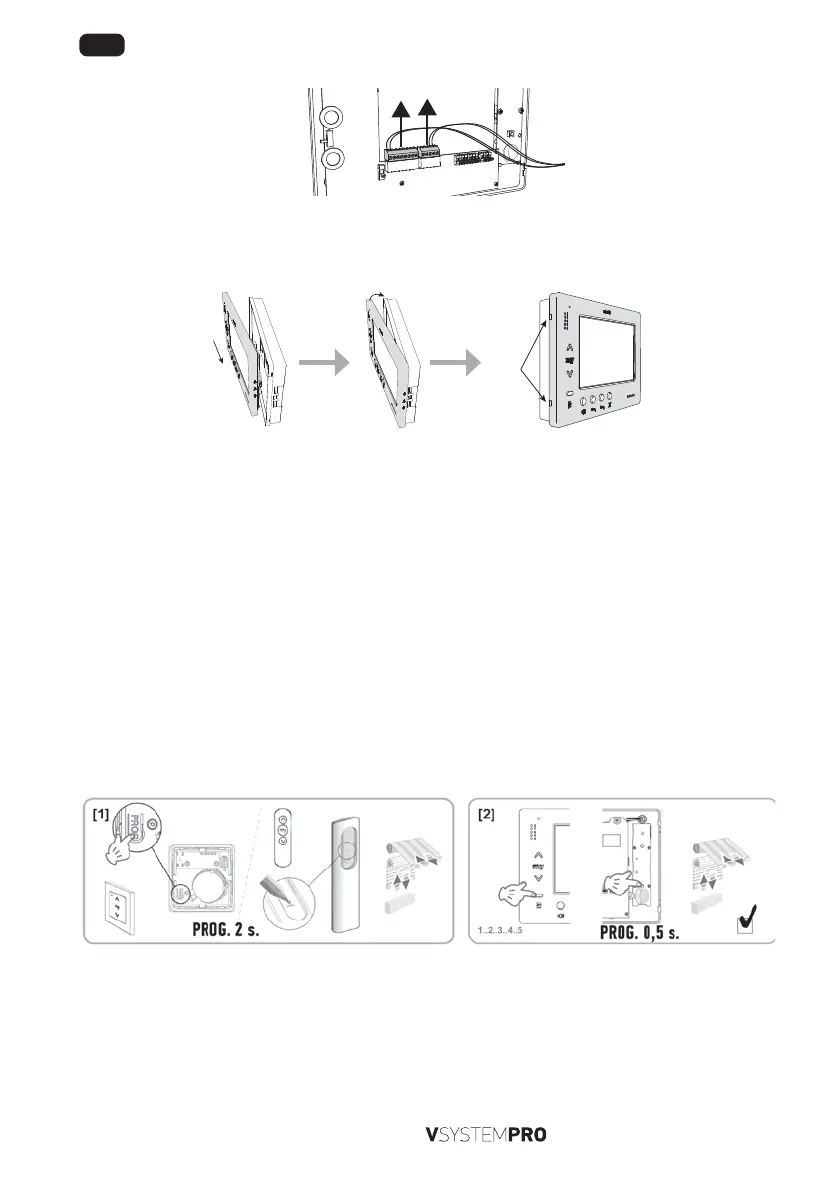
- Disconnect the two removable terminals from the monitor by pulling gently upwards. Do not pull the wires directly.
To reassemble the monitor:
[1]. Reconnect the connectors to the monitor.
[2]. Clip the front panel of the monitor to its rear section, sliding it to the right (ensure you position the thumb-wheels and
the adjustment selector correctly). Clip the monitor into place by gently pressing on the le-hand side.
Clic !
3.2 Registering the monitor control as the first remote control
To registering the monitor control as the first remote control refer to the instructions for the io-homecontrol® drive or receiver
to apply the programming procedure linked to the product.
3.3 Adding or removing the io-homecontrol® monitor control using an existing io-
homecontrol® remote control
To implement the procedure using a control with information feedback (Telis 1 io, Telis Composio io, etc.), please refer to the
instructions for this control.
The procedure described below can be applied using a control of type Smoove, Telis Composio io, Impresario Chronis io, etc.
[1]. On the individual control already associated with the end-product:
- Press and hold (approx. 2 seconds) on its PROG button until the end-product moves up and down: programming mode
is activated for 10min.
[2]. On the io-homecontrol® monitor control to be added or removed:
- Select the desired channel.
- Briefly press the PROG button: the application moves up and down and the io-homecontrol® monitor control is added
or removed.
Begin the procedure again for all channels to be memorised or deleted.
Note: To clear the monitor control programming on an io-homecontrol® receiver, repeat all the steps described above.


 To Next Page
 Loading...