EN
Copyright © 2016 Somfy SAS. All rights reserved.
7
4 USING THE IOHOMECONTROL® MONITOR CONTROL
[1]. Select the desired channel.
[2]. Press
to open the relative product (roller shutter, awning, garage door, etc.) or to switch the light on.
[3]. Press
to close the relative product or to switch the light off.
[4]. Press to:
- stop the relative product currently being moved.
- reach the favourite position if programmed.
4.1 Saving or modifying the favourite position
When the relative product is moving:
[1]. Stop the product in the desired position
[2]. Press for 5 seconds.
4.2 Deleting the favourite position
[1]. Select the desired channel.
[2]. Press for 5 seconds.
5 CHANGING THE IOHOMECONTROL® REMOTE CONTROL BATTERY
Indicator light “18” (see “2.2 Presentation of the monitor”, page 3) indicates the level of wear of the io-homecontrol®
remote control battery: it lights up when controlling an io-homecontrol® product to indicated that the battery needs to be
changed.
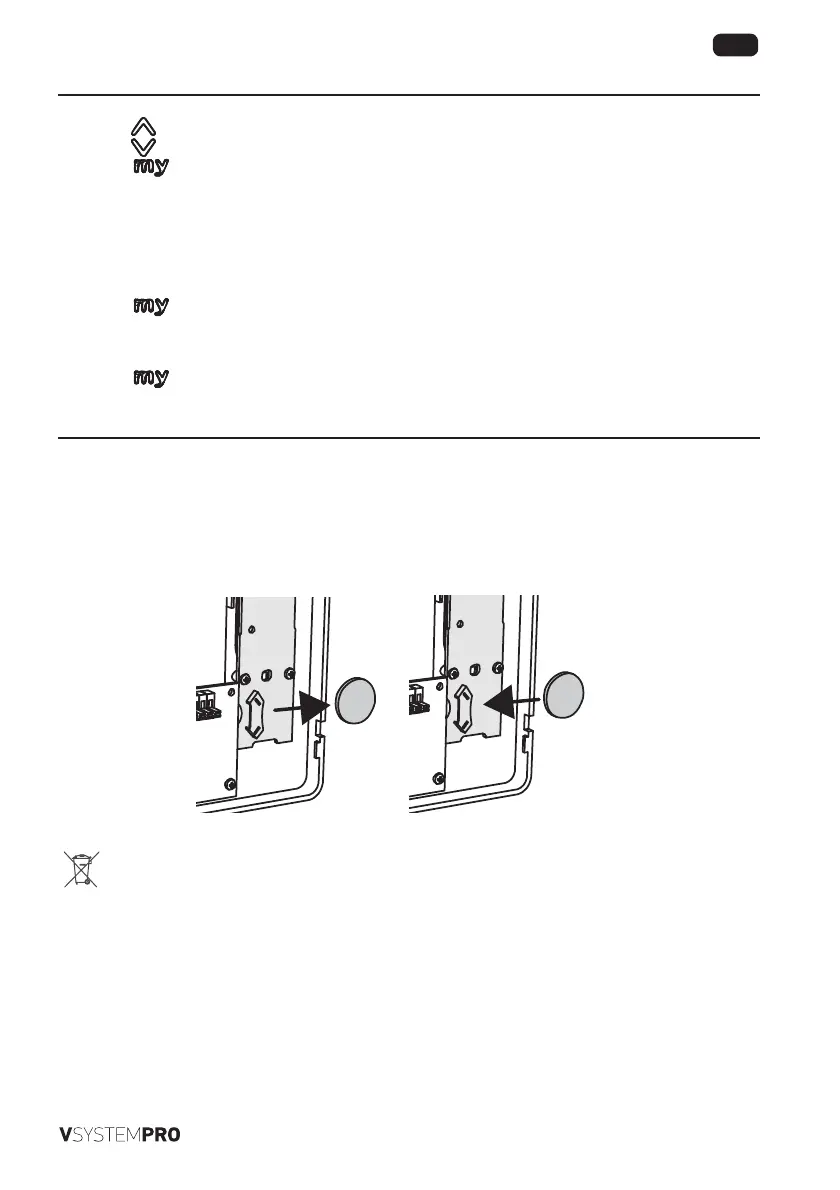
[1]. Remove the monitor from its rear section (see “3.1 General information”, page 5).
[2]. The remote control is on the right when you look at the rear of the monitor. Remove the protective tape then push the
battery to the right using a screwdriver.
[3]. Insert the new battery CR2430 in its housing by pushing it to the le until the end stop.
[4]. Return the monitor to its rear section (see “3.1 General information”, page 5).
Please separate storage cells and batteries from other types of waste and recycle them via your local collection
facility.


 To Next Page
 Loading...