Operation and Maintenance Documentation GUARD v202301
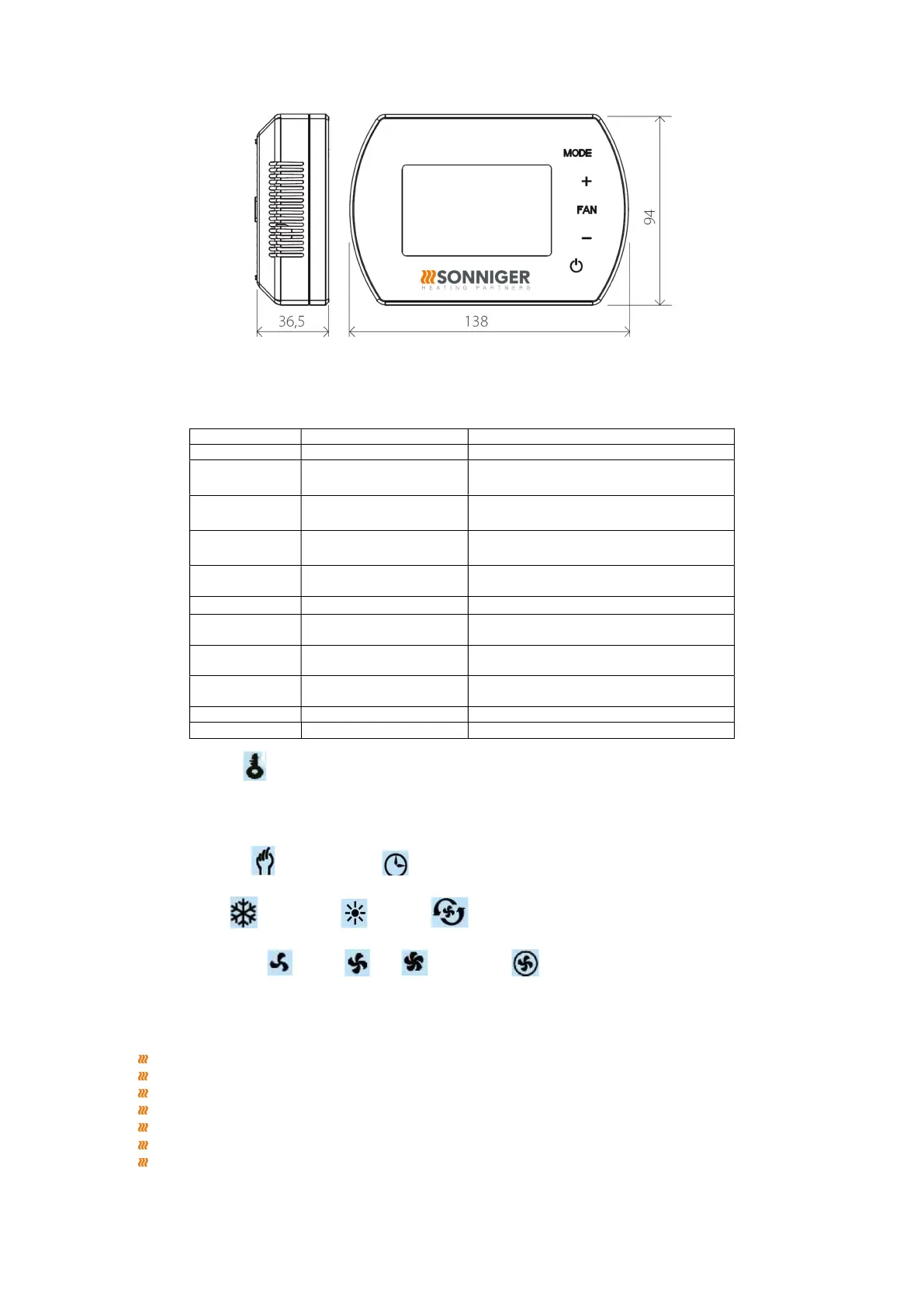
Dimensions
Settings menu
When Panel Intelligent is switched off, press and hold MODE for 5 seconds
To change option use MODE button.
To change value use +/- buttons.
2 EEPROM
1: memory
3 Fan status
C2: Continuous mode
4 Temperature sensor
1: External Sensor NTC (optional)
5 Antifreeze
1: On
6
+5°C ~ +15°C
7 ALARM
1: enable
8 Drycontact
1: NC
9 MODBUS
1: enable
Button lock / unlock
To LOCK buttons press and hold + and then – and hold both of them for 5 seconds.
To UNLOCK buttons press and hold + and then – and hold both of them for 5 seconds.
Press MODE
Change on manual mode or automatic mode
Hold MODE for 5 seconds
Change to cool mode , heating mode , ventilation
Press FAN
Change of the fan speed low , medium , high , automatyczna
Hold FAN for 5 seconds
Manual callendar programming Monday – Friday, Saturday, Sunday 6 settings per day
BMS Functions
Setting/Reading work parameters
Work/Stop conditions
Weekly program
Temperature
Fan speed
Heating, ventilation, cool mode
Antifreeze mode


 To Next Page