Menu item details
Record Setting:
Selects the frame rate of the movie.
Frame Rate:
Selects the shooting frame rate.
Playback speed
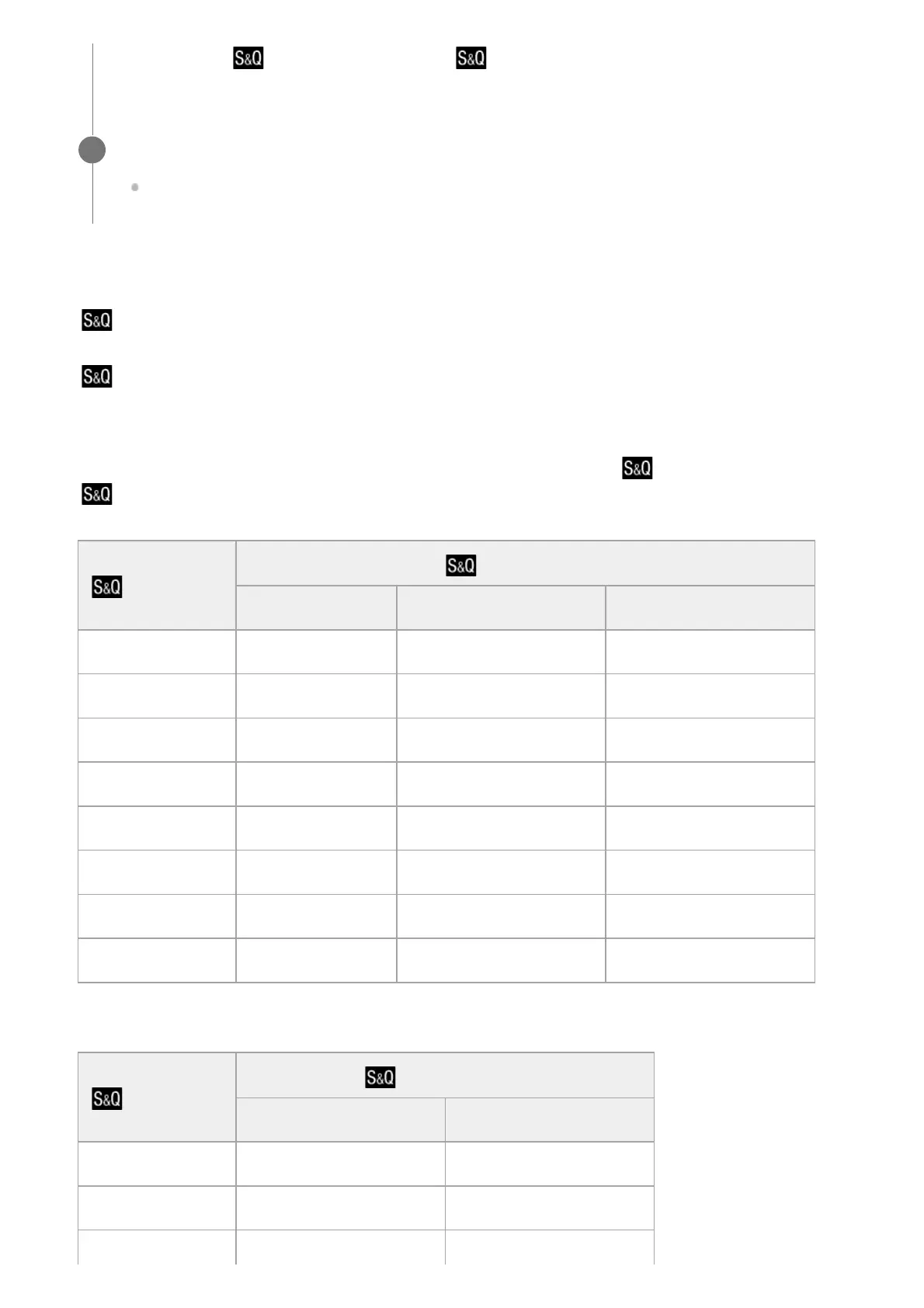
The playback speed will vary as below depending on the assigned [ Record Setting] and [
Frame Rate].
When [NTSC/PAL Selector] is set to NTSC
When [NTSC/PAL Selector] is set to PAL
settings for [ Record Setting] and [ Frame Rate].
Press the MOVIE (movie) button to start recording.
Press the MOVIE button again to stop recording.
4
Frame Rate
Record Setting
24p 30p 60p
120fps 5 times slower 4 times slower -
60fps 2.5 times slower 2 times slower Normal playback speed
30fps 1.25 times slower Normal playback speed 2 times quick
15fps 1.6 times quick 2 times quick 4 times quick
8fps 3 times quick 3.75 times quick 7.5 times quick
4fps 6 times quick 7.5 times quick 15 times quick
2fps 12 times quick 15 times quick 30 times quick
1fps 24 times quick 30 times quick 60 times quick
Frame Rate
Record Setting
25p 50p
100fps 4 times slower -
50fps 2 times slower Normal playback speed
25fps Normal playback speed 2 times quick



 To Next Page