33
AVD-K150B/K150E/K150G/K150N/K150R
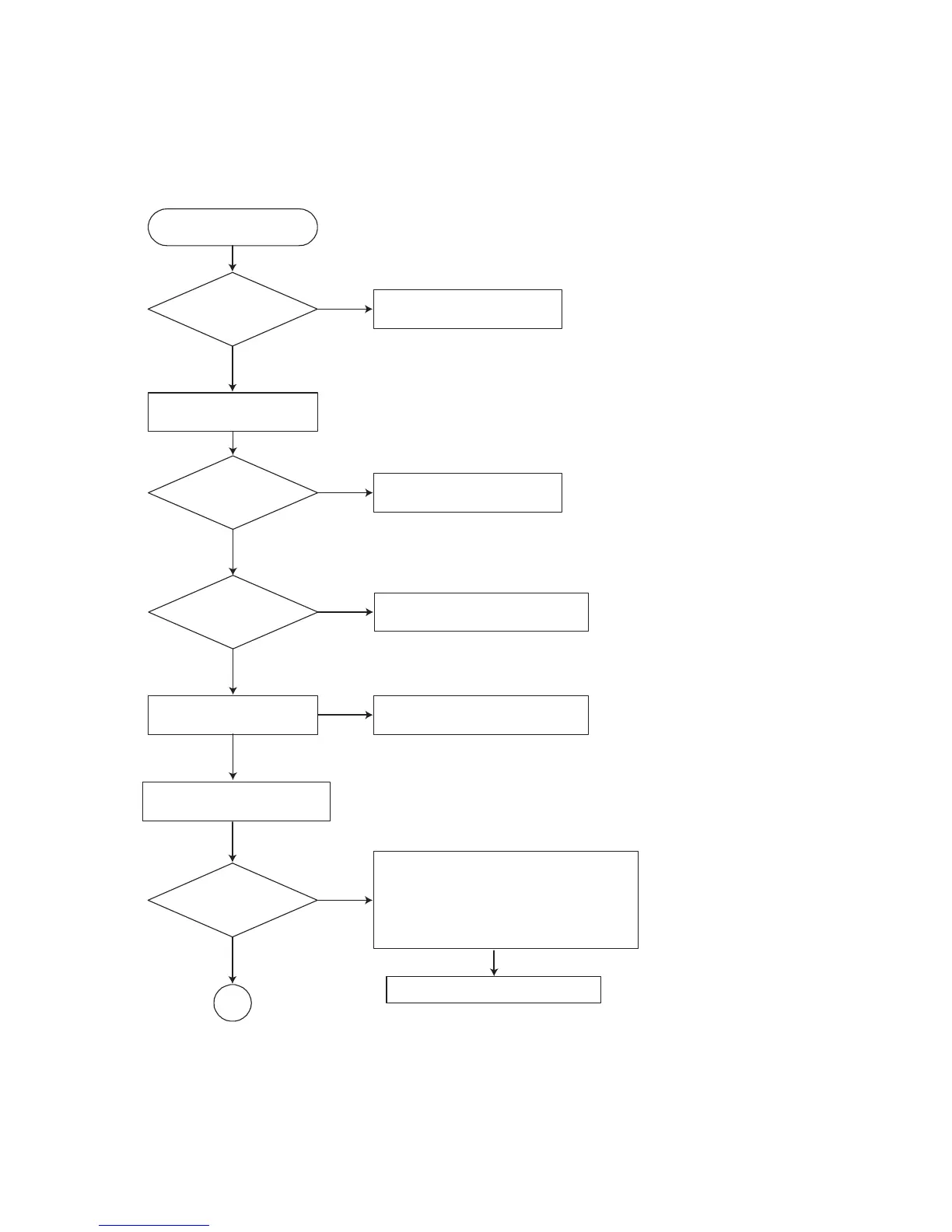
2. Test & debug flow
TEST
Check the POWER PART
No
Yes
No
Yes
No
No
No
Yes
Yes
Yes
Check the POWER PART
Check the regulators or diode(D501).
Check the cable connection.
(PDV03)
1. Check 27MHz system clock.
2. Check systemreset circuit.
3. Check FLASH R/Wenable signal PRD,
RWR.
4. Check RS232 SIGNALS.
5. Check FLASH Memory related circuit.
Check the
AC Voltage
Power PCBA (110V
or 220V)
Switch on the Power PCBA
Is
the DC Voltage
outputs OK?
(5V, 3.3V, 8V, 12V)
Is 3.3V and 2.5V DC
outputs normal on main
PCBA?
Update
FLASH(IC5A1)
successfully?
Replace FLASH( IC5A1)
A
Communication between
VCR & DVD is normally?
Connect to PC RS232 Cable and
update the FLASH memory code.



 To Next Page