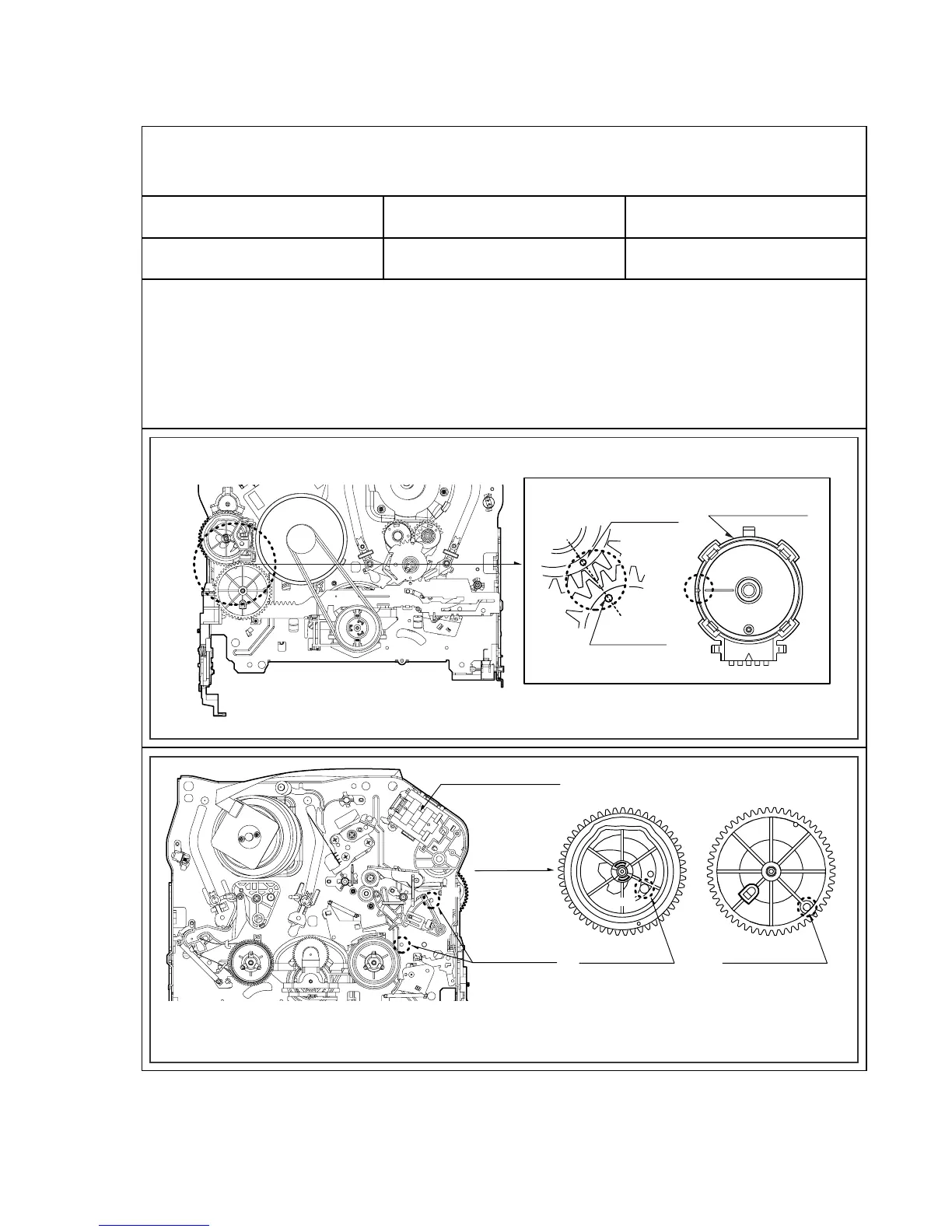
Purpose:To determine if the Mechanism is in the correct position, when a Tape is ejected.
1. Mechanism Alignment Position Check
1) Turn the Power S/W on and eject the Cassette by press-
ing the Eject Button.
2) Remove the Top Cover and Plate Assembly Top, visual-
ly check if the Gear Cam Hole is aligned with the
Chassis Hole as below Fig. C-2.
3) IF not, rotate the Shaft of the Loading Motor to either
clockwise or counterclockwise until the alignment is as
below Fig. C-2.
4) Remove the Screw which fixes the Deck Mechanism and
Main Frame and confirm if the Gear Cam is aligned with
the Gear Drive as below Fig. C-1(A).
5) Confirm if the Mode S/W on the Main P.C.Board is
aligned as below Fig. C-1(B).
6) Remount the Deck Mechanism on the Main P.C.Board
and check each operation.
Gear Cam
Gear Drive
(A)
Mode S/W
(B)
L/D Motor Assembly
Gear Cam
Chassis Hole
Gear Cam Hole
(A)
(B)
(A')
(B')
Gear Drive Hole
Test Equipment/ Fixture
• Blank tape
Test Conditions (Mechanism
Condition)
• Eject Mode (with Cassette ejected)
Check Point
• Mechanism and Mode Switch Position
Fig. C-1
Fig. C-2
CHECK DIAGRAM
BOTTOM VIEW
TOP VIEW
Gear Cam (o) and Gear Drive (o) groove alignment



 To Next Page