13
XR-CA430X/CA440
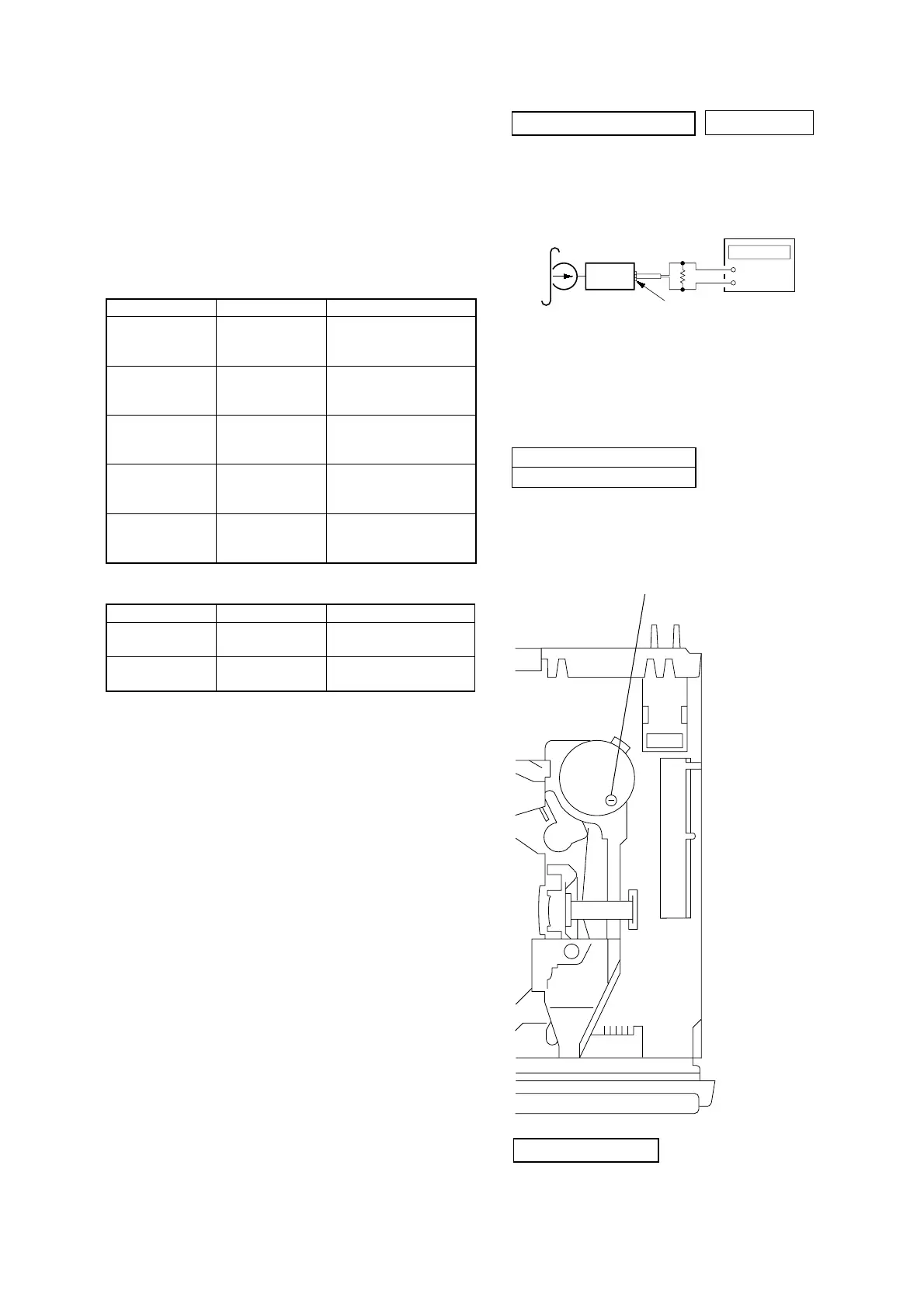
Procedure:
1. Put the set into the FWD PB mode.
2. Adjust adjustment resistor for inside capstan motor so that the
reading on the frequency counter becomes 3,000 Hz.
Specification: Constant speed
Adjustment Location:
Tape Speed Adjustment
– SET UPPER VIEW –
SECTION 4
MECHANICAL ADJUSTMENTS
TAPE TENSION MEASUREMENT
1. Clean the following parts with a denatured-alcohol-moistened
swab:
playback head pinch roller
rubber belt capstan
idler
2. Demagnetize the playback head with a head demagnetizer.
3. Do not use a magnetized screwdriver for the adjustments.
4. The adjustments should be performed with the power supply
voltage (14.4 V) unless otherwise noted.
TORQUE MEASUREMENT
Mode Torque Meter Meter Reading
2.95 – 6.37 mN•m
Forward CQ-102C (30 – 65 g•cm)
(0.42 – 0.90 oz•inch)
Forward
0.05 – 0.44 mN•m
CQ-102C (0.5 – 4.5g•cm)
Back Tension
(0.01 – 0.06 oz•inch)
2.95 – 6.37 mN•m
Reverse CQ-102RC (30 – 65 g•cm)
(0.42 – 0.90 oz•inch)
Reverse
0.05 – 0.44 mN•m
CQ-102RC (0.5 – 4.5g•cm)
Back Tension
(0.01 – 0.06 oz•inch)
5.89 – 19.61 mN•m
FF, REW CQ-201B (60 – 200 g•cm)
(0.83 – 2.78 oz•inch)
Mode Tension Meter Meter Reading
Forward CQ-403A
more than 60 g
(more than 2.12 oz)
Reverse CQ-403R
more than 60 g
(more than 2.12 oz)
SECTION 5
ELECTRICAL ADJUSTMENTS
0 dB=0.775 V
TAPE SPEED ADJUSTMENT
Setting:
Frequency counter
2,955 to 3,075 Hz
TAPE DECK SECTION
frequency counter
test tape
WS-48A
(3 kHz, 0 dB)
set
AUDIO OUT REAR jack (CNJ151)
–
+
10 k
Ω
TUNER SECTION
Tuner section adjustments are done automatically in this set.



 To Next Page