Direct
printing
LCD
screen
display
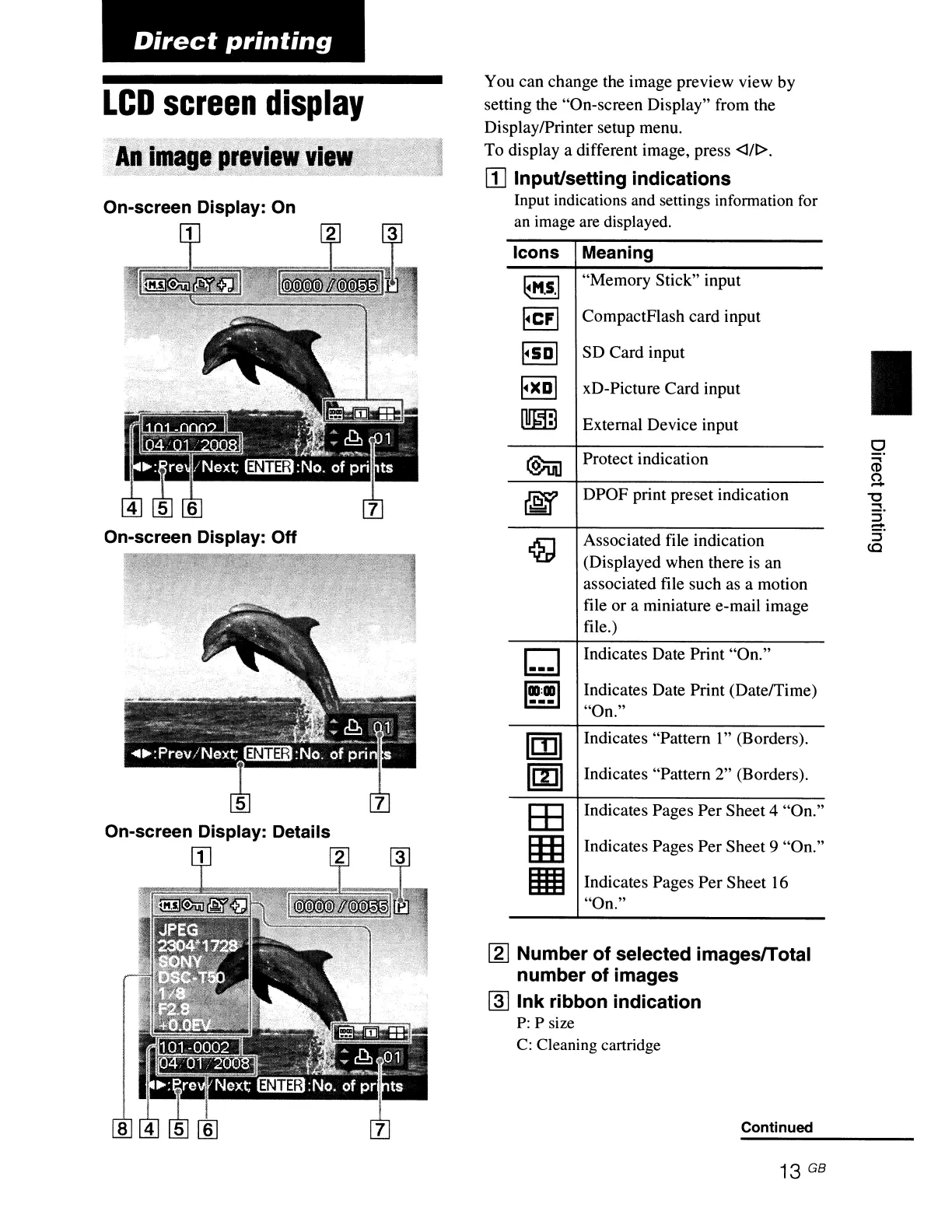
On-screen Display:
On
1
On-screen Display: Off
On-screen Display: Details
1 2
You can change the image preview view by
setting the "On-screen Display" from the
DisplaylPrinter setup menu.
To display a different image, press
<1/1>.
WInput/setting indications
Input indications and settings information for
an
image are displayed.
Icons Meaning
~M.s·1
"Memory Stick" input
FeFI
CompactFlash card input
I~SDI
SO Card input
I~)(DI
xD-Picture Card input
[!!IIDJ
External Device input
@iii]
Protect indication
~
DPOF print preset indication
~
Associated file indication
(Displayed when there is an
associated file such as a motion
file
or
a miniature e-mail image
file.)
6l
Indicates Date Print "On."
1
11I
:
11I
1
Indicates Date Print (Date/Time)
---
"On."
m
Indicates "Pattern I" (Borders).
m
Indicates "Pattern 2" (Borders).
EE
Indicates Pages Per Sheet 4 "On."
EIIJ
Indicates Pages Per Sheet 9 "On."
III
Indicates Pages
Per
Sheet
16
"On."
~
Number
of
selected imagesfTotal
number of images
@]
Ink ribbon indication
P:
P size
C:
Cleaning cartridge
Continued
13 GB
I
o
....
CD
U
"'0
....
:i'
-
5'
<C



 To Next Page