....",. 'l!mm: Select stamp.
~!~
C<1!cnebr
F~;;j
~
(;
t7
t»
lL
.j.!<.
•
~i
1\
:1'
"f
:z:
;:/
'.tI
{l
P
'It
.•
:~
\
...
\I"
jf
4£.$
..
a
<jJ
.~
...
~J""".lli·0,~
.•
~*
.
.\lJ.;;l
~.,\
••
~
~
.~
You can add a stamp
or
desired color to a specific
day in the calendar.
When adding a
stamp
(Example)
(DPress
<3/1>
to select
~
(Stamp), and press
ENTER.
The
stamp selection
window is displayed.
@Press
<3/1>/
A/V
to select
a desired stamp, and
press ENTER.
Settings/Procedures
Set the
color
of
Sunday and
Saturday to be displayed in
the calendar. Press
I> and
then
t::../V
to select the
desired color for Sunday
and Saturday. Then press
ENTER.
Modify
Calendar
Date
color
Item
01;'
2008
Sunday
Sunday
in~
Modify
Calendar
:::====
=======
..
---.1
......
'f
to
setitmfiil
to fix.
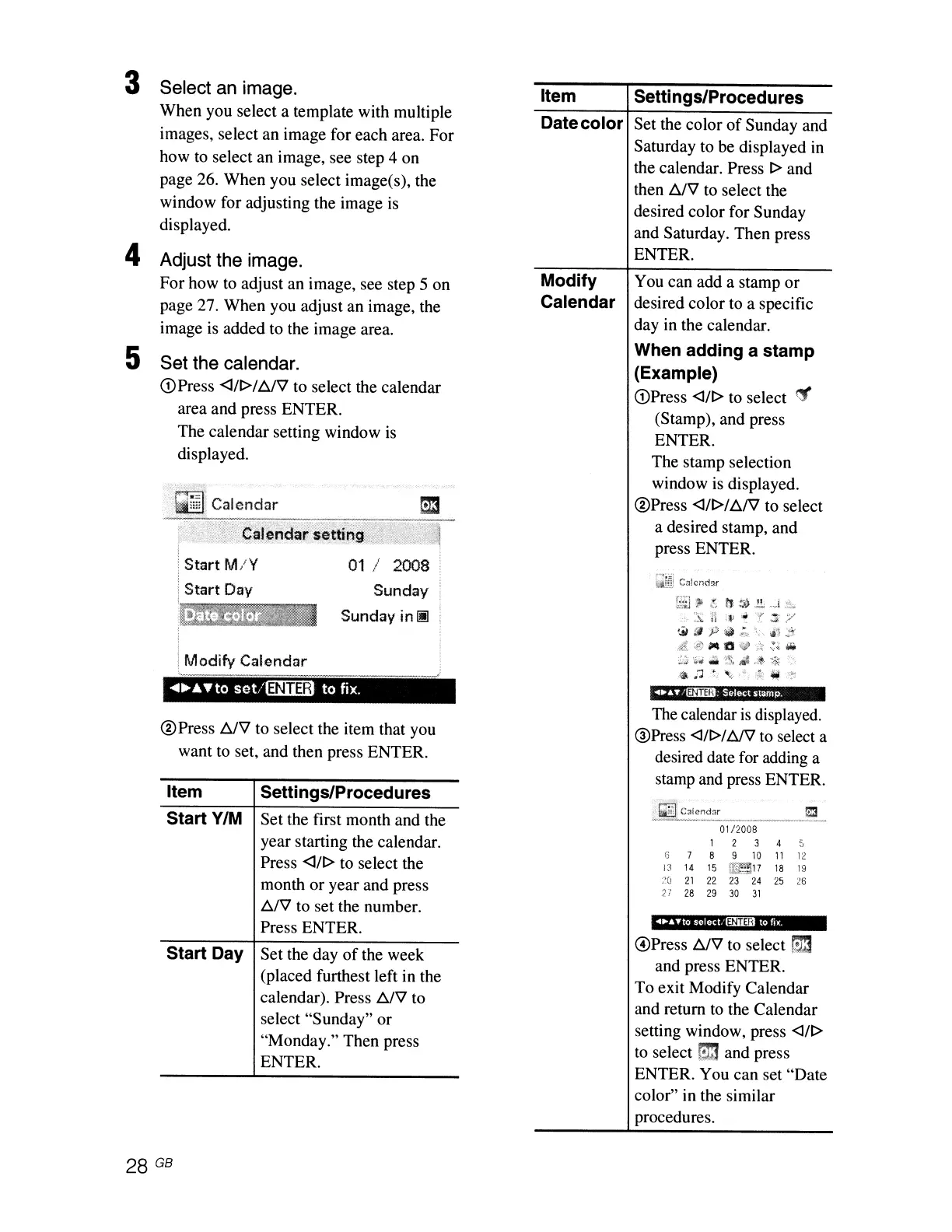
Set the calendar.
(DPress <J!r>/A/'il to select the calendar
area and press ENTER.
The
calendar setting window is
displayed.
Select an image.
When
you select a template with multiple
images, select
an
image for each area.
For
how to select an image, see step 4 on
page 26.
When
you select image(s), the
window for adjusting the image is
displayed.
Adjust the image.
For
how to adjust an image, see step 5
on
page 27.
When
you adjust
an
image, the
image is added to the image area.
5
4
3
@Press
t::../V
to select the item that you
want to set, and then press ENTER.
Item
Start
VIM
Start Day
Settings/Procedures
Set the first month and the
year starting the calendar.
Press
<]/1>
to select the
month
or
year and press
A/V
to set the number.
Press ENTER.
Set the day
of
the week
(placed furthest left in the
calendar). Press
t::../V
to
select
"Sunday"
or
"Monday." Then press
ENTER.
The calendar
is
displayed.
@Press
<3/1>/
t::..JV
to select a
desired date for adding a
stamp and press ENTER.
01/2008
1
2
3
4
,
..
6
7
8 9
10
11
12
13
14
15
"N·;~'7
18
19
::0
21
22
23
24
25
26
2'
28
29
30
31
.'
..
..
"
.10
selecl.13:illl1 to
r..
G)Press
t::../V
to select
S3
and press ENTER.
To
exit Modify Calendar
and return
to
the Calendar
setting window, press
<3/1>
to
select
m3
and press
ENTER. You can set
"Date
color" in the similar
procedures.
28 GB



 To Next Page