Functions
• ICM Method: The printer does
not support the ICM method
settings. Even if you select an
option other than "ICM
Disabled," the printed results
will not reflect the setting.
Leave the option as it is.
• ICM Intent: The printer does
not support the ICM Intent
settings. Leave the option as
it
is.
• Paper Size: From the drop-
down list box, select the paper
size you actually use for
printing: P sizelL size
Note: L size print paper is not
sold
in
some regions.
• Copy Count: Specify the
number
of
copies to be
printed.
Ii-.
Sony
DPP-FP97
Aclvon<ed
Document Settings
:a-ifij
Pop<t/Outplll
:.
_!'P-;;'-oiDPi-FPWlij
,
C~P'I
CoUnl
l
,ize<D
PP
•
FP9
U
9-~.
GrOphK
'1111111*_
..
:
:
GIG
ImagoColor
. . IeM Mtthod:
KM
Pjyblcd
!.... IeM Int..,t
~
;k.\iI
Document Options
i--
..
··
Advanced Printing, Features:
~
: Poses perShed layout:
Right
then
Down
'
•••
m
Co""
p,inting Modo:
TriIt
ColOI
t24bppl
fl··~
P.r~nter
F~t.urfS;
! Bo"l.d
..
, Print
Qti
Auto
fino
Prinl6:
Qff
Auto
Touch'up:Qff
m·
Color Sdt,"!I
Graphic -
Image
Color Man-
agement
Paper/
Output
Items
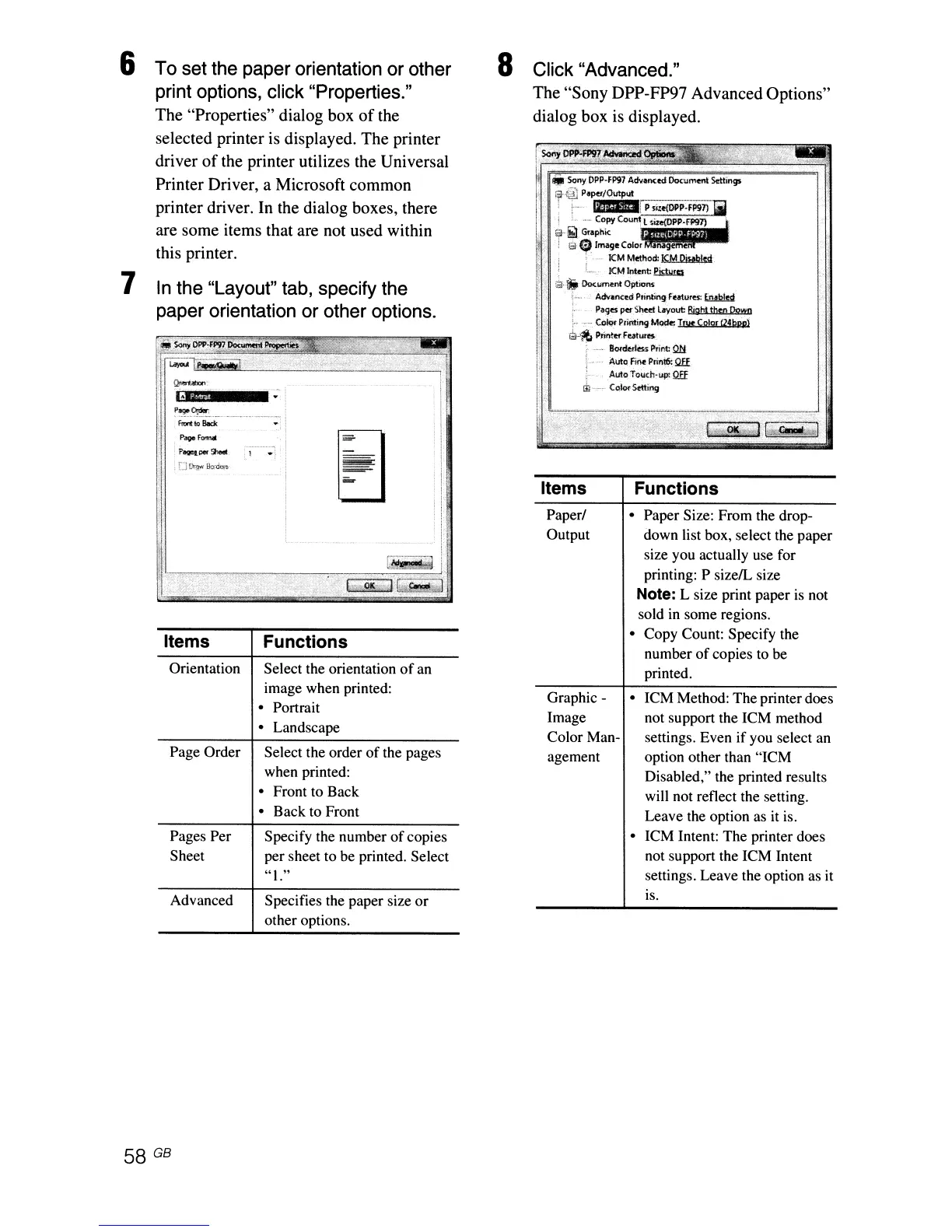
Click "Advanced."
The "Sony DPP-FP97 Advanced Options"
dialog box
is
displayed.
8
Specifies the paper size
or
other options.
"1."
Specify the number
of
copies
per sheet to be printed. Select
Functions
Select the order
of
the pages
when printed:
• Front to Back
• Back to Front
Select the orientation
of
an
image when printed:
• Portrait
• Landscape
~~.~~
..
~_.,'
-----_
..
__
._-----
..
frnnl!<>Boc:lc
.
Pooe
r""""
Advanced
Page Order
Pages Per
Sheet
Orientation
Items
In
the "Layout" tab, specify the
paper orientation or other options.
.:
; I
!l,~~~~~~~_____,_~~~~~~~:jip~~~-J'?....,..,i~·
i:
1
~,;:9J;£;j
~~J.~l
i
To set the paper orientation or other
print options, click "Properties."
The "Properties" dialog box
of
the
selected printer is displayed. The printer
driver
of
the printer utilizes the Universal
Printer Driver, a Microsoft common
printer driver. In the dialog boxes, there
are some items that are not used within
this printer.
7
6



 To Next Page