19
Enjoying with your camcorder
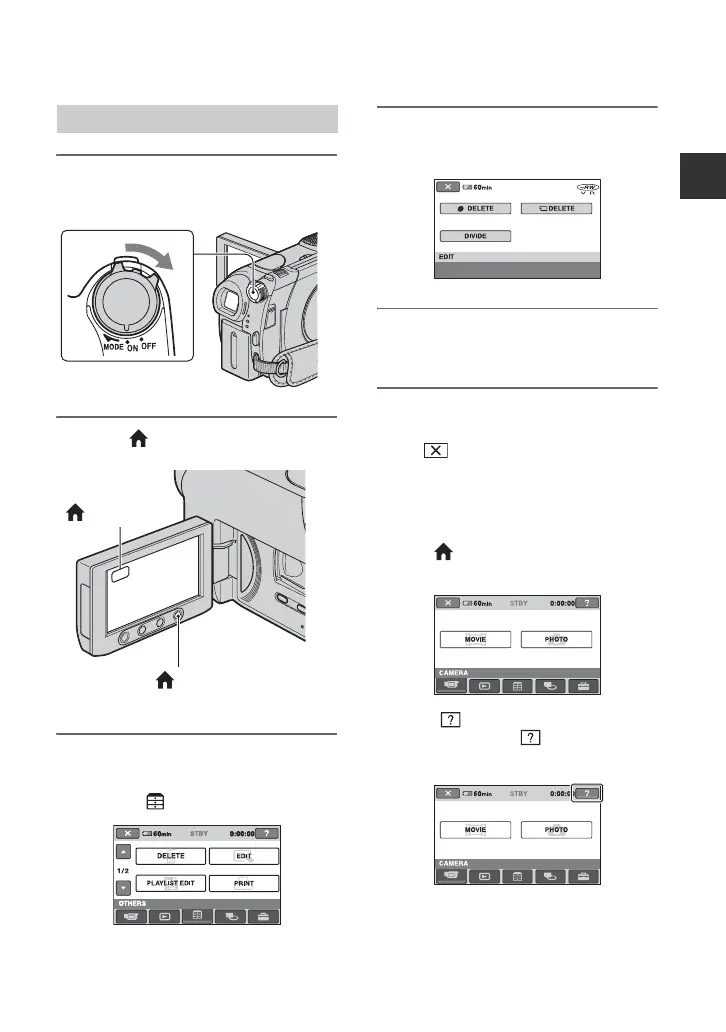
1 Turn the POWER switch to turn
on your camcorder.
2 Press (HOME) A (or B).
3 Touch the category you want to
use.
Example: (OTHERS) category
4 Touch the item you want to use.
Example: [EDIT]
5 Continue operation by following
the guidance on the screen.
To hide the HOME MENU screen
Touch .
When you want to know something
about the function of each item on the
HOME MENU - HELP
1 Press (HOME).
The HOME MENU appears.
2 Touch (HELP).
The bottom of the (HELP) button
turns orange.
Using the HOME MENU
(HOME) A
(HOME) B
Continued ,













 To Next Page