115
Quick Reference
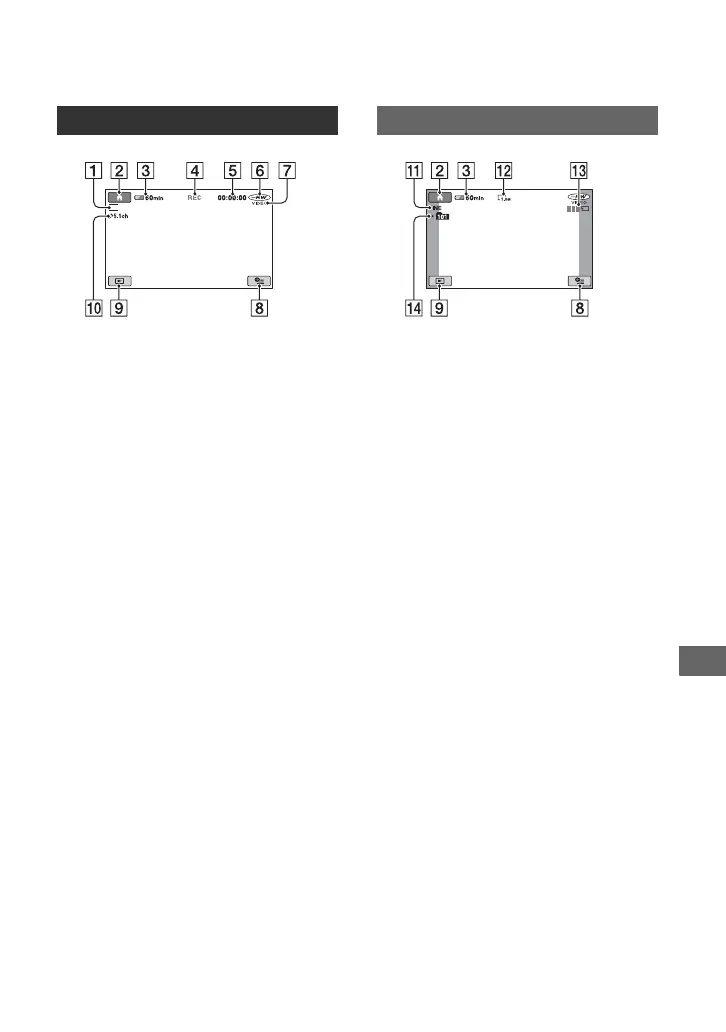
Indicators displayed during recording/playback
A Recording mode (HQ/SP/LP) (64)
B HOME button (19, 62)
C Remaining battery (approx.) (23)
D Recording status ([STBY] (standby) or
[REC] (recording))
E Counter (hour/minute/second)
F Disc type (14)
G Recording format (14)
Appears for DVD-RW only.
H OPTION button (20, 73)
I VIEW IMAGES button (32, 39)
J 5.1ch surround recording (36)
K Quality ([FINE] / [STD]) (66)
L Image size (66)
M Appears while a still image is being
saved.
N Recording folder
z Tips
• As the number of still images recorded in
“Memory Stick Duo” increases, new folders are
automatically created to store them.
Recording movies
SP
Recording still images
Continued ,













 To Next Page