34
Recording
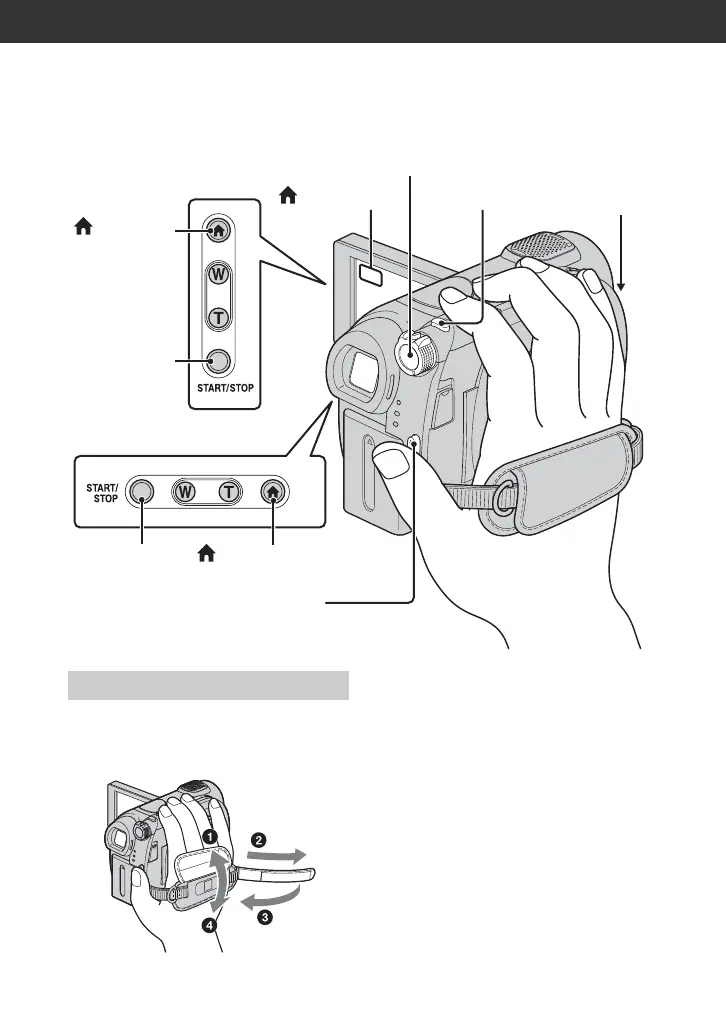
Adjust and fasten the grip belt as illustrated,
and hold your camcorder properly.
b Notes
• If the access lamps (page 28, 29) is on after
recording is finished, it means data is still being
written onto the disc or “Memory Stick Duo.”
Do not apply shock or vibration to your
camcorder, and do not disconnect the battery or
AC Adaptor.
POWER switch A
PHOTO F
START/STOP
C
(HOME) D
START/STOP B
Open the
Lens cover
(p. 27)
(HOME) E
(HOME) D
START/STOP
C
DCR-DVD108/DVD608
DCR-DVD308/DVD708
Adjusting the grip belt













 To Next Page