33
Recording/Playback
Still images:
Touch , then touch the still image you want to view.
* [DATA CODE] is fixed to [DATE/TIME] (p. 67).
z Tips
• The screen returns to the VISUAL INDEX
screen when the movies from the one you
selected through the one at the end of the list are
all played back.
• You can slow down the playback speed by
touching during pause.
• You can adjust volume by selecting
(HOME) t (SETTINGS) t [SOUND
SETTINGS] t [VOLUME], then with
/ .
To cancel Easy Handycam operation
Press EASY B again. disappears
from the screen.
Menu settings during Easy Handycam
operation
Press (HOME) H(or I) to display
the menu items available for setup changes
(p.18, 62).
b Notes
• You can neither delete nor edit movies on the
disc during Easy Handycam operation.
• Most of the menu items automatically return to
the default settings. The settings of some menu
items are fixed. For more details, see page 85.
• DVD-RW are formatted in VIDEO mode
(p. 14).
• (OPTION) will not appear.
• Cancel Easy Handycam operation if you want to
add effects to images or change settings.
Invalid buttons during Easy Handycam
operation
You cannot use some buttons/functions
during Easy Handycam operation since
they are automatically set (
p. 85). [Invalid
during Easy Handycam operation.] may
appear if operations not available during
Easy Handycam operation are attempted.
To view movies on a disc on other
devices (Finalize)
To view movies stored on a disc on a DVD
device or a computer, you need to "finalize"
the disc. For details on finalize operation,
see page 44.
b Notes
• For DVD-R, DVD+R DL, you cannot reuse the
disc or record additional movies onto the disc
once you finalize the disc even if the disc has
free space.
• During Easy Handycam operation, the DVD
menu is fixed to [STYLE1].
• You cannot record additional scenes on a
finalized disc during Easy Handycam operation
(p. 60).
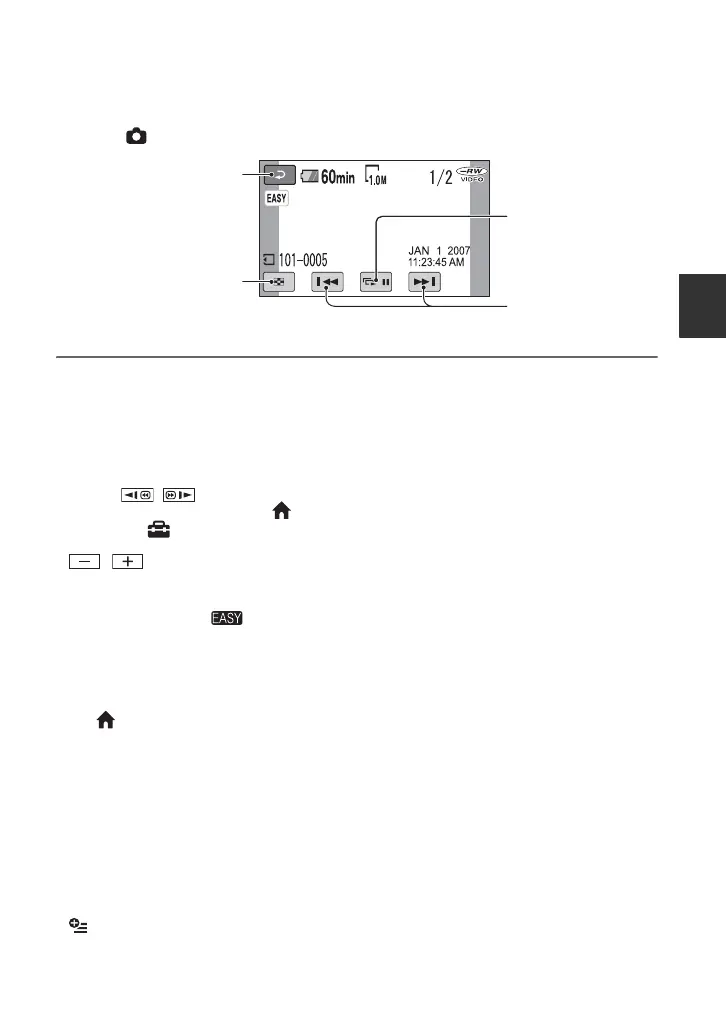
Slide show button
(page 41)
Previous/Next
Go to the VISUAL
INDEX screen
Return (to the VISUAL
INDEX screen)













 To Next Page