68
VIEW IMAGES SET (Continued)
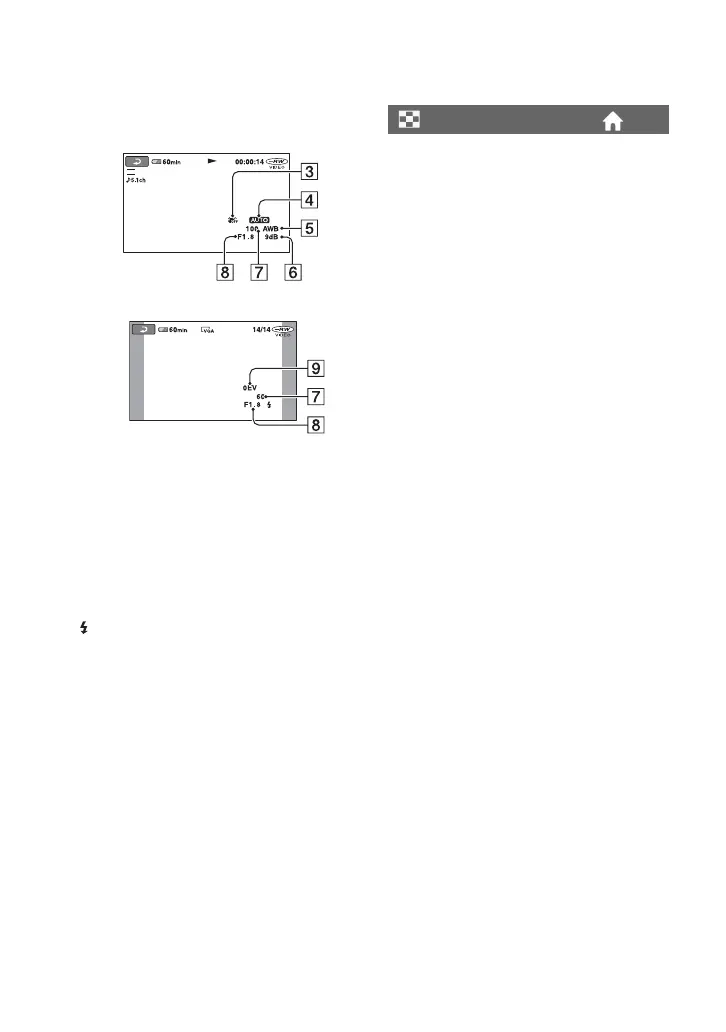
CAMERADATA
CSteadyShot off
DBrightness
EWhite balance
FGain
GShutter speed
HAperture value
IExposure
z Tips
• appears in the following cases:
– during displaying still images recorded using
an external flash (DCR-DVD308/DVD708).
– during displaying still images recorded by
another device using a flash.
• The data code is displayed on the TV screen if
you connect your camcorder to a TV.
• The indicator toggles through the following
sequences as you press DATA CODE on the
Remote Commander: [DATE/TIME] t
[CAMERADATA] t [OFF] (no
indication)(DCR-DVD308/DVD708).
• Depending on the disc condition, bars [--:--:--]
appear.
You can select the number of thumbnails that
appear on the VISUAL INDEX screen.
B ZOOM LINK
Change the number of thumbnails (6 or 12)
with the zoom lever on your camcorder.*
6IMAGES
Displays thumbnails of 6 images.
12IMAGES
Displays thumbnails of 12 images.
* You can operate with the zoom buttons on the
LCD frame or on the Remote Commander
(For DCR-DVD308/DVD708).
SP
Movie
Still image
DISPLAY













 To Next Page