EasyManua.ls Logo

Sony DXC-637 - Page 23

Sony DXC-637
63 pages
Print Icon
To Next Page IconTo Next Page
To Previous Page IconTo Previous Page
Loading...
I
Viewfinder
Screen
Indications
and
Menus
Advanced
menu
3
ltems
and
settings
in
advanced
menu
3
(continued!
Og-L
(43)dZ€9-0xd
(on)ze9-oxd
Items
and
settings
in
advanced
menu
2
(continued)
EVS
ON:
enable
the
EVS
Whether
or
not
to
enable
tunction.
the
EVS
function
to
increase
the
vertical
definition
from
400
lines
to
450
lines
(NTSC)
or
from
450
lines
to
530
lines
(PAL).
*
When
using
a
CCU-M5/
MSP
Camera
Control
Unit,
make
this
setting
on
the
CCU-M5/M5P.
+
Enabling
this
function
tends
to
increase
the
occurrence
of
aliasing
(moiré
patterns).
OFF:
disable
the
EVS
function.
(Normal
setting)
MODE
is
set
to
“STD”
Iris
adjustment
mode
Automatic
adjustment
White
balance
ATW
function
(Auto
Tracing
adjustment
mode
White
balance)
Camera
image
(CAM)
or
|
Camera
image
color
bar
(BARS)
output
High,
medium
and
low
0
dB,
9
dB,
18
dB
gain
settings*
Dynamic
contrast
control
|
On
function
(DCC)
Electronic
shutter*
Color
matrix
setting”
Hyper
gain
function
Aut
iris
backlight
mode
Auto
iris
spotlignt
mode
Black
balance
adjustment
Master
pedestal
levet
(M.
PED)‘
Detail
(outline)
emphasis
level*
iris
automatic
adjustment
reference
value
Dua!
pixel
readout
(OPR)
Ott
function*
b)
When
EZ
MODE
is
set
to
“CUSTOM",
moving
the
EZ
MODE
switch
to
the
ON
position
does
not
change
the
items
marked
with
an
asterisk
in
the
above
table
to
standard
values.
Off
Standard
Automatic
adjustment
enabled
+40
**
ADVANCED
MENU3
**
7b
IND:
IRIS
IND:
ON
GAIN
_
INO:
FILTER
IND:
ON
MIC
IND:
ON
AUDIO
IND:
ON
TAPE
IND:
ON
IND:
ON
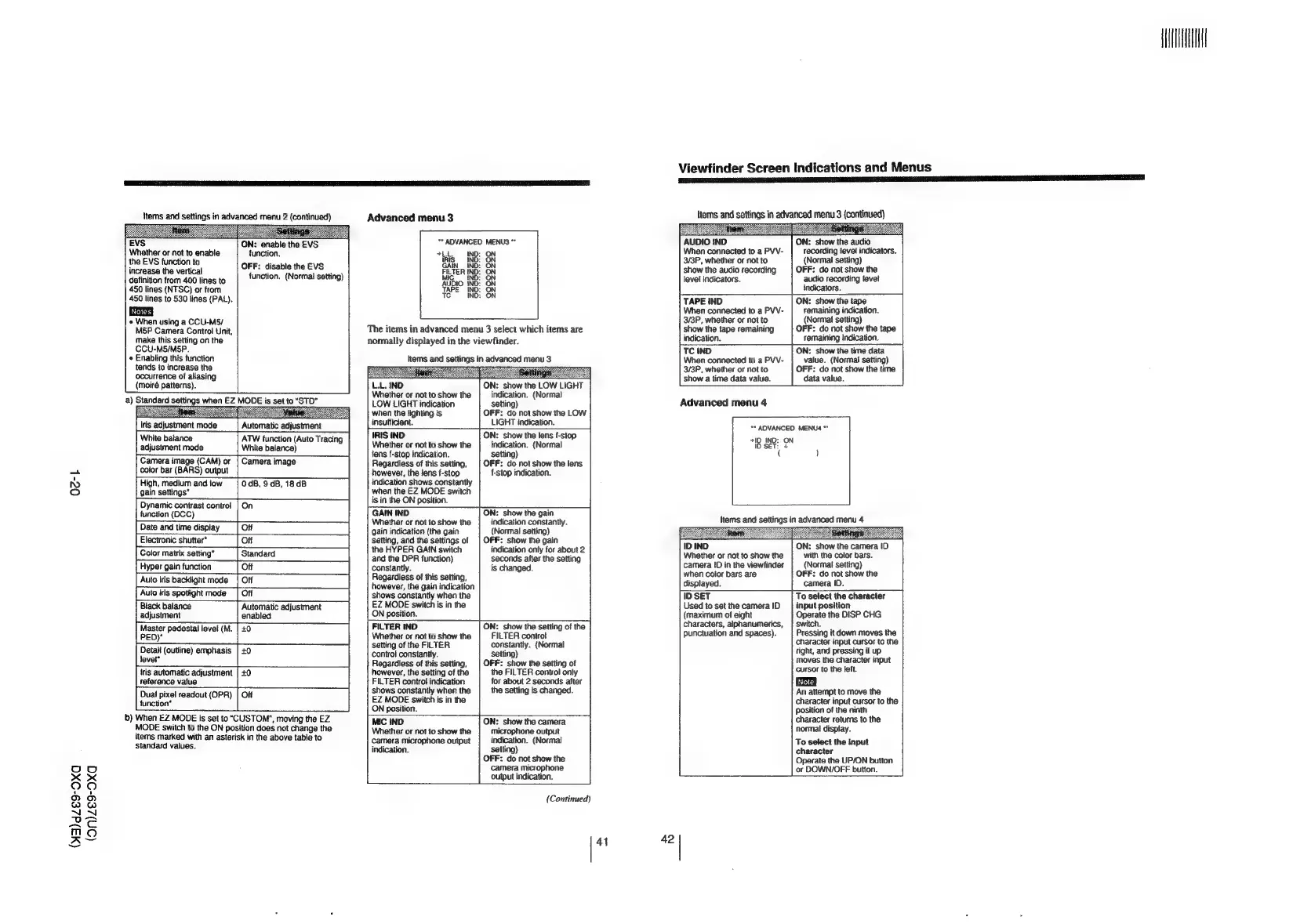
The
items
in
advanced
menu
3
select
which
items
are
normally
displayed
in
the
viewfinder.
Items
and
settings
in
advanced
menu
3
Whether
or
not
to
show
the
LOW
LIGHT
indication
when
the
lighting
ts
insufficient.
IRIS
IND
Whether
or
not
to
show
the
fens
f-stop
indication.
Regardless
of
this
setting,
however,
the
lens
f-stop
indication
shows
constantly
when
the
EZ
MODE
switch
is
in
the
ON
position.
GAIN
IND
Whether
or
not
to
show
the
gain
indication
(the
gain
setting,
and
the
settings
of
the
HYPER
GAIN
switch
and
the
DPR
function)
constantly.
Regardless
of
this
setting,
however,
the
gain
indication
shows
constantly
when
the
EZ
MODE
switch
is
in
the
ON
position.
FILTER
IND
Whether
or
not
to
show
the
setting
of
the
FILTER
contro}
constantly.
Regardless
of
this
setting,
however,
the
setting
of
the
FILTER
control
indication
shows
constantly
when
the
EZ
MODE
switch
is
in
the
ON
position.
MIC
IND
Whether
or
not
to
show
the
camera
microphone
output
indication.
indication.
(Normal
setting)
OFF:
do
not
show
the
LOW
LIGHT
indication.
ON:
show
the
lens
f-stop
indication.
(Normal
setting)
OFF:
do
not
show
the
lens
f-stop
indication.
ON:
show
the
gain
indication
constantly.
(Normal
setting)
OFF:
show
the
gain
indication
only
for
about
2
seconds
after
the
setting
is
changed.
ON:
show
the
setting
of
the
FILTER
controt
constantly.
(Normal
setting)
OFF:
show
the
setting
of
the
FILTER
conwol
only
for
about
2
seconds
after
the
setting
Is
changed.
ON:
show
the
camera
microphone
output
indication.
(Normal
satting)
OFF:
do
not
show
the
camera
microphone
output
indication.
(Continued)
AUDIO
IND
When
connected
to
a
PVV-
3/3P,
whether
or
not
to
show
the
audio
recording
Jevet
indicators.
lem
SESS
mae
Soronin
ra
ON:
show
the
audio
recording
level
indicators.
(Normal
setting)
OFF:
do
not
show
the
audio
recording
levet
indicators.
TAPE
iND
When
connected
to
a
PVV-
3/3P,
whether
or
not
to
show
the
tape
remaining
indication.
ON:
show
the
tape
remaining
indication.
(Normal
setting)
OFF:
do
not
show
the
tape
remaining
indication.
TC
IND
When
connected
to
a
PVV-
3/3P,
whether
or
not
to
show
a
time
data
value.
ON:
show
the
time
data
value.
(Normal
setting)
OFF:
do
not
show
the
time
data
value.
Advanced
menu
4
**
ADVANCED
MENU4
**
710
IND:
ON
ID
SET:
+
Items
and
settings
in
advanced
menu
4
ID
IND
Whether
or
not
to
show
the
camera
ID
in
the
viewfinder
when
color
bars
are
displayed.
stb
ON:
show
the
camera
ID
with
the
color
bars.
(Normal
setting)
OFF:
do
not
show
the
camera
ID.
ID
SET
Used
to
set
the
camera
ID
{maximum
of
eight
characters,
alphanumerics,
punctuation
and
spaces).
4
42
|To
select
the
character
input
position
Operate
the
DISP
CHG
switch.
Pressing
it
down
moves
the
character
input
cursor
to
the
right,
and
pressing
it
up
moves
the
character
input
cursor
to
the
jeft.
An
attempt
to
move
the
character
input
cursor
to
the
position
of
the
ninth
character
returns
to
the
normal
display.
To
select
the
input
character
Operate
the
UP/ON
button
or
DOWN/OFF
button.

Related product manuals