EasyManua.ls Logo

Sony DXC-637 - Flange Focal Length Adjustment

Sony DXC-637
63 pages
Print Icon
To Next Page IconTo Next Page
To Previous Page IconTo Previous Page
Loading...
(wa)dZ69-Oxd
Ge-k
(on)ze9-Oxd
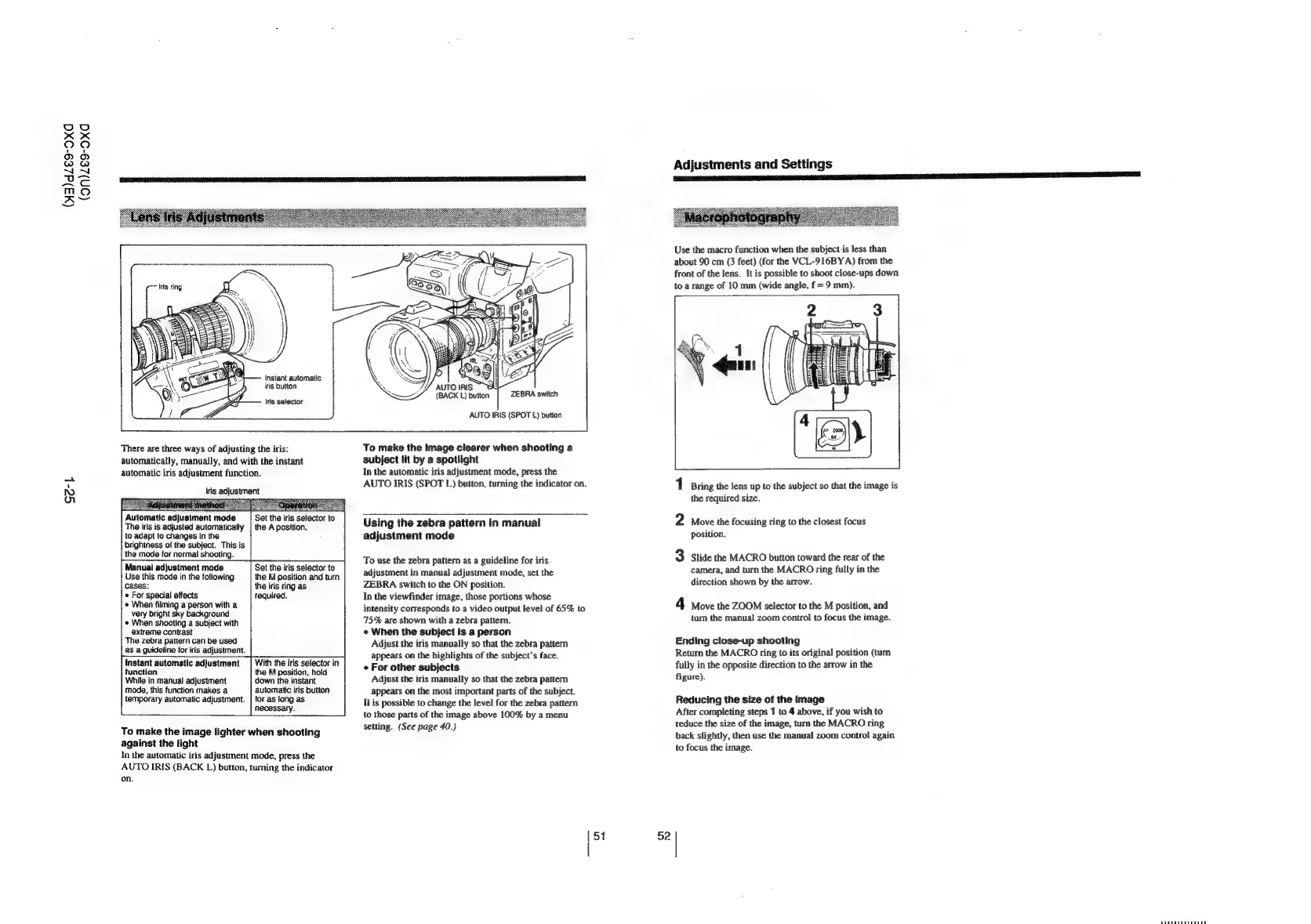
Instant
automatic
iris
button
Iris
selector
There
are
three
ways
of
adjusting
the
iris:
automatically,
manually,
and
with
the
instant
automatic
iris
adjustment
function.
tris
adjustment
Automatic
adjustment
mode
The
iris
is
adjusted
automatically
to
adapt
to
changes
in
the
brightness
of
the
subject.
This
is
the
mode
for
normal
shooting.
Set
the
iris
setector
to
the
A
position.
Manual
adjustment
mode
Use
this
mode
in
the
following
cases:
*
For
special
effects
*
When
filming
a
person
with
a
very
bright
sky
background
*
When
shooting
a
subject
with
extreme
contrast
The
zebra
pattern
can
be
used
as
a
guideline
for
iris
adjustment.
Set
the
iris
selector
to
the
M
position
and
turn
the
iris
ring
as
required.
instant
automatic
adjustment
function
While
in
manual
adjustment
mode,
this
function
makes
a
temporary
automatic
adjustment.
With
the
iris
selector
in
the
M
position,
hold
down
the
instant
automatic
iris
button
for
as
long
as
necessary.
To
make
the
image
lighter
when
shooting
against
the
light
In
the
automatic
iris
adjustment
mode,
press
the
AUTO
IRIS
(BACK
L)
button,
turning
the
indicator
on.
AUTO
IRIS
,
(BACK
L)
button
ZEBRA
switch
AUTO
IRIS
(SPOT
L)
button
To
make
the
image
clearer
when
shooting
a
subject
lit
by
a
spotlight
In
the
automatic
iris
adjustment
mode,
press
the
AUTO
IRIS
(SPOT
L)
button,
turning
the
indicator
on.
Using
the
zebra
pattern
in
manual
adjustment
mode
To
use
the
zebra
pattern
as
a
guideline
for
iris
adjustment
in
manual
adjustment
mode,
set
the
ZEBRA
switch
to
the
ON
position.
In
the
viewfinder
image,
those
portions
whose
intensity
corresponds
to
a
video
output
level
of
65%
to
75%
are
shown
with
a
zebra
pattern.
«
When
the
subject
is
a
person
Adjust
the
iris
manually
so
that
the
zebra
pattern
appears
on
the
highlights
of
the
subject’s
face.
e
For
other
subjects
Adjust
the
iris
manually
so
that
the
zebra
pattern
appears
on
the
most
important
parts
of
the
subject.
It
is
possible
to
change
the
level
for the
zebra
pattern
to
those
parts
of
the
image
above
100%
by
a
menu
setting.
(See
page
40.)
51
52
Adjustments
and
Settings
Use
the
macro
function
when
the
subject-is
less
than
about
90
cm
(3
feet)
(for
the
VCL-916BYA)
from
the
front
of
the
lens.
It
is
possible
to
shoot
close-ups
down
to
a
range
of
10
mm
(wide
angle,
f
=
9
mm).
1
Bring
the
lens
up
to
the
subject
so
that
the
image
is
the
required
size.
2
Move
the
focusing
ring
to
the
closest
focus
position.
3
Slide
the
MACRO
button
toward
the
rear
of
the
camera,
and
turn
the
MACRO
ring
fully
in
the
direction
shown
by
the
arrow.
4
Move
the
ZOOM
selector
to
the
M
position,
and
turn
the
manual
zoom
control
to
focus
the
image.
Ending
close-up
shooting
Return
the
MACRO
ring
to
its
original
position
(turn
fully
in
the
opposite
direction
to
the
arrow
in
the
figure).
Reducing
the
size
of
the
image
After
completing
steps
1
to
4
above,
if
you
wish
to
reduce
the
size
of
the
image,
turn
the
MACRO
ring
back
slightly,
then
use
the
manual
zoom
control
again
to
focus
the
image.
PUTETTEREREEEL?

Related product manuals